iframe scroll issue | Community
Skip to main content
surajitk1518267
June 2, 2021
Solved

iframe scroll issue

  • June 2, 2021
  • 2 replies
  • 2442 views

We need to add a iframe in the page and inside iframe we are calling a website which has functionality to zoom in & out.

But as soon we try to zoom in / out using mouse scroll inside iframe, main page start scrolling.

We tried to add the functionality of scrolling="no" but it doesn't work.

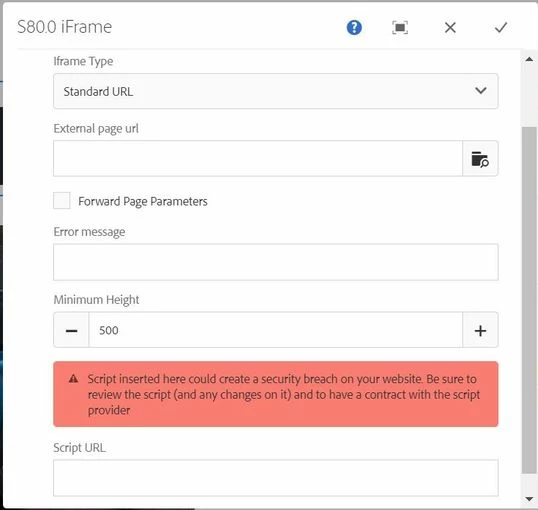
We have only below options to edit

Kindly suggest.

iframe called is https://kiger.renault.co.in/#/car/360/kiger

Functionality where it was not working is https://www.renault.co.in/cars/renault-kiger.html
This post is no longer active and is closed to new replies. Need help? Start a new post to ask your question.
Best answer by BrianKasingli

@surajitk1518267,

if the AEM out of the box iframe component is causing too many issues, I suggest that you would create your own iframe component. 

Example code I found online looks helpful, https://stackoverflow.com/questions/39398787/stop-scrolling-on-zoomable-iframe


2 replies

Ritesh_Mittal
Community Advisor and Adobe Champion
June 2, 2021


Hi @surajitk1518267 ,


You can lock the scroll when user clicks inside div containing  iframe and the same can be unlocked when user clicks outside of iframe div. I think that should help you (assuming scroll lock will not lock iframe contained website). Please see below example -


https://stackoverflow.com/questions/21315306/how-to-stop-window-scroll-after-specific-event/21315466


BrianKasingli
Community Advisor and Adobe Champion
BrianKasingliCommunity Advisor and Adobe ChampionAccepted solution
Community Advisor and Adobe Champion
June 2, 2021

@surajitk1518267,

if the AEM out of the box iframe component is causing too many issues, I suggest that you would create your own iframe component. 

Example code I found online looks helpful, https://stackoverflow.com/questions/39398787/stop-scrolling-on-zoomable-iframe