How to use multiple color picker fields in the same tab in a dialog? | Community
Skip to main content
January 26, 2021
Solved

How to use multiple color picker fields in the same tab in a dialog?

  • January 26, 2021
  • 2 replies
  • 1547 views

I have installed the color picker package provided by Adobe helpx document and I need to use two color pickers in the same tab of a page properties dialog that I'm creating. I have given the following structure for the color pickers.

First item in the multifield the color picker is rendering fine.
but in the second item of the multifield the color picker is rendering as a text field could you please help me in resolving this issue.
 

This post is no longer active and is closed to new replies. Need help? Start a new post to ask your question.
Best answer by BrianKasingli

@mandak21904112,

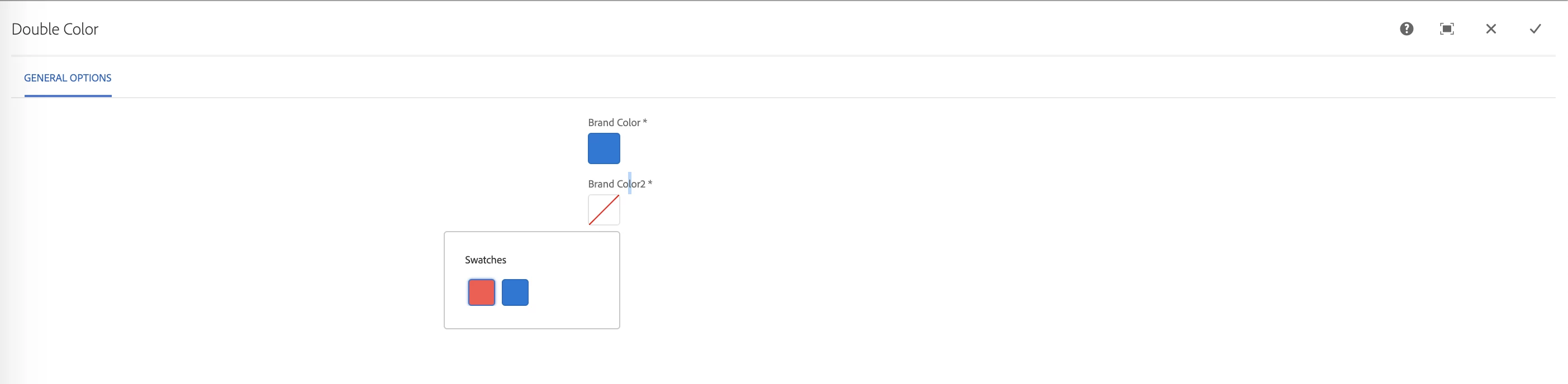
This works for me outside of a multifielld... Take a look at the screenshot and my cq_dialog.xml example below. Also please share with us your cq_dialogue.xml, there may be a problem. 

I have experienced some weird behaviors in the past where sometimes double colorpicker does not work as expecting when it sits inside one of the pre-defined Granite UI layouts, https://helpx.adobe.com/experience-manager/6-5/sites/developing/using/reference-materials/granite-ui/api/jcr_root/libs/granite/ui/components/foundation/layouts/index.html; it is rare.


<?xml version="1.0" encoding="UTF-8"?> <jcr:root xmlns:sling="http://sling.apache.org/jcr/sling/1.0" xmlns:cq="http://www.day.com/jcr/cq/1.0" xmlns:jcr="http://www.jcp.org/jcr/1.0" xmlns:nt="http://www.jcp.org/jcr/nt/1.0" jcr:primaryType="nt:unstructured" jcr:title="Double Color" sling:resourceType="cq/gui/components/authoring/dialog"> <content jcr:primaryType="nt:unstructured" sling:resourceType="granite/ui/components/foundation/container"> <layout jcr:primaryType="nt:unstructured" sling:resourceType="granite/ui/components/foundation/layouts/tabs" type="nav"/> <items jcr:primaryType="nt:unstructured"> <general jcr:primaryType="nt:unstructured" jcr:title="General Options" sling:resourceType="granite/ui/components/foundation/section"> <layout jcr:primaryType="nt:unstructured" sling:resourceType="granite/ui/components/foundation/layouts/fixedcolumns"/> <items jcr:primaryType="nt:unstructured"> <column jcr:primaryType="nt:unstructured" sling:resourceType="granite/ui/components/foundation/container"> <items jcr:primaryType="nt:unstructured"> <colorfield-swatch-example-brandColor jcr:primaryType="nt:unstructured" sling:resourceType="granite/ui/components/coral/foundation/form/colorfield" autogenerateColors="off" disabled="{Boolean}false" emptyText="Please choose a color" fieldLabel="Brand Color" name="./brandColor" required="{Boolean}true" showDefaultColors="{Boolean}false" showProperties="{Boolean}false" showSwatches="{Boolean}true" variant="swatch"> <items jcr:primaryType="nt:unstructured"> <color1 jcr:primaryType="nt:unstructured" value="#FF4136"/> <color2 jcr:primaryType="nt:unstructured" value="#0077D9"/> </items> </colorfield-swatch-example-brandColor> <colorfield-swatch-example-brandColor2 jcr:primaryType="nt:unstructured" sling:resourceType="granite/ui/components/coral/foundation/form/colorfield" autogenerateColors="off" disabled="{Boolean}false" emptyText="Please choose a color" fieldLabel="Brand Color2" name="./brandColor2" required="{Boolean}true" showDefaultColors="{Boolean}false" showProperties="{Boolean}false" showSwatches="{Boolean}true" variant="swatch"> <items jcr:primaryType="nt:unstructured"> <color1 jcr:primaryType="nt:unstructured" value="#FF4136"/> <color2 jcr:primaryType="nt:unstructured" value="#0077D9"/> </items> </colorfield-swatch-example-brandColor2> </items> </column> </items> </general> </items> </content> </jcr:root>


2 replies

Anudeep_Garnepudi
Community Advisor
Community Advisor
January 26, 2021

@mandak21904112 

Can you share dialog.xml

AG
BrianKasingli
Community Advisor and Adobe Champion
BrianKasingliCommunity Advisor and Adobe ChampionAccepted solution
Community Advisor and Adobe Champion
January 26, 2021

@mandak21904112,

This works for me outside of a multifielld... Take a look at the screenshot and my cq_dialog.xml example below. Also please share with us your cq_dialogue.xml, there may be a problem. 

I have experienced some weird behaviors in the past where sometimes double colorpicker does not work as expecting when it sits inside one of the pre-defined Granite UI layouts, https://helpx.adobe.com/experience-manager/6-5/sites/developing/using/reference-materials/granite-ui/api/jcr_root/libs/granite/ui/components/foundation/layouts/index.html; it is rare.


<?xml version="1.0" encoding="UTF-8"?> <jcr:root xmlns:sling="http://sling.apache.org/jcr/sling/1.0" xmlns:cq="http://www.day.com/jcr/cq/1.0" xmlns:jcr="http://www.jcp.org/jcr/1.0" xmlns:nt="http://www.jcp.org/jcr/nt/1.0" jcr:primaryType="nt:unstructured" jcr:title="Double Color" sling:resourceType="cq/gui/components/authoring/dialog"> <content jcr:primaryType="nt:unstructured" sling:resourceType="granite/ui/components/foundation/container"> <layout jcr:primaryType="nt:unstructured" sling:resourceType="granite/ui/components/foundation/layouts/tabs" type="nav"/> <items jcr:primaryType="nt:unstructured"> <general jcr:primaryType="nt:unstructured" jcr:title="General Options" sling:resourceType="granite/ui/components/foundation/section"> <layout jcr:primaryType="nt:unstructured" sling:resourceType="granite/ui/components/foundation/layouts/fixedcolumns"/> <items jcr:primaryType="nt:unstructured"> <column jcr:primaryType="nt:unstructured" sling:resourceType="granite/ui/components/foundation/container"> <items jcr:primaryType="nt:unstructured"> <colorfield-swatch-example-brandColor jcr:primaryType="nt:unstructured" sling:resourceType="granite/ui/components/coral/foundation/form/colorfield" autogenerateColors="off" disabled="{Boolean}false" emptyText="Please choose a color" fieldLabel="Brand Color" name="./brandColor" required="{Boolean}true" showDefaultColors="{Boolean}false" showProperties="{Boolean}false" showSwatches="{Boolean}true" variant="swatch"> <items jcr:primaryType="nt:unstructured"> <color1 jcr:primaryType="nt:unstructured" value="#FF4136"/> <color2 jcr:primaryType="nt:unstructured" value="#0077D9"/> </items> </colorfield-swatch-example-brandColor> <colorfield-swatch-example-brandColor2 jcr:primaryType="nt:unstructured" sling:resourceType="granite/ui/components/coral/foundation/form/colorfield" autogenerateColors="off" disabled="{Boolean}false" emptyText="Please choose a color" fieldLabel="Brand Color2" name="./brandColor2" required="{Boolean}true" showDefaultColors="{Boolean}false" showProperties="{Boolean}false" showSwatches="{Boolean}true" variant="swatch"> <items jcr:primaryType="nt:unstructured"> <color1 jcr:primaryType="nt:unstructured" value="#FF4136"/> <color2 jcr:primaryType="nt:unstructured" value="#0077D9"/> </items> </colorfield-swatch-example-brandColor2> </items> </column> </items> </general> </items> </content> </jcr:root>