March 4, 2025
Répondu

How to unlock the default metadata in aem cloud and make the title and description fields as mandatory without creating a custom metadata schema.

How to unlock the default metadata in aem cloud and make the title and description fields as mandatory without creating a custom metadata schema.

Meilleure réponse par anupampat

Hi @sindhusomisetty ,


To make any field manadatory ,

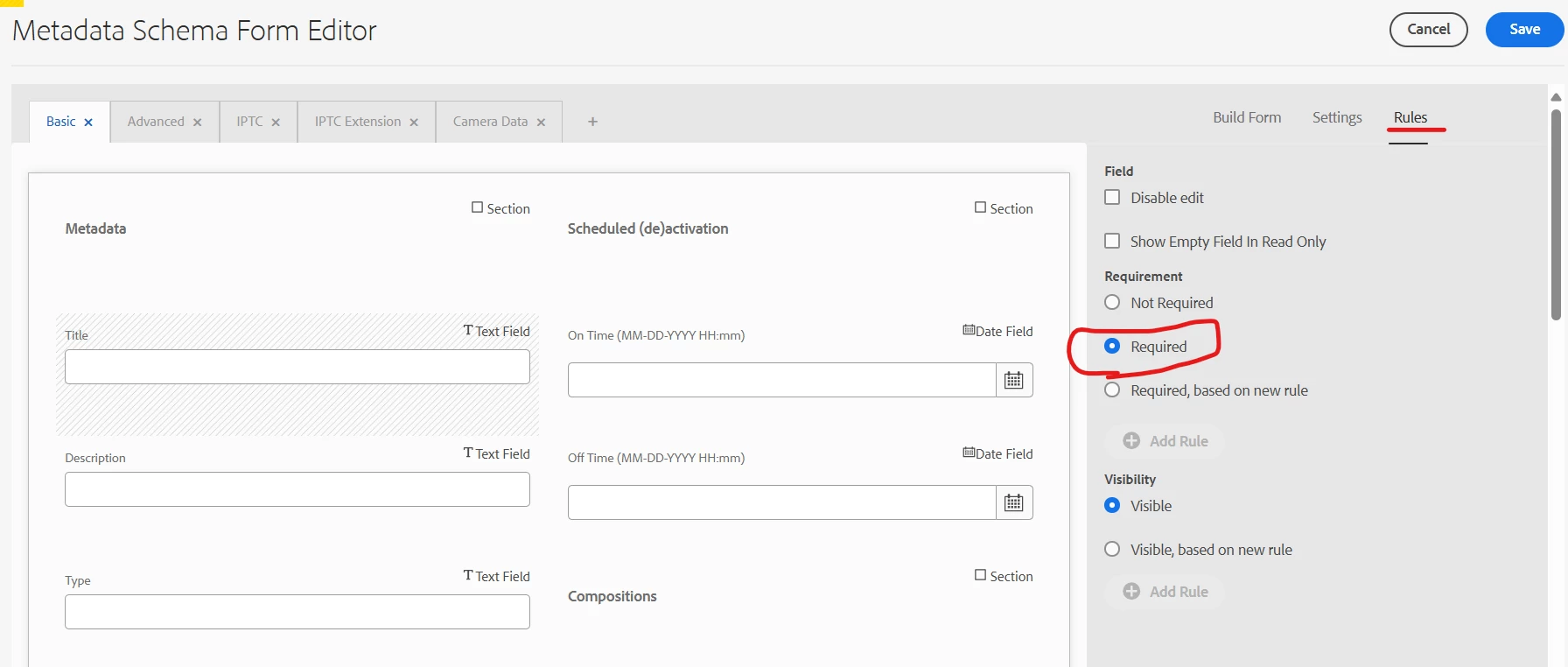
1. Open/Edit the Metadata Schema

2. Click the desired field

3. Go to Rules and mark it as required


You can probably unlock the dafault schema via overlaying since they are locked because its a fallback schema.

Best way is to create your own schema, you can copy the default schema and add your custom Tabs/properties and then ofcourse add them to asset folders for them to reflect.

Refer - https://experienceleague.adobe.com/en/docs/experience-manager-cloud-service/content/assets/manage/metadata-schemas


Regards,

Anupam Patra

1 commentaire

anupampat
Community Advisor
anupampatCommunity AdvisorRéponse
Community Advisor
March 4, 2025

Hi @sindhusomisetty ,


To make any field manadatory ,

1. Open/Edit the Metadata Schema

2. Click the desired field

3. Go to Rules and mark it as required


You can probably unlock the dafault schema via overlaying since they are locked because its a fallback schema.

Best way is to create your own schema, you can copy the default schema and add your custom Tabs/properties and then ofcourse add them to asset folders for them to reflect.

Refer - https://experienceleague.adobe.com/en/docs/experience-manager-cloud-service/content/assets/manage/metadata-schemas


Regards,

Anupam Patra