How to Split JSONArray | Community
Skip to main content
Level 3
June 22, 2023
Solved

How to Split JSONArray

  • June 22, 2023
  • 2 replies
  • 1544 views

Hi All,


I have customized CF model, as shown below.
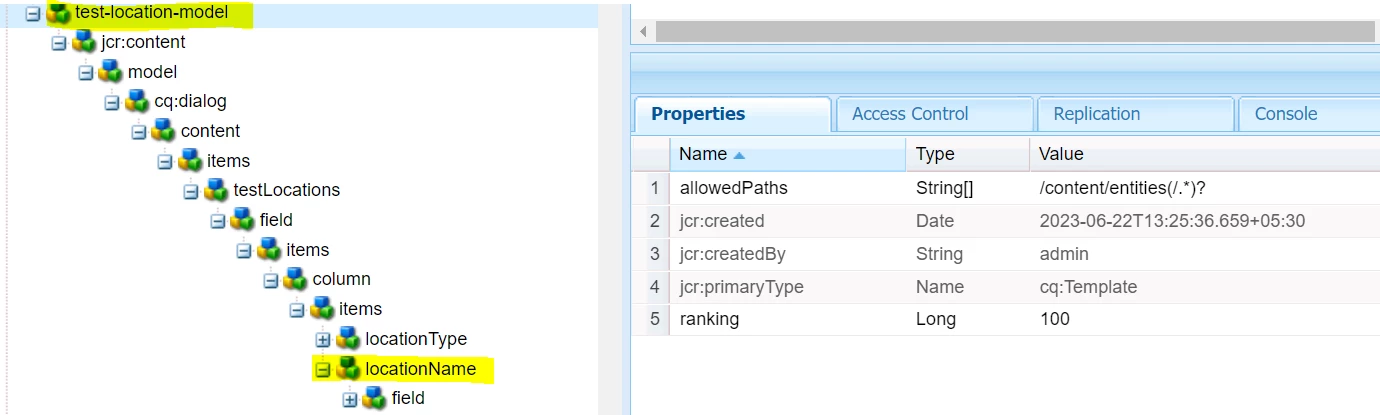


NOTE - My location Name value is coming from database


I have written the JSON and in JSON my location name is coming like below.

************* JSON **************

"testLocations":
{"City":[{"id":"161341","name":"Badarganj"}],
"Country":[{"id":"157031","name":"India"}]}


I have written below java to get my testlocations JSON


************** JAVA Needs To Update*************


private void settestLocations(Resource masterResource, Node masterNode, testPublishModel testModel) throws RepositoryException { LOGGER.info("Inside locations"); JsonObject testLocations = new JsonObject(); ValueMap masterResourceValueMap = masterResource.getValueMap(); if(masterNode.hasProperty(Constants.test_LOCATIONS)) { String[] testLocationsStringArray = masterResourceValueMap.get(Constants.test_LOCATIONS, String[].class); for (String testLocationString : testLocationsStringArray) { JsonObject testLocation = gson.fromJson(testLocationString, JsonObject.class); String locationType = StringUtils.EMPTY; JsonArray locationName = new JsonArray(); if (testLocation.has(LOCATION_TYPE)) { locationType = testLocation.get(LOCATION_TYPE).getAsString(); } if (testLocation.has(LOCATION_NAME)) { locationName = testLocation.get(LOCATION_NAME).getAsJsonArray(); LOGGER.info("locationName12345 ==== " + locationName); } testLocations.add(locationType, locationName); } } testModel.settestLocations(testLocations); }


********************* testmodel JAVA class is as below ********************


import java.util.List; import com.google.gson.JsonObject; public class TestModel { JsonObject testLocations; List<testLocationsEntity> locationName; public JsonObject gettestLocations() { return testLocations; } public void settestLocations(JsonObject testLocations) { this.testLocations = testLocations; } public List<testLocationsEntity> gettestLocationName() { return locationName; } public void settestLocationName(List<testLocationsEntity> testLocationNameList) { this.locationName = testLocationNameList; } @Override public String toString() { return "TestModel [ testLocations=" + testLocations + ", locationName123=" + locationName + "]"; } }


Here requirement is that my JSON should come like below , as highlighted in Red

"testLocations":{
"City":[{"id":"161341","testName[Badarganj]"}],
"Country":[{"id":"161341","testName[India]"}]
}


I tried lots of option but still not able to achieve the required JSON .


Thanks in advance

Subrat

This post is no longer active and is closed to new replies. Need help? Start a new post to ask your question.
Best answer by subnaik

Dear all,

My issue is resolved. Just adding below line of code in bold


testLocationString = testLocationString .replace("name", "communityName");


for (String testLocationString : testLocationsStringArray) { testLocationString = testLocationString .replace("name", "communityName"); JsonObject testLocation = gson.fromJson(testLocationString, JsonObject.class);


2 replies

Tanika02
Level 7
June 22, 2023

Hello @subnaik  - 


You can use a JSON library such as Jackson for this purpose : 


//Imports import com.fasterxml.jackson.databind.JsonNode; import com.fasterxml.jackson.databind.ObjectMapper; import com.fasterxml.jackson.databind.node.ObjectNode; //Code try { ObjectMapper objectMapper = new ObjectMapper(); JsonNode rootNode = objectMapper.readTree(originalJson); transformJsonNode(rootNode); String transformedJson = objectMapper.writerWithDefaultPrettyPrinter().writeValueAsString(rootNode); System.out.println(transformedJson); } catch (Exception e) { e.printStackTrace(); } private static void transformJsonNode(JsonNode node) { if (node.isObject()) { ObjectNode objectNode = (ObjectNode) node; objectNode.fields().forEachRemaining(entry -> transformJsonNode(entry.getValue())); } else if (node.isArray()) { for (JsonNode childNode : node) { transformJsonNode(childNode); } } else if (node.isValueNode() && node.isTextual()) { String value = node.asText(); ((ObjectNode) node).put(0, "testName[" + value + "]"); }


Regards,

Tanika 😊

subnaikAuthor
Level 3
June 22, 2023

Hi @tanika02  and all


I changes in my Java class, as shown below , but it is coming error , as shown below


Also I am not sure why you put system.out.println as in AEM it is not working.

private void settestLocations(Resource masterResource, Node masterNode, CommunityPublishModel testModel) throws RepositoryException { LOGGER.info("Inside locations"); JsonObject testLocations = new JsonObject(); ValueMap masterResourceValueMap = masterResource.getValueMap(); if(masterNode.hasProperty(Constants.COMMUNITY_LOCATIONS)) { String[] testLocationsStringArray = masterResourceValueMap.get(Constants.COMMUNITY_LOCATIONS, String[].class); for (String testLocationString : testLocationsStringArray) { JsonObject testLocation = gson.fromJson(testLocationString, JsonObject.class); String locationType = StringUtils.EMPTY; JsonArray locationName = new JsonArray(); if (testLocation.has(LOCATION_TYPE)) { locationType = testLocation.get(LOCATION_TYPE).getAsString(); } if (testLocation.has(LOCATION_NAME)) { locationName = testLocation.get(LOCATION_NAME).getAsJsonArray(); LOGGER.info("locationName12345 ==== " + locationName); } testLocations.add(locationType, locationName); } } testModel.setCommunityLocations(testLocations); ObjectMapper objectMapper = new ObjectMapper(); JsonNode rootNode = objectMapper.readTree(testLocations); transformJsonNode(rootNode); String transformedJson = objectMapper.writerWithDefaultPrettyPrinter().writeValueAsString(rootNode); LOGGER.info("transformedJson ==== "+transformedJson); } private static void transformJsonNode(JsonNode node) { if (node.isObject()) { ObjectNode objectNode = (ObjectNode) node; objectNode.fields().forEachRemaining(entry -> transformJsonNode(entry.getValue())); } else if (node.isArray()) { for (JsonNode childNode : node) { transformJsonNode(childNode); } } else if (node.isValueNode() && node.isTextual()) { String value = node.asText(); ((ObjectNode) node).put("testName[" + value + "]", 0); } }


Tanika02
Level 7
June 22, 2023

Hello @subnaik - 


The above code block was just for your reference. Please remove the unnecessary piece.


Do you have the right imports?


import com.fasterxml.jackson.databind.JsonNode;
import com.fasterxml.jackson.databind.ObjectMapper;


If Not, Please add.


Additionally, make sure you have the required Jackson dependencies in your project's build configuration.

subnaikAuthorAccepted solution
Level 3
June 23, 2023

Dear all,

My issue is resolved. Just adding below line of code in bold


testLocationString = testLocationString .replace("name", "communityName");


for (String testLocationString : testLocationsStringArray) { testLocationString = testLocationString .replace("name", "communityName"); JsonObject testLocation = gson.fromJson(testLocationString, JsonObject.class);