How to setup Venia store in AEM ? | Community
Skip to main content
Mario248
Level 7
September 25, 2024

How to setup Venia store in AEM ?

  • September 25, 2024
  • 3 replies
  • 2241 views

For one of my poc, I am planning to setup commerce cockpit and CIF components and I want to use Venia commerce store to setup(https://venia.magento.com/). I have downloaded and installed the package from https://github.com/adobe/aem-cif-guides-venia. I am trying to setup cloud config


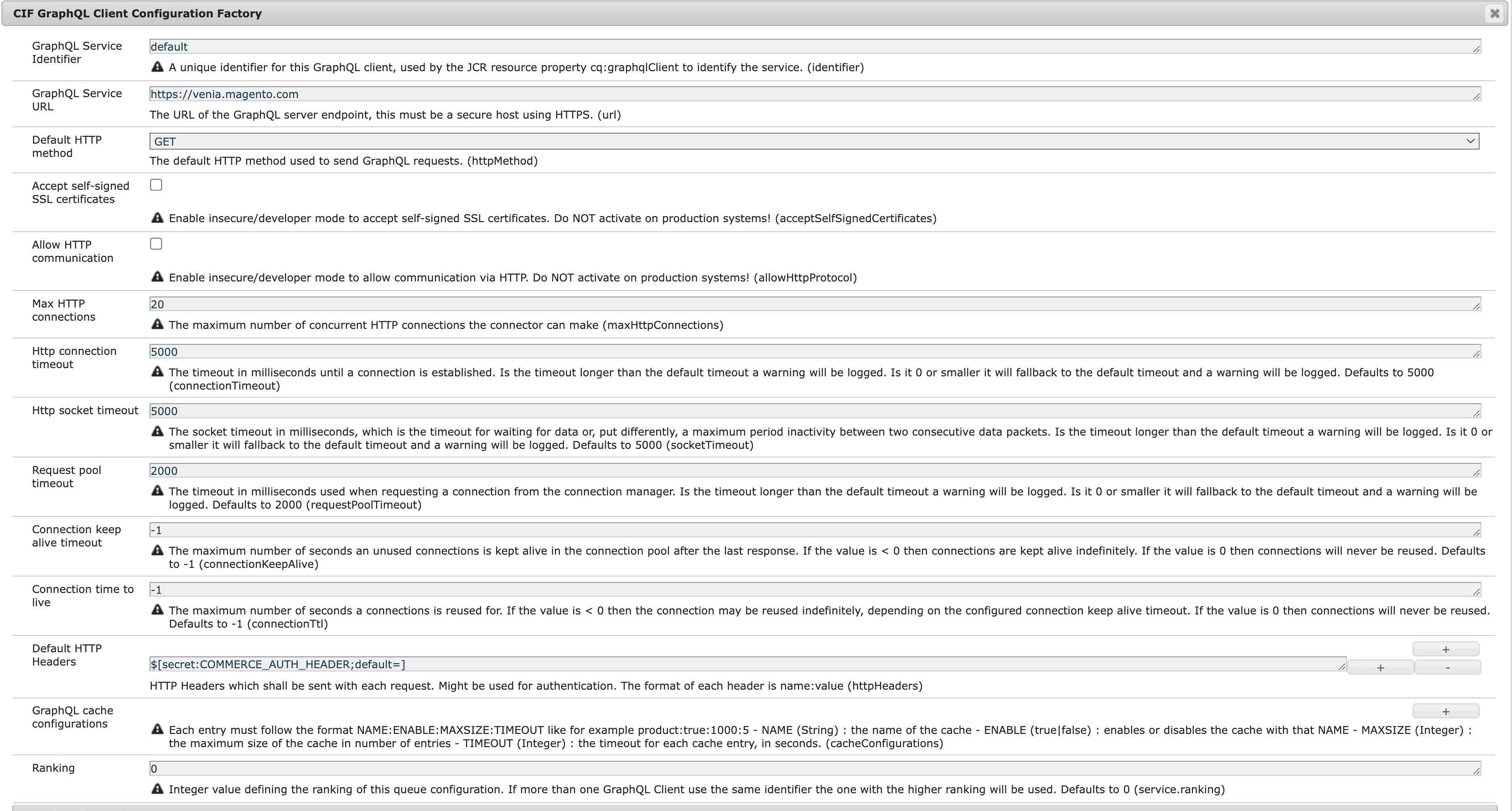
Here is my com.adobe.cq.commerce.graphql.client.impl.GraphqlClientImpl config

GraphQL Service Identifier - https://venia.magento.com
 

Commerce Cloud Conf
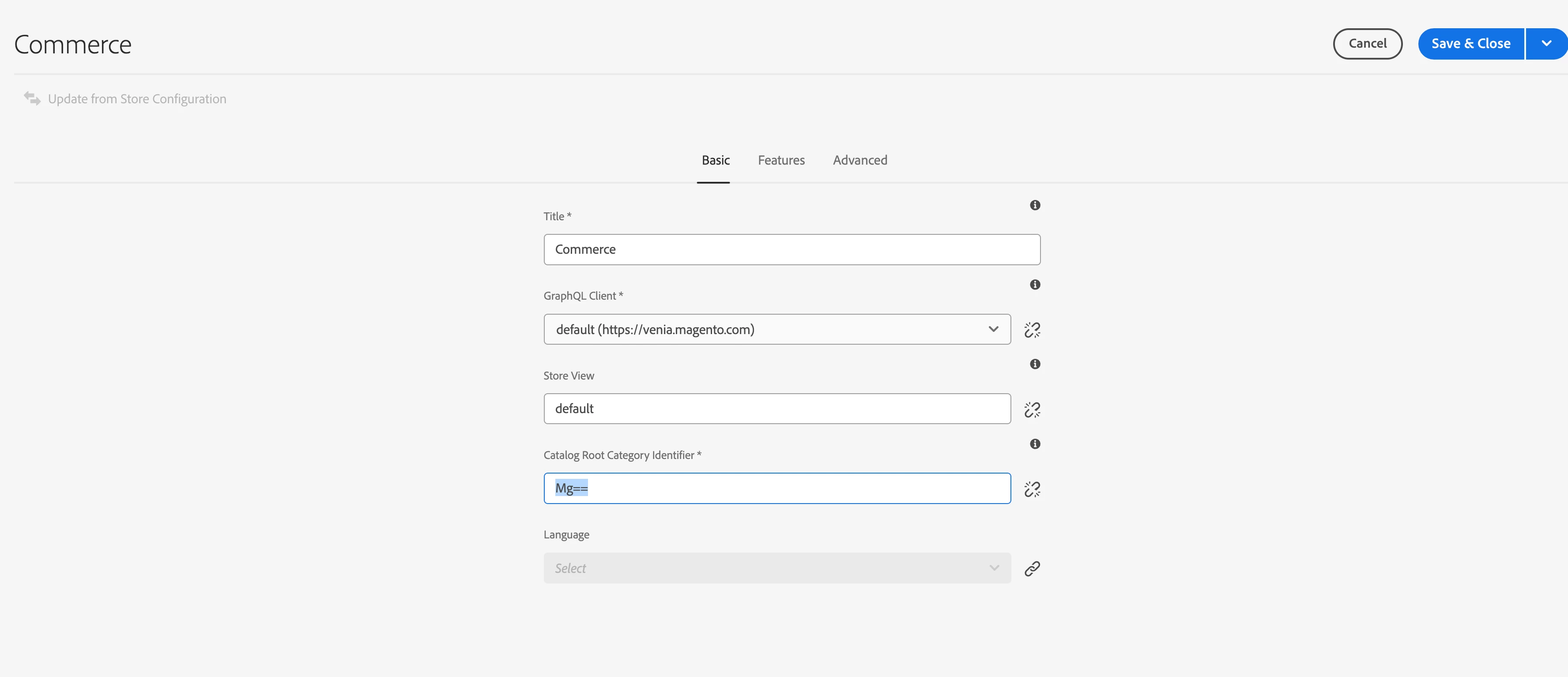
I guess I should update "Catalog Root Category Identifier" . Does anyone know what should be the value for this field ?

This post is no longer active and is closed to new replies. Need help? Start a new post to ask your question.

3 replies

MukeshYadav_
Community Advisor
Community Advisor
September 25, 2024

Hi @mario248 ,

Mg== is encode value of 2 https://base64.guru/decode/Mg==

This value represent the root category id in Magento store.

You can try with this default value itself without changing.

You may refer below for details


https://www.mgt-commerce.com/tutorial/magento-2-root-category/

https://experienceleague.adobe.com/en/docs/commerce-admin/catalog/categories/category-root

Thanks

Mario248
Mario248Author
Level 7
September 25, 2024

Thanks for your response. I see use the default config but commerce cockpit is loading

http://localhost:4502/commerce.html


I dont see any error in error log. It tells "The configuration venia is not available or did not return a valid schema". Looks like I have valid config but how do we check schema? Is there way to check valid schema ?


MukeshYadav_
Community Advisor
Community Advisor
September 27, 2024

Hi @mario248 ,

We can see the product is loading with default root category id 2 i.e. Mg==

Please change the endpoint(graphql service URL) to https://venia.magento.com/graphql

that is append /graphql

"data": {
"storeConfig": {
"store_code": "default",
"root_category_uid": "Mg==",
"__typename": "StoreConfig"
}
}
}

Thanks


abhishekanand_
Community Advisor
Community Advisor
September 25, 2024

Hi @mario248 


in your configuration com.adobe.cq.commerce.graphql.client.impl.GraphqlClientImpl config

the default http method should be POST

Abhishek Anand
Mario248
Mario248Author
Level 7
September 25, 2024

I changed to POST but still commerce cockpit is not loading. 

abhishekanand_
Community Advisor
Community Advisor
September 25, 2024

As @mukeshyadav_ you need to check the value represent the root category id in Magento store it can be "Mg==" or "Mw==" try with these two values and also in your configuration remove the default http headers and also check the advanced tab configuration GraphQL Proxy Path * and also check Enable Catalog UID Support to true 

Abhishek Anand
kautuk_sahni
Community Manager
Community Manager
October 16, 2024

@mario248 Did you find the suggestions helpful? Please let us know if you require more information. Otherwise, please mark the answer as correct for posterity. If you've discovered a solution yourself, we would appreciate it if you could share it with the community. Thank you!

Kautuk Sahni
July 31, 2025

Setting up the Venia store can be a headache, honestly. I stumbled onto a resource that helped—might save you some time: image-to-base64