How to set default value for dropdown granite/ui/components/coral/foundation/form/select | Community
Skip to main content
Level 2
June 3, 2025
Solved

How to set default value for dropdown granite/ui/components/coral/foundation/form/select

  • June 3, 2025
  • 4 replies
  • 780 views

I am trying to set the default value for dropdown : granite/ui/components/coral/foundation/form/select


But it's not working tried with selected = "true",forceIgnoreFreshness = "true"
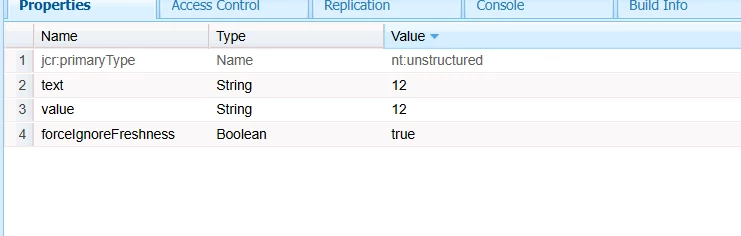
Anyone please suggets!

This post is no longer active and is closed to new replies. Need help? Start a new post to ask your question.

4 replies

arunpatidar
Community Advisor
arunpatidarCommunity AdvisorAccepted solution
Community Advisor
June 3, 2025
SureshDhulipudi
Community Advisor
Community Advisor
June 3, 2025

you can try like this to set default value:


<items jcr:primaryType="nt:unstructured"> <dropdown jcr:primaryType="nt:unstructured" sling:resourceType="granite/ui/components/coral/foundation/form/select" fieldLabel="Select an Option" name="./dropdownValue" value="option2"> <!-- Default value --> <items jcr:primaryType="nt:unstructured"> <option1 jcr:primaryType="nt:unstructured" text="Option 1" value="option1" /> <option2 jcr:primaryType="nt:unstructured" text="Option 2" value="option2" /> <option3 jcr:primaryType="nt:unstructured" text="Option 3" value="option3" /> </items> </dropdown> </items>
PRATHYUSHA_VP
Community Advisor
Community Advisor
June 3, 2025

Hi @kirthika 


Below fix will work if selected option is applied as suggested by arun --


Thanks

AmitVishwakarma
Community Advisor
Community Advisor
June 3, 2025

Hi @kirthika ,


Option 1: Use value Property

Set the default selected option using the value property on the select component.

Example:

<dropdown jcr:primaryType="nt:unstructured" sling:resourceType="granite/ui/components/coral/foundation/form/select" fieldLabel="Choose an Option" name="./dropdownValue" value="option2"> <!-- Default selected value --> <items jcr:primaryType="nt:unstructured"> <option1 jcr:primaryType="nt:unstructured" text="Option 1" value="option1"/> <option2 jcr:primaryType="nt:unstructured" text="Option 2" value="option2"/> <option3 jcr:primaryType="nt:unstructured" text="Option 3" value="option3"/> </items> </dropdown>

This will show Option 2 as selected by default when the dialog opens for the first time.


Option 2: Use selected="true" on the Option

If you're not using the value property, you can directly mark an <option> as selected:

Example:

<dropdown jcr:primaryType="nt:unstructured" sling:resourceType="granite/ui/components/coral/foundation/form/select" fieldLabel="Choose an Option" name="./dropdownValue"> <items jcr:primaryType="nt:unstructured"> <option1 jcr:primaryType="nt:unstructured" text="Option 1" value="option1"/> <option2 jcr:primaryType="nt:unstructured" text="Option 2" value="option2" selected="true"/> <!-- This is selected by default --> <option3 jcr:primaryType="nt:unstructured" text="Option 3" value="option3"/> </items> </dropdown>

Noted:

  - selected="true" works only when no value is already stored in the JCR node (i.e., fresh content).

  - value="option2" always works unless overridden by existing saved value in the content node.

  - If you're using editable templates, ensure this dialog is part of a component not pre-authored with existing values (check /content/...).


Regards,
Amit