How To Restrict Access To Workflow Models For A User Or Group | Community
Skip to main content
Level 2
March 12, 2019
Solved

How To Restrict Access To Workflow Models For A User Or Group

  • March 12, 2019
  • 14 replies
  • 10543 views

In AEM 6.4, When a user is on a page, they can start a Workflow by going to Page Properties and selecting Start Workflow. Next a pop up is displayed which list the available workflows the user can start as shown below.
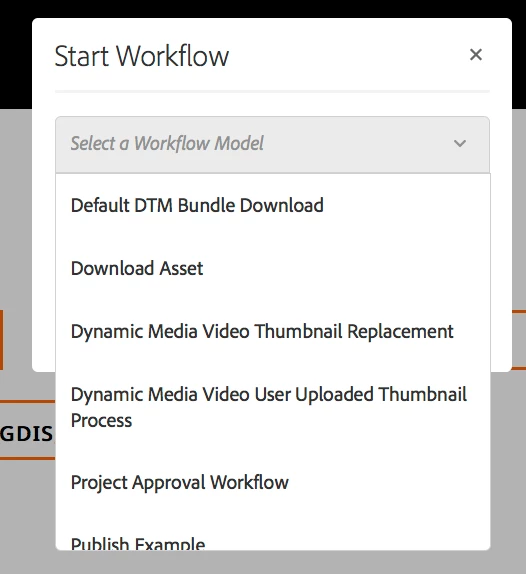
I would like to hide certain workflows in this list from certain users/groups. For instance, I want to show only the Download Asset and Project Approval Workflow for a group. Everything else should be hidden.

In the following article, How to hide workflow models in the start workflow list?

It states that I should be able to add the workflow:system tag to a workflow model to hide it. However, adding that tag did not work.

What is the recommended way of restricting the list of workflow models that appear when a user selects start workflow?

Best answer by Gaurav-Behl

I've verified that this link How to hide workflow models in the start workflow list?  still works for 6.4

1) Open workflow properties in Touch UI

2) Add the tag 'workflow:system' and remove other tags, if any.

3) Save the changes and close the properties dialog

4) Click on Sync button to propagate the changes to corresponding workflow model definition under /var/workflow/models/<name>/metaData node.

5) Validate that you can see "tags" property as "system" on the metaData node

6) That specific model with "system" tag would stop appearing in the dropdown on your content page.

14 replies

Level 2
March 22, 2019

I have one more issue that came up. I am unable to edit the OOB Workflow Model called, Activation Model. Not sure, if this is just an issue in my local (AEM 6.4).

http://localhost:4502/editor.html/libs/settings/workflow/models/activationmodel.html

I get an error stating No Resource found.

arunpatidar
Community Advisor
Community Advisor
March 22, 2019

Any new or modified Workflow Models must be migrated to /conf/global/workflow/models.

When migrating modified AEM-provided Workflow Models

With the Workflow Model Editor open, modify the browser's address URL, and replace the path segment /libs/settings/workflow/models with /etc/workflow/models.

For example, change: http://localhost:4502/editor.html/libs/settings/workflow/models/dam/update_asset.html to http://localhost:4502/editor.html/etc/workflow/models/dam/update_asset.html

Enable Edit mode in the Workflow Model Editor which will copy the Workflow Model definition to /conf/global/workflow/models.

Tap the Sync button to sync the changes to the Runtime Workflow Model under /var/workflow/models.

Export both the Workflow Model (/conf/global/workflow/models/<workflow-model>) and Runtime Workflow Model (/var/workflow/models/<workflow-model>) and integrate into the AEM project.

For example, export:

/config/settings/workflow/models/dam/my_workflow_model

and

/var/workflow/models/dam/my_workflow_model

Workflow Model resolution occurs in the following order:

/conf/global/settings/workflow/models

/libs/settings/workflow/models

/etc/workflow/models

Thus, any customizations of AEM-provided Workflow Models persisted in the Previous location must be moved to /conf/global/settings/workflow/models if they are to be retained, otherwise they will be superseded by the AEM-provided Workflow Model definition in /libs/settings/workflow/models.

Arun Patidar
Level 3
July 1, 2019

Hi Mandeep,

I am facing the same issue you have faced for ActivationModel.

Getting error as - Resource at /libs/settings/workflow/models/activationmodel.html not found.

https://aemdamauth1d.healthehostt.com:4443/editor.html/libs/settings/workflow/models/activationmodel.html

Tried with below path as well (Per Arun Patidar post), but same result (resource not found).

https://aemdamauth1d.healthehostt.com:4443/editor.html/etc/workflow/models/activationmodel.html

did you get a chance to resolve this issue, if so, can you please share resolution steps.

Thanks n Regards,

Nitu

arunpatidar
Community Advisor
Community Advisor
July 1, 2019

I think the model is missing from AEM, Try creating new workflow with same name 'activationmodel' and title 'ActivationModel' and add tag workflow:system to hide workflow.

Arun Patidar