How to remove previously authored thumbnail image via Authoring | Community
Skip to main content
saurabhn3378167
May 26, 2020
Solved

How to remove previously authored thumbnail image via Authoring

  • May 26, 2020
  • 2 replies
  • 3867 views

We have a requirement to delete authored image in Thumbnail tab of page properties via Authoring, in short we need to deselect image or remove authored image.

This post is no longer active and is closed to new replies. Need help? Start a new post to ask your question.
Best answer by leoberliant

Touch UI does not offer an option to remove a thumbnail. You only can overwrite an existed thumbnail.

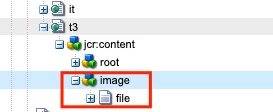
To remove teh thumbnail complete, you can employ CRXDe and delete an image node within the page node's structure: /jcr:content/image


2 replies

leoberliantAdobe EmployeeAccepted solution
Adobe Employee
May 26, 2020

Touch UI does not offer an option to remove a thumbnail. You only can overwrite an existed thumbnail.

To remove teh thumbnail complete, you can employ CRXDe and delete an image node within the page node's structure: /jcr:content/image


BrianKasingli
Community Advisor and Adobe Champion
May 26, 2020

@saurabhn3378167 

Just adding to @leoberliant 's note. Whenever your editable template includes a thumbnail, that thumbnail will be visible on every page that used that editable template. In this case, if you want to overwrite the page's thumbnail, you need to include an image asset in this path /content/my-site/en-gb/home/jcr:content/image.

I hope this helps.