
How to populate tags in universal editor tags field | Community
Skip to main content
sravs
Community Advisor
Community Advisor
March 27, 2025
Question

How to populate tags in universal editor tags field

  • March 27, 2025
  • 2 replies
  • 554 views

I've created a block that includes a tag field. Below is the JSON configuration for setting up the tag field.


{
"component": "aem-tag",
"name": "tags",
"value": "",
"label": "Tags",
"valueType": "string"
}


I've created the taxonomy page and published it as per the instructions in the Managing Taxonomy Data | Adobe Experience Manager. However, I am still unable to see the tags under the tag field.
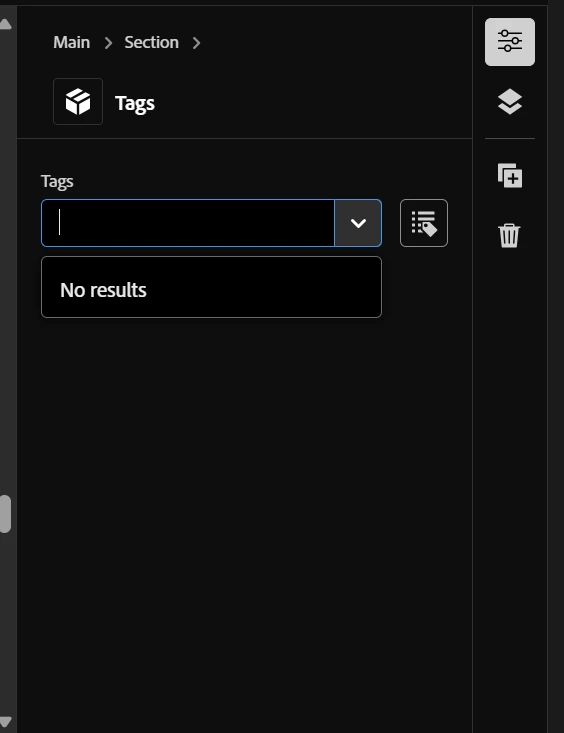
 

Please let me know if I missed anything.

This post is no longer active and is closed to new replies. Need help? Start a new post to ask your question.

2 replies

AmitVishwakarma
Community Advisor
Community Advisor
March 27, 2025

Hi @sravs ,

1. Verify Taxonomy Configuration

Make sure you have:
      - Created the taxonomy page in AEM (/taxonomy)
     - Published the taxonomy page as per Adobe’s guidelines
     - Ensured that your taxonomy terms have proper IDs

2. Check Your JSON Configuration

Your current JSON config:

{ "component": "aem-tag", "name": "tags", "value": "", "label": "Tags", "valueType": "string" }

This looks correct, but you need to ensure:
"valueType" is "array" instead of "string" (tags usually support multiple values)

Update your JSON like this:


3. Ensure the Correct Data Source

The Universal Editor (aem-tag field) must fetch tags from the published taxonomy.
If the tags are not appearing, do the following:

Check if tags exist in the Published Taxonomy JSON
Run this in your browser:

https://your-aem-instance/taxonomy.json

If tags are missing, your taxonomy was not published correctly!

Ensure the tags have correct namespace and ID references.
Example correct structure:

{ "tags": [ { "id": "marketing:campaigns/summer-2025", "title": "Summer 2025", "path": "/taxonomy/marketing/campaigns/summer-2025" }, { "id": "products/electronics", "title": "Electronics", "path": "/taxonomy/products/electronics" } ] }

  If your tags do not follow this structure, update your taxonomy.

4. Confirm the Correct Namespaces in Universal Editor

Sometimes, tags don’t appear because of a missing namespace reference.
Update the JSON configuration to explicitly reference the taxonomy path:

{ "component": "aem-tag", "name": "tags", "value": [], "label": "Tags", "valueType": "array", "taxonomy": "/taxonomy/marketing" }

Replace "/taxonomy/marketing" with your actual taxonomy root path.

5. Debug Using Console Logs

If tags still do not appear, open the browser console:

Go to Network Tab
Look for requests to /taxonomy.json
Check if it's loading correctly
If the request fails, your taxonomy is misconfigured or not published properly

Regards,
Amit

sravs
Community Advisor
sravsCommunity AdvisorAuthor
Community Advisor
April 8, 2025

Hi @amitvishwakarma ,


The suggested approach didn't work either. The tags are still not loading, even though the taxonomy.json is loading without any issues.

kautuk_sahni
Community Manager
Community Manager
April 1, 2025

@sravs Did you find the suggestion helpful? Please let us know if you need more information. If a response worked, kindly mark it as correct for posterity; alternatively, if you found a solution yourself, we’d appreciate it if you could share it with the community. Thank you!

Kautuk Sahni