
How to populate by default item in multifield dialog | Community
Skip to main content
keshava219
Level 3
August 31, 2023
Solved

How to populate by default item in multifield dialog

  • August 31, 2023
  • 2 replies
  • 1415 views

By default it will be nothing as shown in screenshot, I want to highlight single item without clicking "Add" button. 
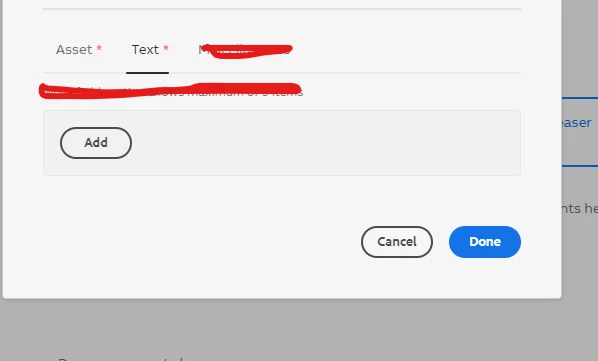
I heard like we need right custom js for this, any reference let me know. I'm Using

"granite/ui/components/coral/foundation/form/multifield"



This post is no longer active and is closed to new replies. Need help? Start a new post to ask your question.
Best answer by Mahedi_Sabuj

Hi @keshava219,

You can consider using "cq:template" here. The values will be stored to the content node as soon as you add the component to the page. 

_cq_template / .content.xml (country / language can be empty based on your needs) 


<?xml version="1.0" encoding="UTF-8"?> <jcr:root xmlns:jcr="http://www.jcp.org/jcr/1.0" xmlns:nt="http://www.jcp.org/jcr/nt/1.0" jcr:primaryType="nt:unstructured"> <navItems jcr:primaryType="nt:unstructured"> <item0 jcr:primaryType="nt:unstructured" country="Germany" language="German"/> </navItems> </jcr:root>


Reference: https://www.aem-blog.com/post/how-to-pre-populate-values-in-aem-component 

2 replies

Sady_Rifat
Community Advisor
Community Advisor
August 31, 2023

Hello @keshava219 ,
You can try this script,
In your clientlib JS,

(function($) { $(document).on("foundation-contentloaded", function(e) { console.log("Hello"); $(".coral-Form-field.coral3-Multifield").each(function() { let $multifield = $(this); let $fields = $multifield.find(".coral3-Multifield-item"); // Check if the multifield is empty if ($fields.length === 0) { // Add default item $multifield.find(".coral3-Button").click(); } }); }); })(jQuery);

Add the clientlib by using 

extraClientlibs=[your.clientlib.name]


Mahedi_Sabuj
Community Advisor
Mahedi_SabujCommunity AdvisorAccepted solution
Community Advisor
August 31, 2023

Hi @keshava219,

You can consider using "cq:template" here. The values will be stored to the content node as soon as you add the component to the page. 

_cq_template / .content.xml (country / language can be empty based on your needs) 


<?xml version="1.0" encoding="UTF-8"?> <jcr:root xmlns:jcr="http://www.jcp.org/jcr/1.0" xmlns:nt="http://www.jcp.org/jcr/nt/1.0" jcr:primaryType="nt:unstructured"> <navItems jcr:primaryType="nt:unstructured"> <item0 jcr:primaryType="nt:unstructured" country="Germany" language="German"/> </navItems> </jcr:root>


Reference: https://www.aem-blog.com/post/how-to-pre-populate-values-in-aem-component 

Mahedi Sabuj
