How to make Navigation componnent visible in component list of Edit mode? | Community
Skip to main content
Level 4
February 18, 2022
Solved

How to make Navigation componnent visible in component list of Edit mode?

  • February 18, 2022
  • 1 reply
  • 658 views

Hi all,

Does anyone know how to make Navigation Component visible in Edit mode, please? I can see it in default header structure. After deleting it, I am not able to find it again. It looks like all the components under "<Program name> - Structure" group are invisible by default.

AEM version: AEM as a cloud service
AEM RELEASE: 2021.12.6151.20211217T120950Z

Thanks.
This post is no longer active and is closed to new replies. Need help? Start a new post to ask your question.
Best answer by Asutosh_Jena_

Hi @huideshao 


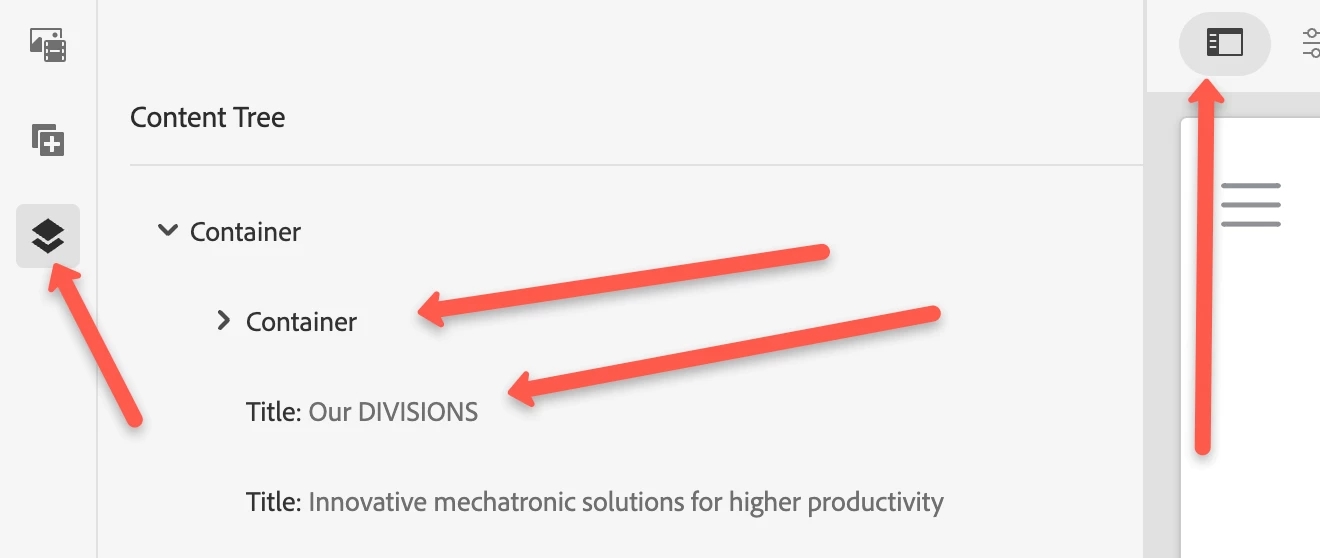
You should be able to navigate to "Content Tree" section by clicking on the "Toggle Side Panel" and it will allow you to see all the components used on the page if you are not able to see it in edit mode.


Thanks!


1 reply

Asutosh_Jena_
Community Advisor
Asutosh_Jena_Community AdvisorAccepted solution
Community Advisor
February 22, 2022

Hi @huideshao 


You should be able to navigate to "Content Tree" section by clicking on the "Toggle Side Panel" and it will allow you to see all the components used on the page if you are not able to see it in edit mode.


Thanks!