


How to limit the number of components in Container Components? | AEM Community Blog Seeding
How to limit the number of components in Container Components? by Albinsblog
Abstract
In this post, let us see the approaches to limit the components in container components; in some cases, we may have the use case to limit the number of child components allowed to be added into the container due to the business rules.

OPTION1 — LIMIT THROUGH FE LOGIC:
Limit the number of components through Front End Javascript; refer to http://mnmaem.blogspot.com/2018/02/aem-parsys-customisation.html for more details on this approach. The challenge of this approach sometime may create incompatibility issues or out-of-sync issues during the AEM level changes.

In this post, let us see the approaches to limit the components in container components; in some cases, we may have the use case to limit the number of child components allowed to be added into the container due to the business rules.

OPTION1 — LIMIT THROUGH FE LOGIC:
Limit the number of components through Front End Javascript; refer to http://mnmaem.blogspot.com/2018/02/aem-parsys-customisation.html for more details on this approach. The challenge of this approach sometime may create incompatibility issues or out-of-sync issues during the AEM level changes.

OPTION2 — LIMIT THROUGH EDIT CONFIG LISTENERS AND BACK END SERVLET:
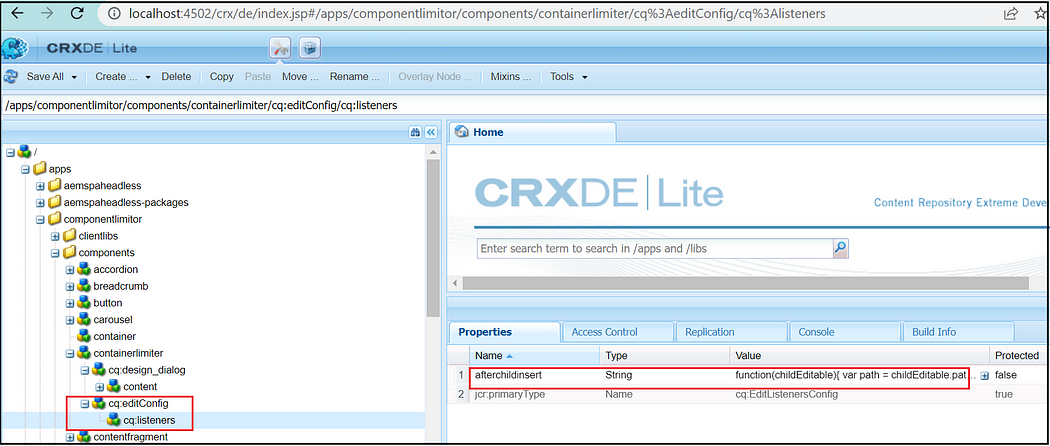
In this option, we will use a back-end servlet and an edit config listener(afterchildinsert) to limit the number of components in a container.

Add the afterchildinsert listener to the component edit config and add the below JavaScript.
function(childEditable) {
var path = childEditable.path;
var date = new Date();
var servletURL = '/bin/ComponentLimiterSevlet?' + date.getTime();
var requestData = 'componentPath=' + path;
$.ajax({
async: false,
type: 'GET',
url: servletURL,
dataType: 'text',
data: requestData,
success: function(returnData) {
if (returnData == 'false') {
var cmp = childEditable.getParent();
cmp.refresh();
showErrorAlert('Cannot drop more component, if you want to add more, please set the Max component allowed bigger.', 'Error');
}
}
})
function showErrorAlert(message, title) {
var fui = $(window).adaptTo("foundation-ui"),
options = [{
text: "OK",
warning: true
}];
message = message || "Unknown Error";
title = title || "Error";
fui.prompt(title, message, "error", options);
}
}
Read Full Blog
How to limit the number of components in Container Components?
Q&A
Please use this thread to ask the related questions.