How to include clientlibs in experience fragment in AEM? | Community
Skip to main content
Anderson_Hamer
Level 4
June 21, 2021
Solved

How to include clientlibs in experience fragment in AEM?

  • June 21, 2021
  • 4 replies
  • 2898 views

I would need load set of clientlibs in experience fragment in order to make tth component work, for example, I want to load bootstrap 3.2 version and some custom clientlibs in experience fragment. If it is page, we go to page properties and  add whatever clientlibs that is needed and if it is editable template, we will add the clientlibs in page policy of the template. But in experience fragment I could not see any place to add clientlibs. Can you guys tell me how to add clientlibs in experience fragment
This post is no longer active and is closed to new replies. Need help? Start a new post to ask your question.
Best answer by BrianKasingli

@anderson_hamer,

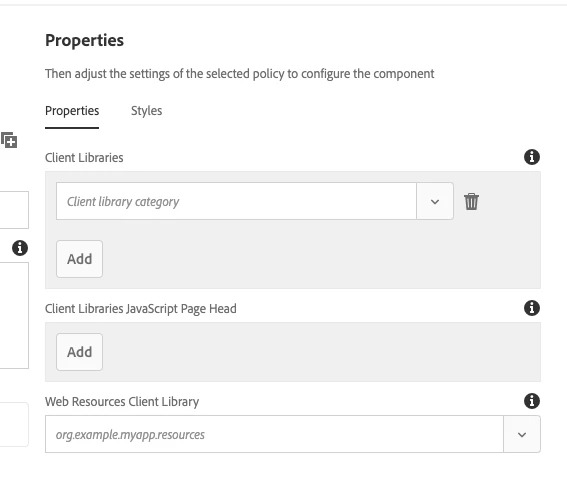
An experience fragment, XF, can be created with the same editable template structure. This means that when you are on your target XF page, clicking on the drop-down menu from the top left author header nav, you should see the "edit the template" button. From the template editor, you can edit the policies, and include your client libraries, like you should for a page.


4 replies

ibishika
Level 4
June 21, 2021

The template using which you are creating the experience fragment should be pointing to some template type which in turn is extended from some component. Find the template type and from that find the component to which it's pointed to. In that component you can add the clientlib.

BrianKasingli
Community Advisor and Adobe Champion
BrianKasingliCommunity Advisor and Adobe ChampionAccepted solution
Community Advisor and Adobe Champion
June 22, 2021

@anderson_hamer,

An experience fragment, XF, can be created with the same editable template structure. This means that when you are on your target XF page, clicking on the drop-down menu from the top left author header nav, you should see the "edit the template" button. From the template editor, you can edit the policies, and include your client libraries, like you should for a page.


Ritesh_Mittal
Community Advisor and Adobe Champion
June 22, 2021

Hi @anderson_hamer ,


Below is what you need to achieve it-


1. In your project editable template structure just change sling:resourceType to project specific xfpage component.


sling:resourceType = myproject/components/structure/page/xfpage


2. Now this xfpage component can inherit the OOTB xfpage, 'cq/experience-fragments/components/xfpage'


3. Add your clientlib in customheaderlibs.html


Cheers!

Level 2
June 22, 2021

Either add it using edit template(policies) or by adding it in the customheaderlibs.html of your template