
How to I disable pannel in authroing more? | Community
Skip to main content
Manu_Mathew_
Community Advisor
Community Advisor
July 1, 2022
Solved

How to I disable pannel in authroing more?
  • July 1, 2022
  • 2 replies
  • 978 views

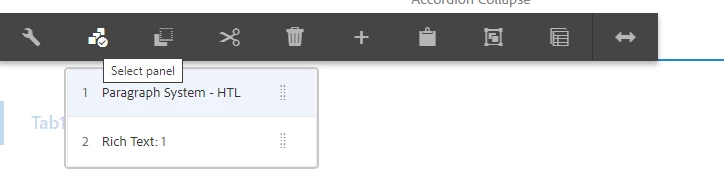
Is there a way to disbale this select panel option ? 

Can it be disabled based on a condition/scerario?

This post is no longer active and is closed to new replies. Need help? Start a new post to ask your question.
Best answer by ShaileshBassi

@manu_mathew_ PFB suggestion for this implementation:
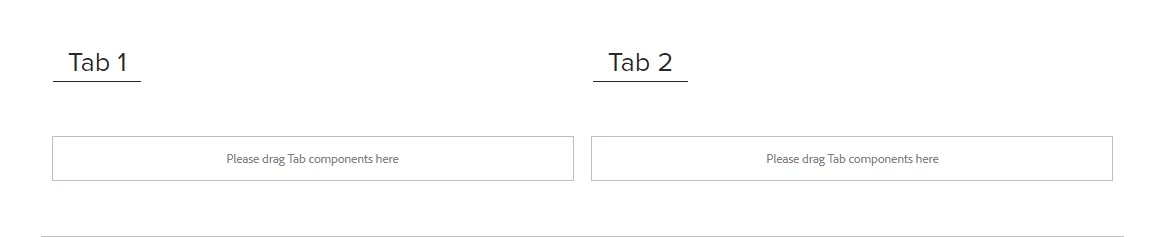
  1. One way is to keep the heading for the tabs also specific to the column. This can be achieved directly by using the OOTB tabs component by dragging the tabs component twice and each having one tab within it and using responsive grid feature adjusting the layout width for the component.
  2. Second way is to create a customs tabs component similar to column control and within the tabs component create the parsys as per the selection from the user. 

    The hide and show for the active tab can be easily achieved with the custom css.

  3. Third is to use the OOTB as it is built, as going forward when you will divide into the parsys there will be high complexity involved in setting the max-width and on click width adjustment of content & parsys along with the OOTB tabs component adjustments happening in parallel.

Thanks


2 replies

Jagadeesh_Prakash
Community Advisor
Community Advisor
July 1, 2022

@manu_mathew_ : This is coming as part of the accordion core component as well. So if you really wanted to hide the "select panel" try to do it from custom clientlibs based on your logic

Manu_Mathew_
Community Advisor
Community Advisor
July 1, 2022

This is actually a custom component, but inherits the core components - tabs.

ShaileshBassi
Community Advisor
Community Advisor
July 3, 2022

@manu_mathew_ Even you hide using the custom clientlibs, the same functionality can be achieved via the screen

And this functionality was added specifically so that the dependency to author the ordering of the tabs can be done by the authors and developers do not have to make the changes from the CRDLE Lite.


Can you elaborate more on the use case, why you need to disable the functionality.

Thanks

Manu_Mathew_
Community Advisor
Community Advisor
July 4, 2022

@shaileshbassi Consider we have a counter to set the number of items say 3 and the parsys is displayed side by side, say left, center and right, and based on tab selection , we can hide and show respective tab panels.Here since we can see the parsys split in a single row , it need not have select panel.

ShaileshBassi
Community Advisor
ShaileshBassiCommunity AdvisorAccepted solution
Community Advisor
July 4, 2022

@manu_mathew_ PFB suggestion for this implementation:

  1. One way is to keep the heading for the tabs also specific to the column. This can be achieved directly by using the OOTB tabs component by dragging the tabs component twice and each having one tab within it and using responsive grid feature adjusting the layout width for the component.
  2. Second way is to create a customs tabs component similar to column control and within the tabs component create the parsys as per the selection from the user. 

    The hide and show for the active tab can be easily achieved with the custom css.

  3. Third is to use the OOTB as it is built, as going forward when you will divide into the parsys there will be high complexity involved in setting the max-width and on click width adjustment of content & parsys along with the OOTB tabs component adjustments happening in parallel.

Thanks