Solved
How to hide fields of a dialog while using granite include
I have created a tab inside a folder in my project
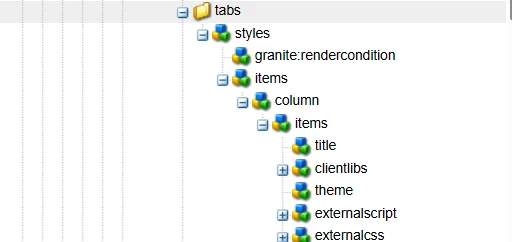
Here is the code
<?xml version="1.0" encoding="UTF-8"?>
<jcr:root xmlns:sling="http://sling.apache.org/jcr/sling/1.0" xmlns:granite="http://www.adobe.com/jcr/granite/1.0" xmlns:cq="http://www.day.com/jcr/cq/1.0" xmlns:jcr="http://www.jcp.org/jcr/1.0" xmlns:nt="http://www.jcp.org/jcr/nt/1.0"
          jcr:primaryType="nt:unstructured"
          jcr:title="Styles"
          sling:resourceType="granite/ui/components/coral/foundation/fixedcolumns">
    <granite:rendercondition
            jcr:primaryType="nt:unstructured"
            sling:resourceType="rcg/components/content/user-group"
            groups="content-authors,admin"/>
    <items jcr:primaryType="nt:unstructured">
        <column
                jcr:primaryType="nt:unstructured"
                sling:resourceType="granite/ui/components/coral/foundation/container">
            <items jcr:primaryType="nt:unstructured">
                <title
                        jcr:primaryType="nt:unstructured"
                        sling:resourceType="granite/ui/components/coral/foundation/form/textfield"
                        fieldLabel="Title"
                        name="./title">
                    <granite:rendercondition
                            jcr:primaryType="nt:unstructured"
                            sling:resourceType="granite/ui/components/coral/foundation/renderconditions/property"
                            propertyName="hideTitle"
                            propertyValue="{Boolean}false"/>
                </title>
                <clientlibs
                        jcr:primaryType="nt:unstructured"
                        sling:resourceType="granite/ui/components/coral/foundation/form/multifield"
                        composite="{Boolean}false"
                        fieldDescription="The client library categories to load. JavaScript is added at the body end, CSS in the page head."
                        fieldLabel="Client Libraries">
                    <granite:rendercondition
                            jcr:primaryType="nt:unstructured"
                            sling:resourceType="granite/ui/components/coral/foundation/renderconditions/property"
                            propertyName="hideClientlibs"
                            propertyValue="{Boolean}false"/>
                    <field
                            jcr:primaryType="nt:unstructured"
                            sling:resourceType="granite/ui/components/coral/foundation/container"
                            name="./clientlibs">
                        <items jcr:primaryType="nt:unstructured">
                            <category
                                    jcr:primaryType="nt:unstructured"
                                    sling:resourceType="granite/ui/components/coral/foundation/form/autocomplete"
                                    emptyText="Client library category"
                                    multiple="{Boolean}false"
                                    name="./clientlibs"
                                    required="{Boolean}false">
                                <datasource
                                        jcr:primaryType="nt:unstructured"
                                        sling:resourceType="core/wcm/components/commons/datasources/clientlibrarycategories/v1"/>
                                <options
                                        jcr:primaryType="nt:unstructured"
                                        sling:resourceType="granite/ui/components/coral/foundation/form/autocomplete/list"/>
                            </category>
                        </items>
                    </field>
                </clientlibs>
                <theme
                        jcr:primaryType="nt:unstructured"
                        sling:resourceType="granite/ui/components/coral/foundation/form/textfield"
                        fieldLabel="Theme"
                        name="./theme">
                    <granite:rendercondition
                            jcr:primaryType="nt:unstructured"
                            sling:resourceType="granite/ui/components/coral/foundation/renderconditions/property"
                            propertyName="hideTheme"
                            propertyValue="{Boolean}false"/>
                </theme>
                <externalscript
                        jcr:primaryType="nt:unstructured"
                        sling:resourceType="granite/ui/components/coral/foundation/form/multifield"
                        composite="{Boolean}false"
                        fieldLabel="External Script">
                    <granite:rendercondition
                            jcr:primaryType="nt:unstructured"
                            sling:resourceType="granite/ui/components/coral/foundation/renderconditions/property"
                            propertyName="hideExternalScript"
                            propertyValue="{Boolean}false"/>
                    <field
                            jcr:primaryType="nt:unstructured"
                            sling:resourceType="granite/ui/components/coral/foundation/container"
                            name="./externalscript">
                        <items jcr:primaryType="nt:unstructured">
                            <scriptlink
                                    jcr:primaryType="nt:unstructured"
                                    sling:resourceType="granite/ui/components/coral/foundation/form/pathfield"
                                    fieldLabel="Script Link"
                                    name="./externalscript"
                                    rootPath="/content"/>
                        </items>
                    </field>
                </externalscript>
                <externalcss
                        jcr:primaryType="nt:unstructured"
                        sling:resourceType="granite/ui/components/coral/foundation/form/multifield"
                        composite="{Boolean}false"
                        fieldLabel="External CSS">
                    <granite:rendercondition
                            jcr:primaryType="nt:unstructured"
                            sling:resourceType="granite/ui/components/coral/foundation/renderconditions/property"
                            propertyName="hideExternalCSS"
                            propertyValue="{Boolean}false"/>
                    <field
                            jcr:primaryType="nt:unstructured"
                            sling:resourceType="granite/ui/components/coral/foundation/container"
                            name="./externalcss">
                        <items jcr:primaryType="nt:unstructured">
                            <csslink
                                    jcr:primaryType="nt:unstructured"
                                    sling:resourceType="granite/ui/components/coral/foundation/form/pathfield"
                                    fieldLabel="CSS Link"
                                    name="./externalcss"
                                    rootPath="/content"/>
                        </items>
                    </field>
                </externalcss>
            </items>
        </column>
    </items>
</jcr:root>
Now i am including this tab at many places like this
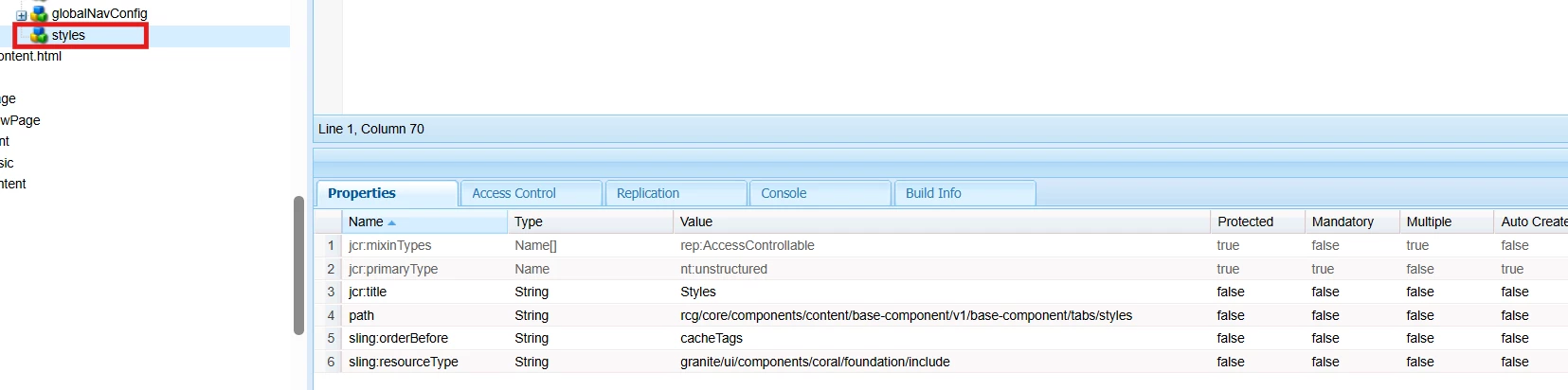
 <styles
                            jcr:primaryType="nt:unstructured"
                            jcr:title="Styles"
                            sling:orderBefore="cacheTags"
                            path="rcg/core/components/content/base-component/v1/base-component/tabs/styles"
                            sling:resourceType="granite/ui/components/coral/foundation/include">
                    </styles>
Now while including, at some places i don't want some of the fields to render for eg. title. Is there any way that we can hide some of the fields at different places not at all the places. I tried granite:hide in my parent style tab but it hides the field at all the places.