How to get project app id or artifact id in sling model | Community
Skip to main content
Level 2
August 4, 2023
Solved

How to get project app id or artifact id in sling model

  • August 4, 2023
  • 4 replies
  • 1020 views

I'm using AEM Cloud and I want to retrieve some data for a page using sling model. For that appID or artifactId is required in sling model. Is there a way to get this is sling model?

This post is no longer active and is closed to new replies. Need help? Start a new post to ask your question.
Best answer by arunpatidar

HI @nikitatailor24 

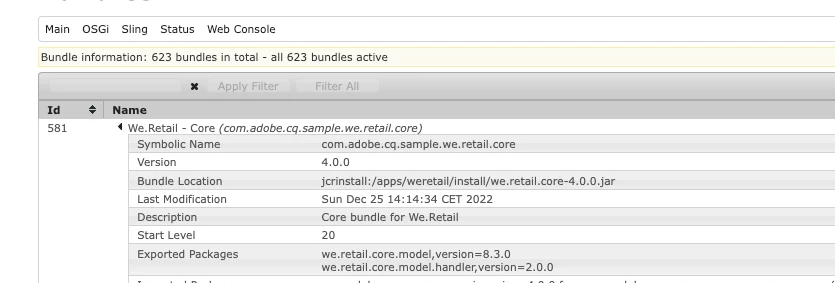
You can try to retrieve bundle version if that helps.


4 replies

Nishant-Singh
Adobe Employee
Adobe Employee
August 4, 2023

Not sure why you need appID or artifactId ? can you please provide your use case ?

SivakumarKanoori
Community Advisor
Community Advisor
August 4, 2023

@nikitatailor24  : 


If your use case is to just to read data from AEM JCR nodes and display on the page You don't need to have app id or artifact id. 

You can use sling model :

You can simply read the data from JCR and map to the sling model variables . Using sightly you can simply display the data.


Sling Models:

Sling Models are annotation driven Java “POJO's” (Plain Old Java Objects) that facilitate the mapping of data from the JCR to Java variables.


Thanks 

Siva

Thanks,Siva
varun249715
Adobe Employee
Adobe Employee
August 4, 2023

@nikitatailor24 I dont think there is an option for this directly in Sling Model.

What is your use case? 


However if you require just the app id or artifact id you can store it in an OSGI config and retrieve it in your sling model.

arunpatidar
Community Advisor
arunpatidarCommunity AdvisorAccepted solution
Community Advisor
August 4, 2023

HI @nikitatailor24 

You can try to retrieve bundle version if that helps.


Arun Patidar