
How to get expiration Flag for custom expired metadatafield for Assets | Community
Skip to main content
khamat_bn
Level 4
January 30, 2021
Solved

How to get expiration Flag for custom expired metadatafield for Assets

  • January 30, 2021
  • 1 reply
  • 1272 views

Hi guys,


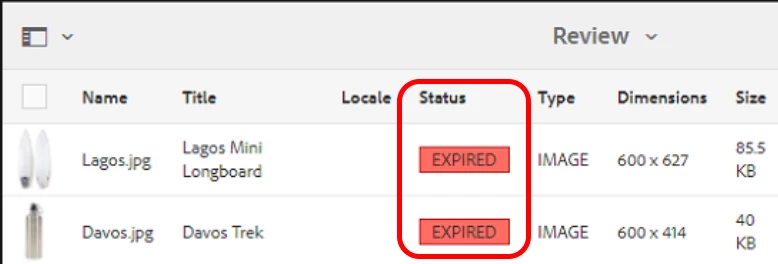
I am using cutom expiration metadata property instead of prism:expirationDate. So we want to also have the expiration flags on Assets shown as below image. Please let me know how we can acheive the same.



This post is no longer active and is closed to new replies. Need help? Start a new post to ask your question.
Best answer by SureshDhulipudi

Instead of customizing the status, why don't you set or update prism:expirationDate value with your custom expiration date. That will automatically set the EXPIRED flag on Asset.


custom:expirationDate = prism:expirationDate

1 reply

SureshDhulipudi
Community Advisor
SureshDhulipudiCommunity AdvisorAccepted solution
Community Advisor
January 31, 2021

Instead of customizing the status, why don't you set or update prism:expirationDate value with your custom expiration date. That will automatically set the EXPIRED flag on Asset.


custom:expirationDate = prism:expirationDate

khamat_bn
khamat_bnAuthor
Level 4
February 1, 2021

Hi,

to update the metadata node with prsm:expirationDate as custom expiration date field, which approach you suggest is better. I have think to modify OOTB workflow xmpWriteback or Event Listner. 

Is there any better approach, please suggest me.