How to enable content fragments models in configuration manager | Community
Skip to main content
Level 4
August 10, 2018
Solved

How to enable content fragments models in configuration manager

  • August 10, 2018
  • 3 replies
  • 2254 views

I am trying to create a content fragment model in AEM 6.3 and I have gone through the below link:

Content Fragment Models

Once I create the CFmodel config in configuration browser I am not sure on how to apply that config to the assets folder so that I can create the CF model. Could you anyone please me with that ?
This post is no longer active and is closed to new replies. Need help? Start a new post to ask your question.
Best answer by arunpatidar

Hi,

Its already mentioned in docs, adding screenshot to Scott answer

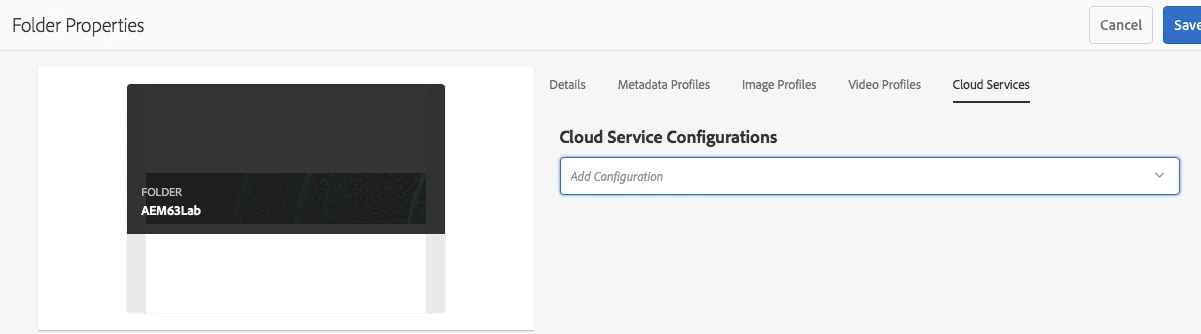
Go to Assets and select assets folder and click on properties, you will see the below screen from there you can select configuration

3 replies

smacdonald2008
Level 10
August 11, 2018

In the doc - it states:

"To use other configurations (i.e. excluding global) with a comparable Assets folder, then you have to define the connection. This is done using Configuration in the Cloud Services tab of the Folder Properties of the appropriate folder."

arunpatidar
Community Advisor
arunpatidarCommunity AdvisorAccepted solution
Community Advisor
August 11, 2018

Hi,

Its already mentioned in docs, adding screenshot to Scott answer

Go to Assets and select assets folder and click on properties, you will see the below screen from there you can select configuration

Arun Patidar
gabriellegarda
Level 2
January 30, 2019

This part of the configuration is missing, you cannot apply your configuration without the cloud configuration, I don't see this on AEM 6.3 although I have enabled CFM