How to display Anchor icon of plugin RTE on edit mode of page | Community
Skip to main content
Level 2
October 8, 2024
Solved

How to display Anchor icon of plugin RTE on edit mode of page

  • October 8, 2024
  • 1 reply
  • 881 views

Hi all,

I have a requirement to display anchor icon on edit mode of page when we have authored anchor tag in RTE.
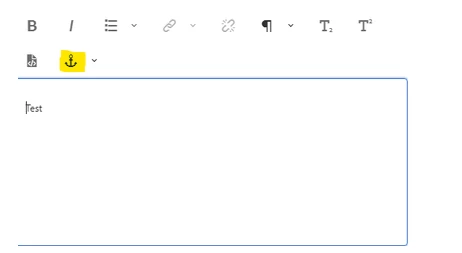
 

if we select anchor tag for test keyword anchor icon will be display next to it. Similarly, can we display anchor icon on edit mode of the page?

Help would be much appreciated. Thanks in advance.

This post is no longer active and is closed to new replies. Need help? Start a new post to ask your question.
Best answer by arunpatidar

Hi @naveent1 
You can use CSS to display the anchor icon in edit mode

https://sourcedcode.com/blog/aem/targeting-css-in-the-editor-html-for-aem-components-for-aemaacs 


.aem-AuthorLayer-Edit a[id]::before { content: "\2693"; margin-left: 5px; font-size: 20px; padding-top: 10px; }


1 reply

arunpatidar
Community Advisor
arunpatidarCommunity AdvisorAccepted solution
Community Advisor
October 8, 2024

Hi @naveent1 
You can use CSS to display the anchor icon in edit mode

https://sourcedcode.com/blog/aem/targeting-css-in-the-editor-html-for-aem-components-for-aemaacs 


.aem-AuthorLayer-Edit a[id]::before { content: "\2693"; margin-left: 5px; font-size: 20px; padding-top: 10px; }


Arun Patidar
October 9, 2024

that sounds nice!