Level 2
Nov 18, 2024 7:30 AM UTC

How to customize the positioning of foundation.validation.validator error message?

I have created a validator for number of slides in carousel , however the error message is not visible in dialog. 
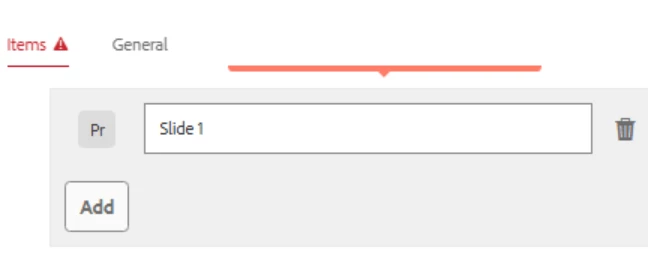
As for the code i am using selector on coral-multifield and returning error message if multifield items lesser than prescribed minimum.

This post is no longer active and is closed to new replies. Need help? Start a new post to ask your question.

6 replies

Tethich
Community Advisor
Community Advisor
Nov 18, 2024 12:25 PM UTC

Hi @zendark 


To get better help, can you share your dialog xml (anonymized of course, if contains any confidential info) ? Maybe you need to add the multifield in a container first. Also worth posting how does your.js validator looks like.

Translate
PRATHYUSHA_VP
Community Advisor
Community Advisor
Nov 18, 2024 3:15 PM UTC

Hi @zendark 


Seems the error message is not visible in the view port. Try checking in the dialog maximized view.


Try to override the dialog width and check if it solves


Hope this helps !

Thanks

Translate
Prathyusha - AEM Developer
PRATHYUSHA_VP
Community Advisor
Community Advisor
Nov 18, 2024 3:18 PM UTC
Prathyusha - AEM Developer
Tethich
Community Advisor
Community Advisor
Nov 18, 2024 4:38 PM UTC

@zendarkAlso check if your validator is working properly. A well example of such validator is https://aemhints.com/2020/10/24/limit-multifield-aem65/

Translate
ZendarkAuthor
Level 2
Nov 20, 2024 5:00 AM UTC

I have used the same code logic as the given code , validator is working fine it is just an issue with the error message being hidden

Translate
kautuk_sahni
Level 9
Nov 26, 2024 9:33 AM UTC

@zendark Did you find the suggestions helpful? Please let us know if you require more information. Otherwise, please mark the answer as correct for posterity. If you've discovered a solution yourself, we would appreciate it if you could share it with the community. Thank you!

Translate
Kautuk Sahni