How to create two groups in AEM 6.1? | Community
Skip to main content
littlegreywolf
Level 3
July 16, 2018
Solved

How to create two groups in AEM 6.1?

  • July 16, 2018
  • 8 replies
  • 3239 views

How to create two groups in AEM 6.1?

One group named 'Maker', only has the rights to edit page contents but not publish/unpublish rights.

Another group named 'Checker', only has the rights to publish/unpublish but not to edit page contents.
This post is no longer active and is closed to new replies. Need help? Start a new post to ask your question.
Best answer by smacdonald2008

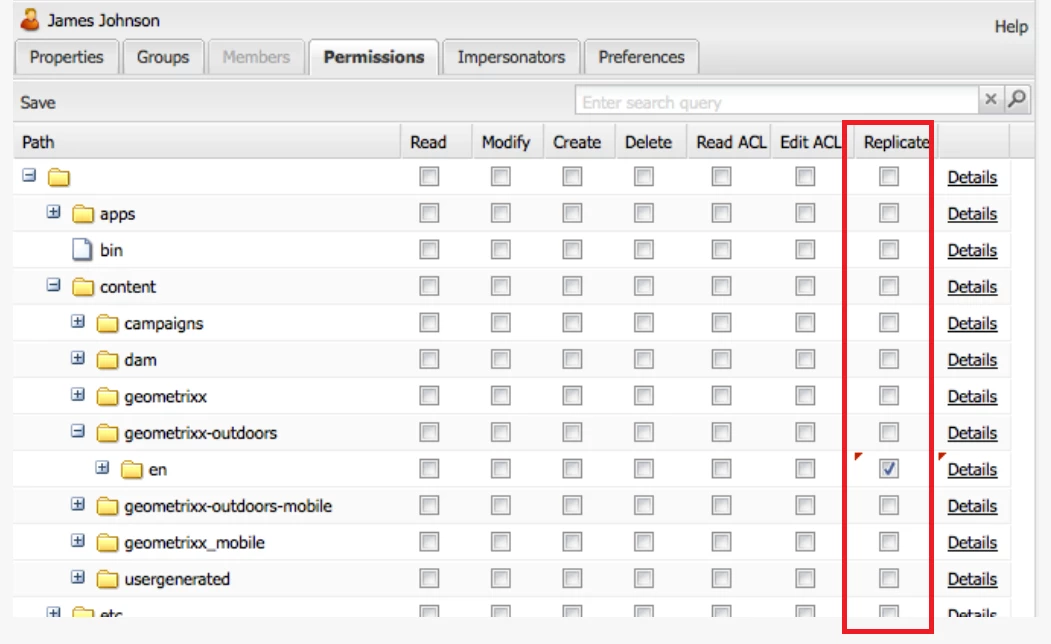
When you click this column for a group -- its member can publish and unpubish.

8 replies

smacdonald2008
Level 10
July 16, 2018

YOu create two groups by following this doc:  User Administration and Security

Then you can set permissions applicable to each group - which is also mentioned in this doc topic.

Adobe Employee
July 16, 2018

Hello,

To create groups:

Classic UI

- Go to http://localhost:4502/useradmin

- Click on Edit button.

- Click on "Create Group" button

Touch UI

- Go to http://localhost:4502libs/granite/security/content/groupadmin.html

- Click on "Add Group" button.

To assign appropriate permissions to each group, use useradmin console or crx/explorer. For permissions details, please check this link [1]

[1] User, Group and Access Rights Administration

littlegreywolf
Level 3
July 16, 2018

It does not describe how to set rights to edit page contents or publish/unpublish .

It only describes the rights to read/modify/create/delete.

Adobe Employee
July 16, 2018

From /useradmin UI for group "Marker" you need to apply at least "Read, Modify, Create and Delete" permissions and deny(uncheck) " Replicate" permission.

For group "Checker" you might want to use some sort of approve workflow, rather than imply an ACL

smacdonald2008
Level 10
July 16, 2018

"It does not describe how to set rights to edit page contents or publish/unpublish ."

It does talks about pub rights --

littlegreywolf
Level 3
July 16, 2018

also allow to unpublish ?

smacdonald2008
smacdonald2008Accepted solution
Level 10
July 16, 2018

When you click this column for a group -- its member can publish and unpubish.

littlegreywolf
Level 3
July 16, 2018

thanks