how to create radio button and drop down fields in same row? guid me with example. | Community
Skip to main content
This post is no longer active and is closed to new replies. Need help? Start a new post to ask your question.
Best answer by MayurSatav

Hi @karthick1356 ,


I had a similar requirement, I followed this Blog and it worked for me.

1. First of all install this package, In this package, you will get all the necessary css and js.

2. Add rowresume as per your resource type. For me, it was granite/coral3 so I added below way
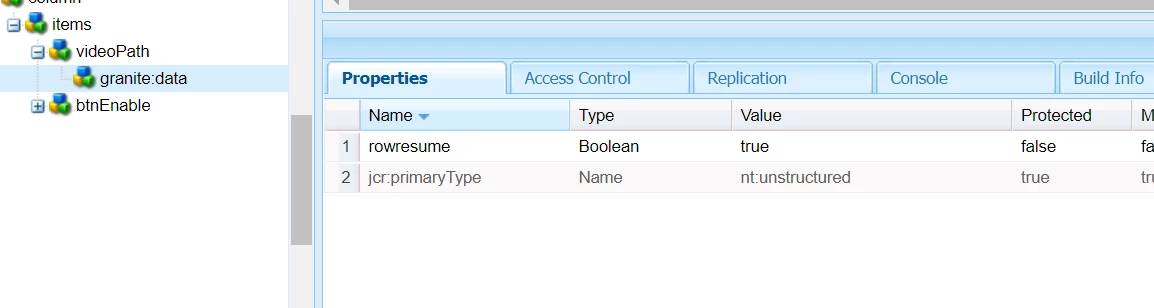
3. Add step 2 property in those fields you want to align inline. 


Thanks

2 replies

VeenaVikraman
Community Advisor
Community Advisor
June 7, 2021

Hi @karthick1356 


   I don't know if you are looking for this exactly, but do take a look. I think this might be helpful http://aemlab.blogspot.com/2019/07/aem-touch-ui-dialog-fields-in-same-row.html


Thanks

Veena ✌

Level 4
June 7, 2021
this is also correct
MayurSatav
Community Advisor and Adobe Champion
MayurSatavCommunity Advisor and Adobe ChampionAccepted solution
Community Advisor and Adobe Champion
June 7, 2021

Hi @karthick1356 ,


I had a similar requirement, I followed this Blog and it worked for me.

1. First of all install this package, In this package, you will get all the necessary css and js.

2. Add rowresume as per your resource type. For me, it was granite/coral3 so I added below way

3. Add step 2 property in those fields you want to align inline. 


Thanks

kautuk_sahni
Community Manager
Community Manager
June 10, 2021
@mayursatav, good to see you helping other AEM customers.
Kautuk Sahni