How to change keystore and truststore password in AEM | Community
Skip to main content
ranadyutis95334
Level 3
January 7, 2021
Solved

How to change keystore and truststore password in AEM

  • January 7, 2021
  • 2 replies
  • 3486 views

Hi,

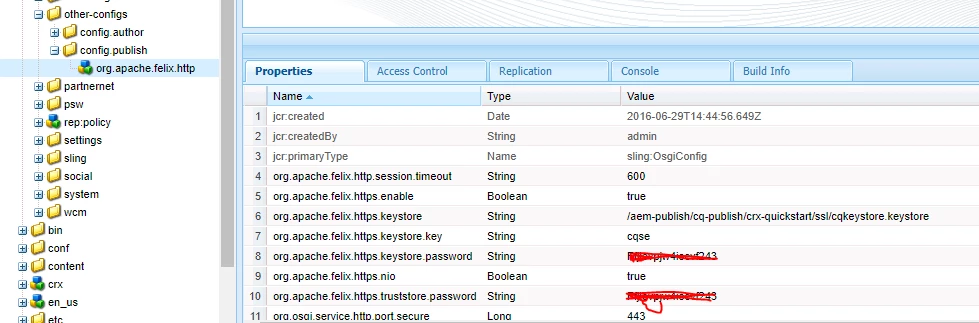
Can someone tell me how do we change the password for keystore and truststore. When I change the password directly from CRXDE and restart, the server do not come up.
This post is no longer active and is closed to new replies. Need help? Start a new post to ask your question.
Best answer by Ankur_Khare

Whenever u create a keystore or truststore a node gets created in aeem .

To change the password you nèed to delete previously created node in crxde and recreate through ui.

2 replies

SureshDhulipudi
Community Advisor
Community Advisor
January 7, 2021

you can write a config service to update the details


@ObjectClassDefinition(name="Config Service", description="This configuration is to update keystore password")
public @interface Configuration {

@AttributeDefinition(name = "Keystore password",
description = "The password to access the some configuration key password")
String keystorePassword() default "defulatkeypassword";


}

Ankur_Khare
Community Advisor
Ankur_KhareCommunity AdvisorAccepted solution
Community Advisor
January 8, 2021

Whenever u create a keystore or truststore a node gets created in aeem .

To change the password you nèed to delete previously created node in crxde and recreate through ui.

Level 3
July 3, 2024

Hi @ankur_khare ,
We have a situation to change the truststore password and unfortunately we don't have the current one. Ours is AEM as a Cloud Service. In this case, if I need to remove the existing truststore and create a new one, how can I do it? CRX/DE is not accessible in AEM cloud service. Can you please advise?

Thanks,
Rahul