How to change java.io.tmpdir in system properties
Hello Everypne,
In order to change the java.io.tmpdir to 'C:\Adobe\AEM\Author\cq-temp', I changed like the below that in C:\Adobe\AEM\Author\crx-quickstart\bin\start.bat
::* -------------------
::* Default JVM options
::* -------------------
set CQ_JVM_OPTS=-server
set CQ_JVM_OPTS=%CQ_JVM_OPTS% -Djava.awt.headless=true
set CQ_JVM_OPTS=%CQ_JVM_OPTS% -Xms8192m
set CQ_JVM_OPTS=%CQ_JVM_OPTS% -Xmx8192m
set CQ_JVM_OPTS=%CQ_JVM_OPTS% -XX:MaxMetaspaceSize=512m
set CQ_JVM_OPTS=%CQ_JVM_OPTS% -XX:NewRatio=1
set CQ_JVM_OPTS=%CQ_JVM_OPTS% -XX:MaxTenuringThreshold=15
set CQ_JVM_OPTS=%CQ_JVM_OPTS% -XX:+UseConcMarkSweepGC
set CQ_JVM_OPTS=%CQ_JVM_OPTS% -XX:ConcGCThreads=4
set CQ_JVM_OPTS=%CQ_JVM_OPTS% -XX:ParallelGCThreads=4
set CQ_JVM_OPTS=%CQ_JVM_OPTS% -Djava.io.tmpdir=C:\Adobe\AEM\Author\cq-temp
set CQ_JVM_OPTS=%CQ_JVM_OPTS% -XX:+HeapDumpOnOutOfMemoryError
set CQ_JVM_OPTS=%CQ_JVM_OPTS% -XX:HeapDumpPath=C:\Adobe\AEM\Author\cq-temp
set CQ_JVM_OPTS=%CQ_JVM_OPTS% -Doak.queryLimitInMemory=500000
set CQ_JVM_OPTS=%CQ_JVM_OPTS% -Doak.queryLimitReads=100000
set CQ_JVM_OPTS=%CQ_JVM_OPTS% -Dupdate.limit=250000
set CQ_JVM_OPTS=%CQ_JVM_OPTS% -Doak.fastQuerySize=true
But it doesn't change.
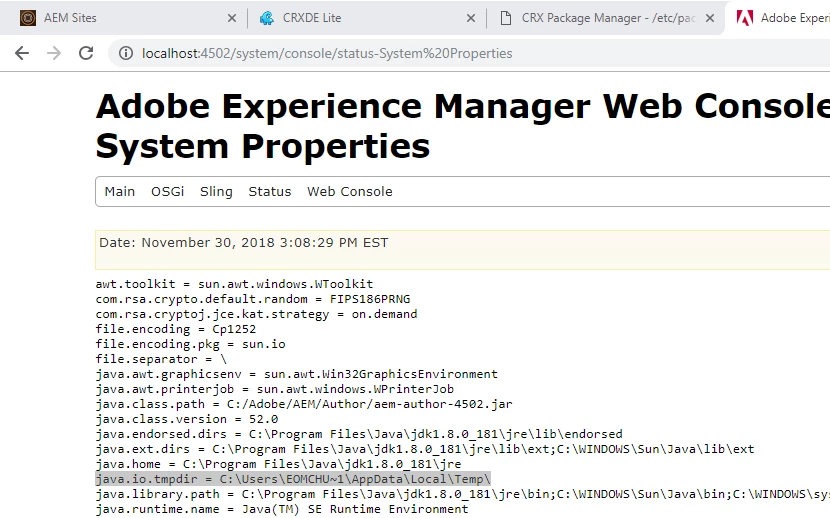
My environment is the following :
-AEM 6.3
-Windows 10
-Java 1.8.1
Can you help me with mine?
Regards
Chung Yong.