How to call Vendor in clientlibs | Community
Skip to main content
Level 4
February 28, 2022
Solved

How to call Vendor in clientlibs

  • February 28, 2022
  • 2 replies
  • 827 views

Hi, 

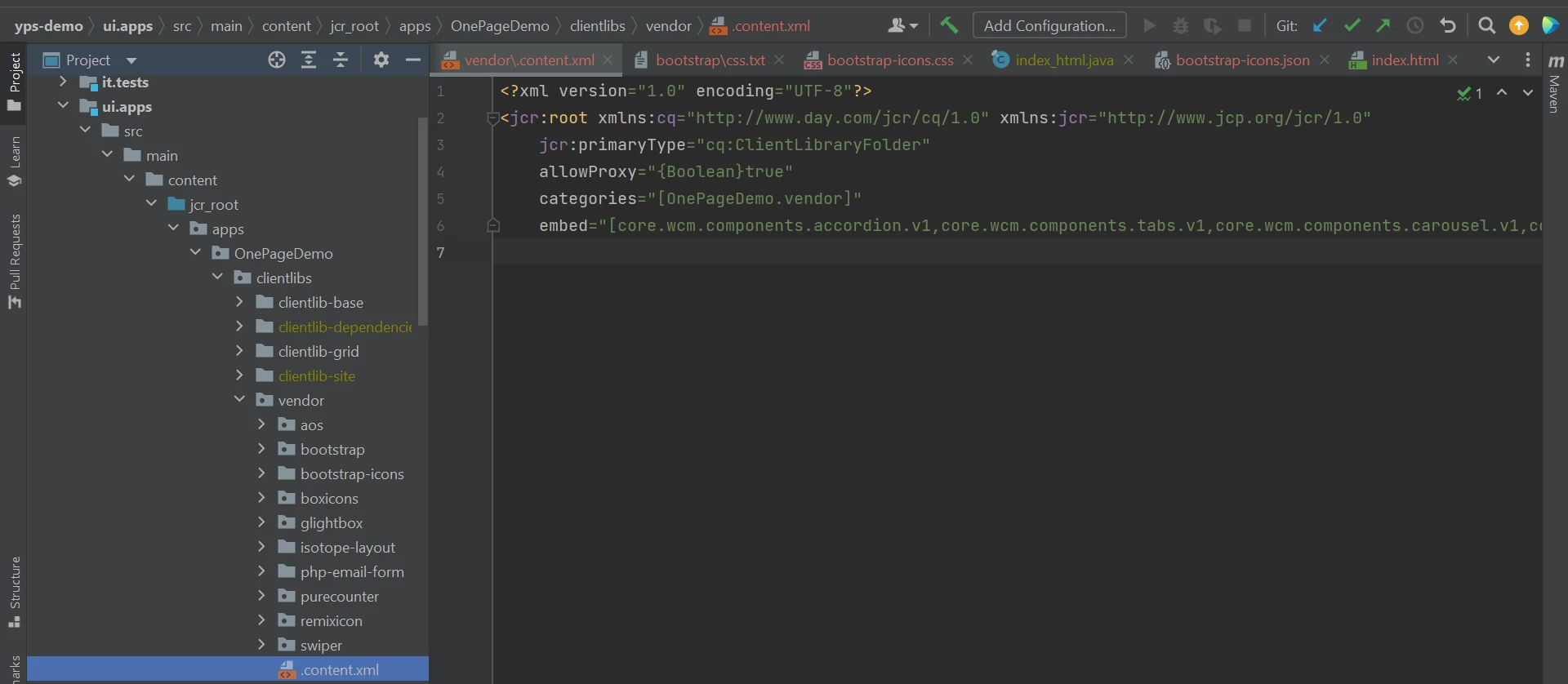
I have some separate css, js and bootstrap icons for my component. Those I have stored under vendor folder like the below. How can I call the below folder in my HTL (for my component) or should I add these to clientlib-base, if so how to add and call them ??

 

This post is no longer active and is closed to new replies. Need help? Start a new post to ask your question.
Best answer by Anish-Sinha

Hi @tessa_learner1 ,

Looks like each folder under the vendor folder is a separate clientlib folder. In this case, you can use dependencies concept to include these client libs into you base clientlibs. And I assume your base clientlibs must be included in the base page. You have to add a property named "dependencies" in your clientlib-base folder and add all the category names as an array. dependencies support multivalues. 

Refer this to understand more about dependencies and embed which will be used in these cases:https://experienceleague.adobe.com/docs/experience-manager-65/developing/introduction/clientlibs.html


2 replies

Anmol_Bhardwaj
Community Advisor
Community Advisor
February 28, 2022

Hi @tessa_learner1 , You already answered you question 🙂. 

We cannot include clientlibs in HTL without categories. You can create a new clienlib folder under apps/your-site/clientlibs and give it a category like vendor-clientlibs, and then bundle/send the vendor clientlibs through gulp under that location (also you can manually paste just to check once). And then include that category inside your HTL.


Anish-Sinha
Adobe Employee
Anish-SinhaAdobe EmployeeAccepted solution
Adobe Employee
February 28, 2022

Hi @tessa_learner1 ,

Looks like each folder under the vendor folder is a separate clientlib folder. In this case, you can use dependencies concept to include these client libs into you base clientlibs. And I assume your base clientlibs must be included in the base page. You have to add a property named "dependencies" in your clientlib-base folder and add all the category names as an array. dependencies support multivalues. 

Refer this to understand more about dependencies and embed which will be used in these cases:https://experienceleague.adobe.com/docs/experience-manager-65/developing/introduction/clientlibs.html


Level 4
March 1, 2022

Hi @anish-sinha  Thank you, I'll try this now.