How to author/select AEM pages in component dialog? | Community
Skip to main content
Mario248
Level 7
June 13, 2022
Solved

How to author/select AEM pages in component dialog?

  • June 13, 2022
  • 3 replies
  • 1761 views

I am building a custom component which will be used to list down few other pages. Basically I want to get the list pages(multi field) from author and show them in the page for which I need to know what resource type I should I use in component dialog. 


I read all OOTB dialogs (https://developer.adobe.com/experience-manager/reference-materials/6-4/granite-ui/api/jcr_root/libs/granite/ui/components/coral/foundation/server.html), text, image, video, rte but I could not find any xtype/ resource type that is related to select any page.


Is there any easy way to get the page path from component dialog ?
This post is no longer active and is closed to new replies. Need help? Start a new post to ask your question.
Best answer by SantoshSai

@Hi @mario248 ,

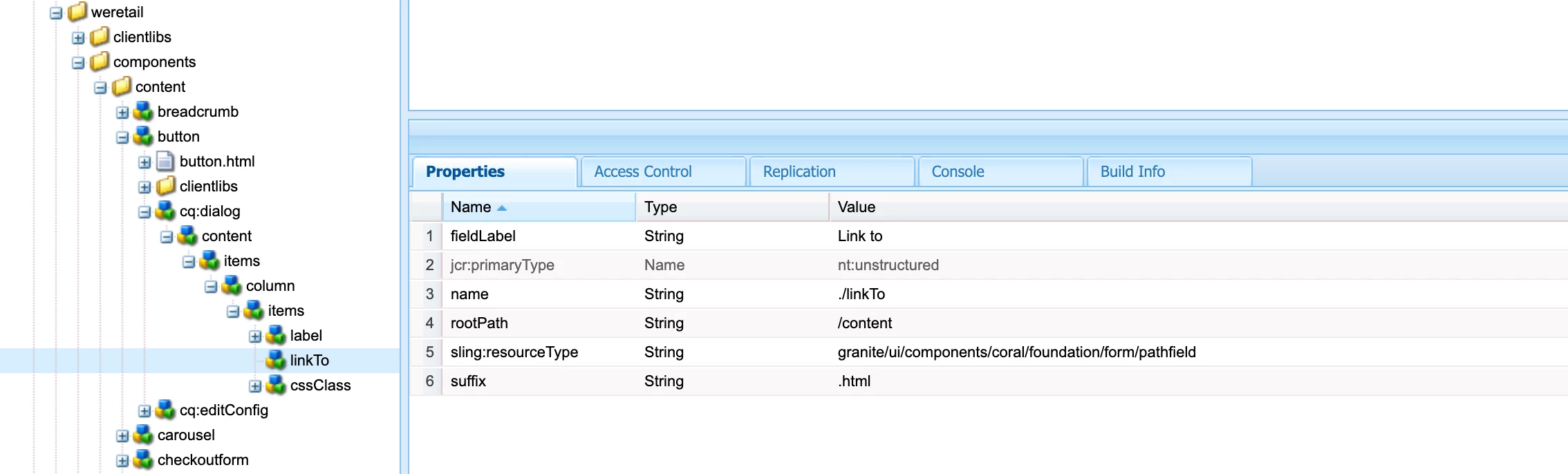
Please refer below button component for we-retail for similar page selection requirement

/apps/weretail/components/content/button/cq:dialog/content/items/column/items/linkTo

To answer your question - here is the resourceType can be used for the same 

granite/ui/components/coral/foundation/form/pathfield

which has additional properties rootPath - which is source data root path. Absolute or relative path for the root folder for the source data.

Hope that helps!

Regards,

Santosh

3 replies

Himanshu_Jain
Community Advisor
Community Advisor
June 13, 2022

Use sling:resourceType as /libs/granite/ui/components/coral/foundation/form/pathfield

Himanshu Jain
JeevanRaj
Community Advisor
Community Advisor
June 13, 2022

Hi @mario248 


What you need is a pathBrowser. You can refer the below.


<pageList jcr:primaryType="nt:unstructured" sling:resourceType="granite/ui/components/coral/foundation/form/pathfield" fieldLabel="Logo Path" name="./logoPath" required="true" rootPath="/content/abc"/>


SantoshSai
Community Advisor
SantoshSaiCommunity AdvisorAccepted solution
Community Advisor
June 13, 2022

@Hi @mario248 ,

Please refer below button component for we-retail for similar page selection requirement

/apps/weretail/components/content/button/cq:dialog/content/items/column/items/linkTo

To answer your question - here is the resourceType can be used for the same 

granite/ui/components/coral/foundation/form/pathfield

which has additional properties rootPath - which is source data root path. Absolute or relative path for the root folder for the source data.

Hope that helps!

Regards,

Santosh

Santosh Sai