
how to assign back to the same reviewer/approver when it is rejected in AEM workflow | Community
Skip to main content
durga_kavali
Level 3
March 2, 2023
Solved

how to assign back to the same reviewer/approver when it is rejected in AEM workflow

  • March 2, 2023
  • 1 reply
  • 796 views

Hi All,


I have a requirement in AEM workflow to pass the multiple reviewers/approvers before activating an asset.

sharing the flow diagram for reference 
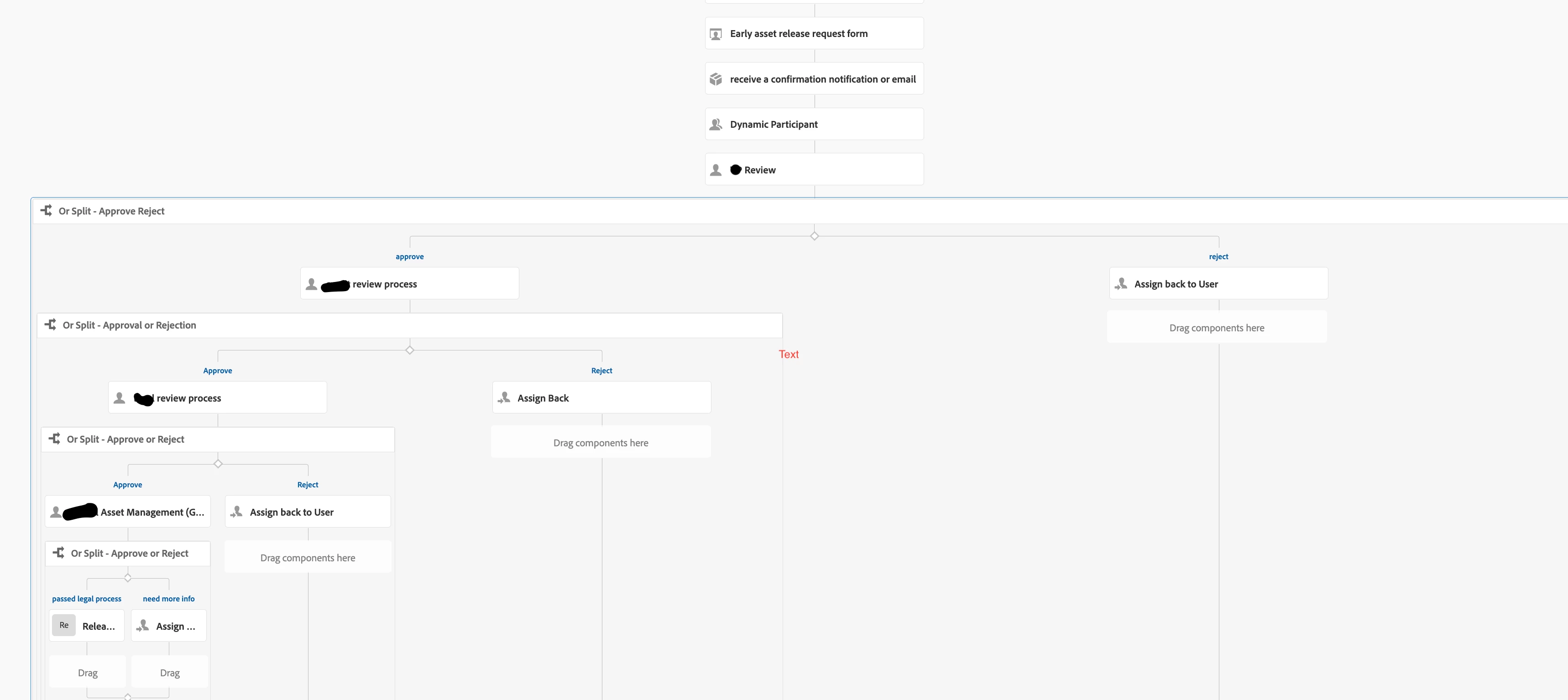
if any of the reviewers rejects it by providing comments for additional info it has to go back to the initiator, initiator provides the requested info using dialog step and send the notification to all the reviewers in process step post this step, I have to assign back to the same reviewer who rejects(assigned back) to the initiator. 

any suggestion to solve how to send back to same reviewer . please can someone help me how to achieve this.

Using AEM as cloud service (6.5)


Thanks,

Durga Kavali.

This post is no longer active and is closed to new replies. Need help? Start a new post to ask your question.
Best answer by Tanika02

Hello @durga_kavali 


  • In the workflow model, add a dynamic participant selection step after the notification step.
  • Configure the dynamic participant selection step to assign the workflow back to the same reviewer who requested additional information.
  • You can use an AEM Workflow Launcher or a custom Workflow Process to implement the logic for assigning the workflow back to the same reviewer.

1 reply

Tanika02
Tanika02Accepted solution
Level 7
June 19, 2023

Hello @durga_kavali 


  • In the workflow model, add a dynamic participant selection step after the notification step.
  • Configure the dynamic participant selection step to assign the workflow back to the same reviewer who requested additional information.
  • You can use an AEM Workflow Launcher or a custom Workflow Process to implement the logic for assigning the workflow back to the same reviewer.