How to archive and restore a Content Fragment in AEM? | Community
Skip to main content
February 22, 2024
Solved

How to archive and restore a Content Fragment in AEM?

  • February 22, 2024
  • 3 replies
  • 1340 views

Hi,


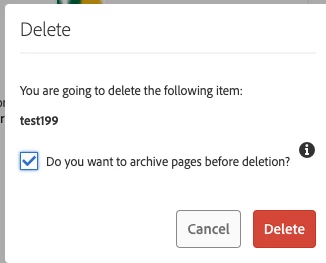
In AEM 6.5, we have an OOTB solution in AEM sites to archive a page before deleting it and restoring it later; however, can we achieve the same for content fragment before deleting it? Is there any OOTB way? If not, what is the alternative?


Archive option when deleting a page:


Thanks

This post is no longer active and is closed to new replies. Need help? Start a new post to ask your question.
Best answer by SureshDhulipudi

In AEM 6.5 there is no out-of-the-box (OOTB) solution to archive and restore content fragments like there is for pages.

If this is required - you have to create a custom service or event handler - before deleting a content fragment, move it to an "archive" location in the JCR repository. same for restore archived content fragment.


some sample code:


@1790552
public class ContentFragmentArchivingService {

@3214626
private ResourceResolverFactory resolverFactory;

public void archiveContentFragment(String pathToFragment) throws PersistenceException {
ResourceResolver resolver = resolverFactory.getServiceResourceResolver(null);

//ContentFragment contentFragment = resource.adaptTo(ContentFragment.class);
Session session = resolver.adaptTo(Session.class);

String archivePath = "/content/dam/archive/" + StringUtils.substringAfterLast(pathToFragment, "/");

session.move(pathToFragment, archivePath);
session.save();
}
}


3 replies

SureshDhulipudi
Community Advisor
SureshDhulipudiCommunity AdvisorAccepted solution
Community Advisor
February 22, 2024

In AEM 6.5 there is no out-of-the-box (OOTB) solution to archive and restore content fragments like there is for pages.

If this is required - you have to create a custom service or event handler - before deleting a content fragment, move it to an "archive" location in the JCR repository. same for restore archived content fragment.


some sample code:


@1790552
public class ContentFragmentArchivingService {

@3214626
private ResourceResolverFactory resolverFactory;

public void archiveContentFragment(String pathToFragment) throws PersistenceException {
ResourceResolver resolver = resolverFactory.getServiceResourceResolver(null);

//ContentFragment contentFragment = resource.adaptTo(ContentFragment.class);
Session session = resolver.adaptTo(Session.class);

String archivePath = "/content/dam/archive/" + StringUtils.substringAfterLast(pathToFragment, "/");

session.move(pathToFragment, archivePath);
session.save();
}
}



Raja_Reddy
Community Advisor
Community Advisor
February 23, 2024

Hi @nkoppul1 

  1. Use the versioning feature in AEM to create a new version of the content fragment before deleting it. This will allow you to restore the previous version of the content fragment if needed.

  2. Create a custom workflow in AEM that archives the content fragment before deleting it. This workflow can be triggered when the content fragment is deleted.

  3. Use a third-party tool or plugin that provides archiving functionality for content fragments in AEM.

aanchal-sikka
Community Advisor
Community Advisor
February 25, 2024

@nkoppul1 


There is no OOTB functionality to Archive the Content Fragments.


The Alternative will depend upon what you want to achieve from the Archive?

  • If you want to store it for regulatory purposes, best it to export and keep it some cost-effective Storage systems like Amazon Glacier
  • If you intent to store it only for a small time and ultimately delete it, then a workflow might help
    • Option-1: Move the Archive asset to a separate Archive folder and regularly purge these Archived assets. This would also assure that you don't loose history. Also, restoring an asset would be as simple as moving it back to original location)
    • Option-2: Mark the asset as archived via a metadata. Lock this asset, so that no one can edit it. You would need a visual indicator and additional Search criterion in Assets Search UI to filter out these assets. Restoring would be as simple as getting rid of archived metadata and unlocking the asset. Please consider a purge in this option as well


Aanchal Sikka