How to add sourceedit to TouchUI dialog? | Community
Skip to main content
This post is no longer active and is closed to new replies. Need help? Start a new post to ask your question.
Best answer by Techaspect_Solu

Hi Sammy Kumar,

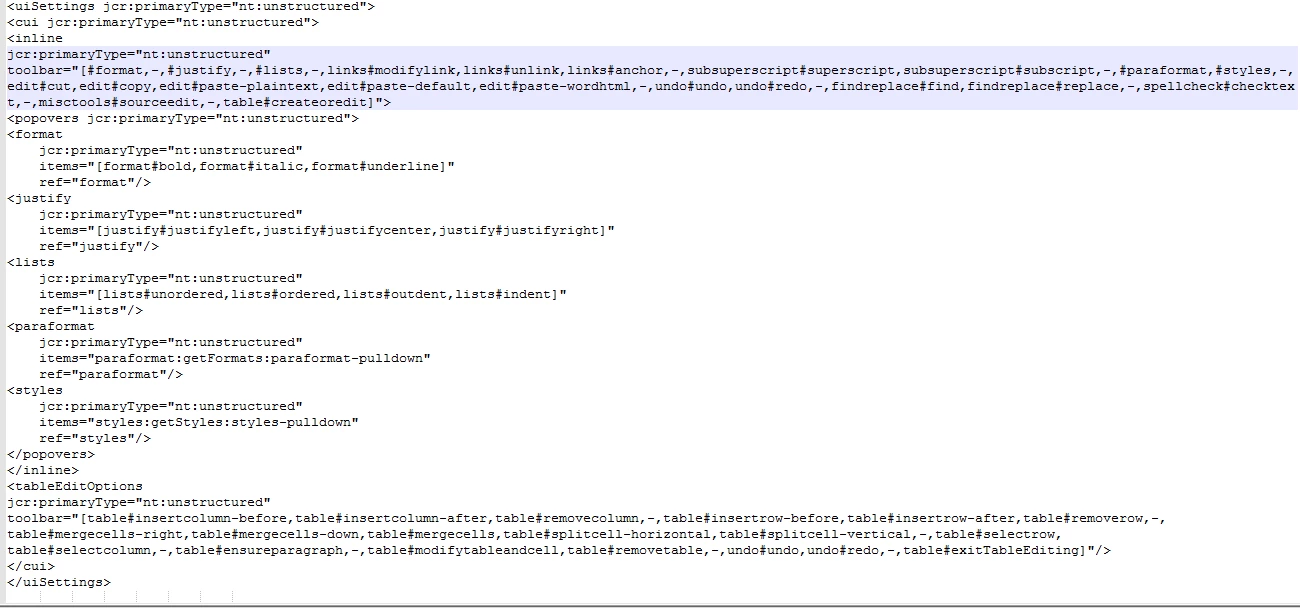
Add uisettings node to your dialog structure as below to make sourceedit enable in dialog.

Hope it helps..!
Thank you,
Techaspect Solutions.
http://www.techaspect.com/

8 replies

zeeshanKhan0786
Level 5
July 19, 2017

Hi

Source Editor (Html Editor) is a part of misctool in rich text editor.

Miscellaneous tools allow you to enter special characters or edit the HTML source.

This will help you to add plugin in rich text.

Adobe Experience Manager Help | Configuring Adobe Experience Manager Touch UI Rich Text Editors

Thanks

Sammy_Kumar
July 19, 2017

I appreciate the response! But what you linked shows how to add sourceedit to the In place Editor. Not the TouchUI Dialog.

I'm looking to see what I need to add to _cq_dialog file

zeeshanKhan0786
Level 5
July 19, 2017

so you have add <rtePlugins jcr:primaryType="nt:unstructured"> node inside your rich-text node Below is the xml

<rtePlugins jcr:primaryType="nt:unstructured">

<misctools

            jcr:primaryType="nt:unstructured"

            features="*">

</misctools>

</rtePlugins>

Techaspect_Solu
Techaspect_SoluAccepted solution
Level 7
July 20, 2017

Hi Sammy Kumar,

Add uisettings node to your dialog structure as below to make sourceedit enable in dialog.

Hope it helps..!
Thank you,
Techaspect Solutions.
http://www.techaspect.com/

Ratna_Kumar
Level 10
July 20, 2017

Hi Sammy,

We have the HELPX article on this topic for configuring the RTE plugins in Touch UI Dialog. Please check here: Configuring Experience Manager Rich Text Editor Plugins in a Touch UI Component Dialog

This also have the package so that you can install and check the same.

Hope this helps!!

~Ratna.

June 7, 2018

Hi,

I am facing an issue with the sourceedit plugin for RTE component in AEM.

If I put a HTML like the code snippet below and publish the page it removes all the inline styles, do you know why?

<div style="background: #f4f4f4 ; border: 2 ; padding: 15 15 15 15 ; box-shadow: 5px 5px #a79d97 ; border-radius: 8px;">

<h3><span class="large">Hello this is test </span></h3>

<p>We are excited to release an update to our product</p>

<p><span class="btn" style="background: #213c60; color: white; border: 1;">Show Me More</span></p>

</div>

August 8, 2019

Hi,

Please use context=unsafe in sightly scripts to resolve the issue.

Thanks

Nikhil-Kumar
Community Advisor
Community Advisor
November 29, 2024