Solved
How to add multiple check-boxes to one section in touch UI dialog
Hi,
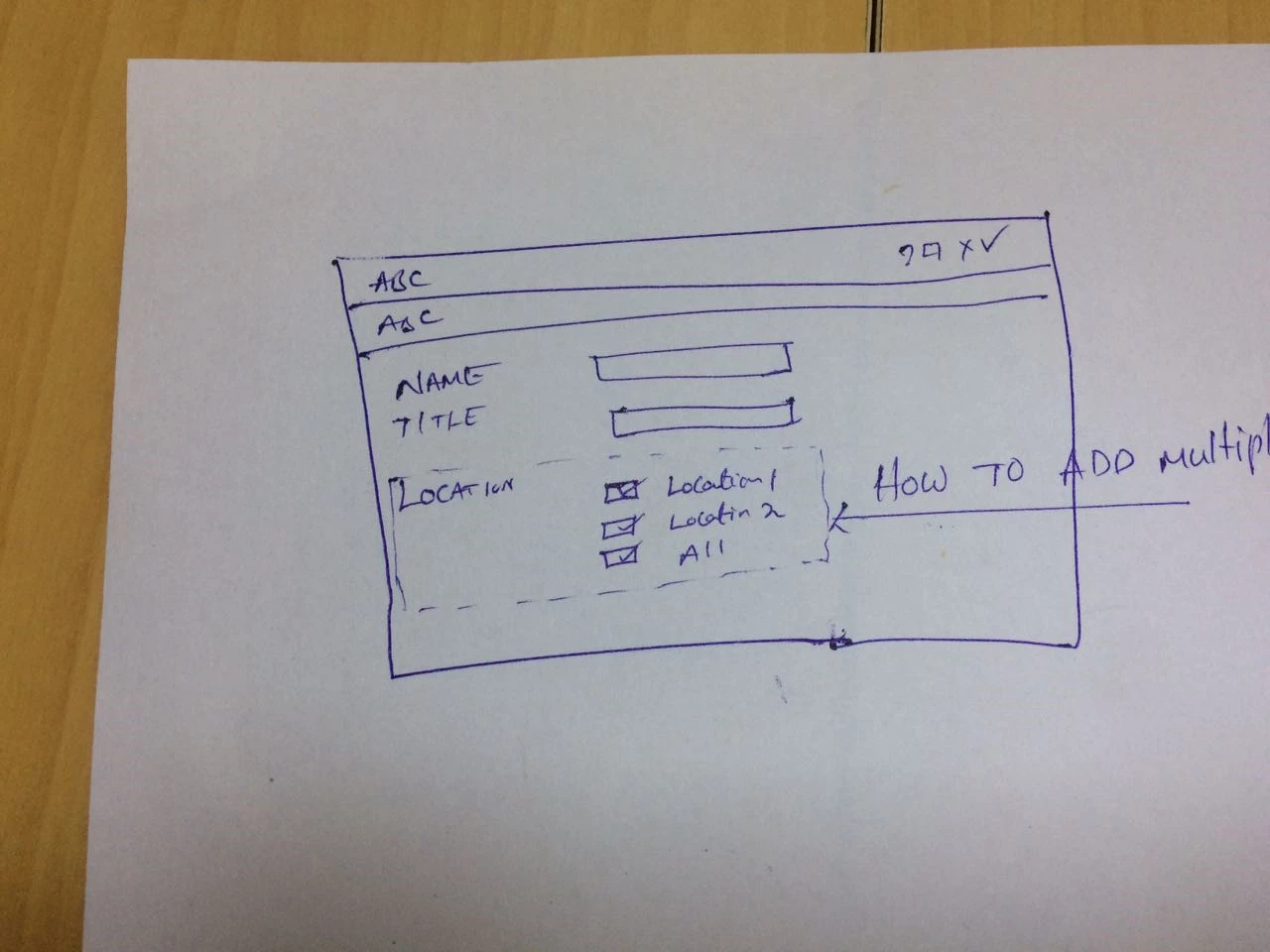
Can anybody help me that how can we add multiple check-boxes to one section in touch UI dialog.
Regards,
Sandhya.
Hi,
Can anybody help me that how can we add multiple check-boxes to one section in touch UI dialog.
Regards,
Sandhya.
Hi Sandhya,
You can create the dialog as below to get the nearest as per your requirement.
Dialog xml:
<?xml version="1.0" encoding="UTF-8"?>
<jcr:root xmlns:sling="http://sling.apache.org/jcr/sling/1.0" xmlns:cq="http://www.day.com/jcr/cq/1.0" xmlns:jcr="http://www.jcp.org/jcr/1.0" xmlns:nt="http://www.jcp.org/jcr/nt/1.0"
jcr:primaryType="nt:unstructured"
jcr:title="Properties"
sling:resourceType="cq/gui/components/authoring/dialog">
<content
jcr:primaryType="nt:unstructured"
sling:resourceType="granite/ui/components/foundation/container">
<layout
jcr:primaryType="nt:unstructured"
sling:resourceType="granite/ui/components/foundation/layouts/fixedcolumns"/>
<items jcr:primaryType="nt:unstructured">
<column
jcr:primaryType="nt:unstructured"
sling:resourceType="granite/ui/components/foundation/container">
<items jcr:primaryType="nt:unstructured">
<heading
jcr:primaryType="nt:unstructured"
sling:resourceType="granite/ui/components/foundation/form/textfield"
fieldDescription="Please provide page Heading"
fieldLabel="Page Heading"
name="./partnerHeading"/>
<description
jcr:primaryType="nt:unstructured"
sling:resourceType="granite/ui/components/foundation/form/textarea"
fieldDescription="Please provide page description"
fieldLabel="Page Description"
name="./partnerDescription"/>
<container
jcr:primaryType="nt:unstructured"
sling:resourceType="granite/ui/components/foundation/container">
<layout
jcr:primaryType="nt:unstructured"
sling:resourceType="granite/ui/components/foundation/layouts/fixedcolumns"
maximized="{Boolean}false"/>
<items jcr:primaryType="nt:unstructured">
<column1
jcr:primaryType="nt:unstructured"
sling:resourceType="granite/ui/components/foundation/container"
class="custom-section">
<items jcr:primaryType="nt:unstructured">
<text
jcr:primaryType="nt:unstructured"
sling:resourceType="granite/ui/components/foundation/heading"
level="2"
text="LOCATION"/>
</items>
</column1>
<column2
jcr:primaryType="nt:unstructured"
sling:resourceType="granite/ui/components/foundation/container"
class="custom-section">
<items jcr:primaryType="nt:unstructured">
<location1
jcr:primaryType="nt:unstructured"
sling:resourceType="granite/ui/components/foundation/form/checkbox"
name="./location1"
text="Location1"
value="location1"/>
<location2
jcr:primaryType="nt:unstructured"
sling:resourceType="granite/ui/components/foundation/form/checkbox"
name="./location2"
text="Location2"
value="location1"/>
<all
jcr:primaryType="nt:unstructured"
sling:resourceType="granite/ui/components/foundation/form/checkbox"
name="./all"
text="All"
value="all"/>
</items>
</column2>
</items>
</container>
</items>
</column>
</items>
</content>
</jcr:root>
Create a clientlib in the same component with category as cq.authoring.dialog and add following CSS to it.
.coral-FixedColumn-column.custom-section {
float: left;
width: 45%;
}
.coral-FixedColumn-column h2 {
margin:0;
}
It would look something like below image:
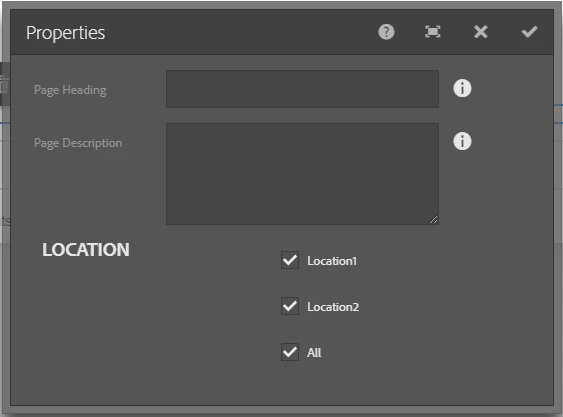
Let me know if you have any queries.
Enter your E-mail address. We'll send you an e-mail with instructions to reset your password.