HOw resolve error while starting AEM in Debug mode? | Community
Skip to main content
Level 3
March 1, 2024
Solved

HOw resolve error while starting AEM in Debug mode?

  • March 1, 2024
  • 3 replies
  • 1783 views

Facing error while starting AEM in Debug mode.
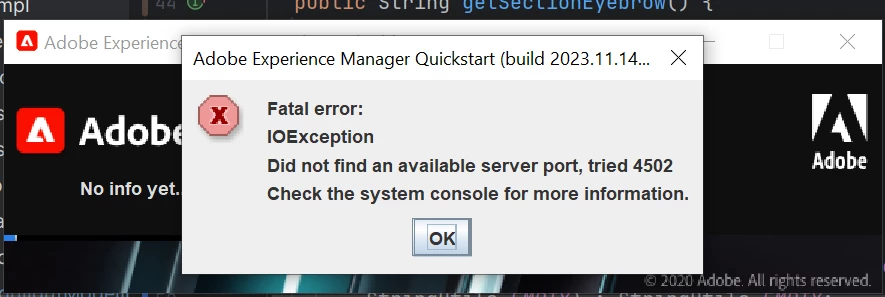
Below is the command used to run AEM in debug mode

java -Xmx2048M -agentlib:jdwp=transport=dt_socket,address=8888,server=y,suspend=n -jar aem-author-p4502.jar


 

This post is no longer active and is closed to new replies. Need help? Start a new post to ask your question.
Best answer by Imran Khan

Open command prompt and go to same folder where jar file is present as shown below and run below inline command

java -jar cq65-author-p4502.jar -fork -forkargs -- -Xdebug -Xrunjdwp:transport=dt_socket,address=30303,suspend=n,server=y -Xmx1500m -XX:MaxPermSize=300m
Please check the highlighted port name.

Note: Restart system it will work as your instance didn't get shutdown or wait for sometime.

3 replies

Level 7
March 1, 2024

Hi @anilkumar9 


Not sure, why are facing the issue, even though you are using the proper command. I have tried this way.  Added these in the start.bat file.

Then. opened the command prompt in bin folder > start.bat

if not defined CQ_JVM_OPTS set CQ_JVM_OPTS=-Xmx2048m -XX:MaxPermSize=512M -Djava.awt.headless=true -agentlib:jdwp=transport=dt_socket,address=8000,server=y,suspend=n ::* add the required JPMS modules, if needed java --add-modules java.se.ee --version > nul 2>&1 if %errorlevel% EQU 0 set CQ_JVM_OPTS=--add-modules java.se.ee %CQ_JVM_OPTS%
Imran Khan
Community Advisor
Imran KhanCommunity AdvisorAccepted solution
Community Advisor
March 1, 2024

Open command prompt and go to same folder where jar file is present as shown below and run below inline command

java -jar cq65-author-p4502.jar -fork -forkargs -- -Xdebug -Xrunjdwp:transport=dt_socket,address=30303,suspend=n,server=y -Xmx1500m -XX:MaxPermSize=300m
Please check the highlighted port name.

Note: Restart system it will work as your instance didn't get shutdown or wait for sometime.

AMANATH_ULLAH
Community Advisor
Community Advisor
March 1, 2024

@anilkumar9 

Can you check if you are already running an AEM instance on port 4502 or if any other process is using port 4502

If yes, try to kill the process and then try


Amanath Ullah