How do you edit text fields in the advanced tab of the page properties? | Adobe Higher Education
Skip to main content
June 21, 2023
Respondido

How do you edit text fields in the advanced tab of the page properties?

  • June 21, 2023
  • 1 resposta
  • 622 Visualizações

How do you edit text fields in the advanced tab of the page properties?


I am attempting to remove the "canonical URL" text field from the advanced tab. However there isn't content.xml to edit. How do you access these fields? 

Este tópico foi fechado para respostas.
Melhor resposta por EstebanBustamante

Your page (component) is inherited from a parent component which actually has the properties you are looking for. You can take advantage of the Sling ResourceMerges properties to hide the canonical Path, you can learn more about resourcemerge here: https://experienceleague.adobe.com/docs/experience-manager-cloud-service/content/implementing/developing/full-stack/sling-resource-merger.html?lang=en#properties


Simply, track which is the parent of your component by checking the property sling:resourceSuperType[1], then copy the cq:dialog into your component and then add the sling sling:hideProperties accordingly as explained in the documentation.

[1].
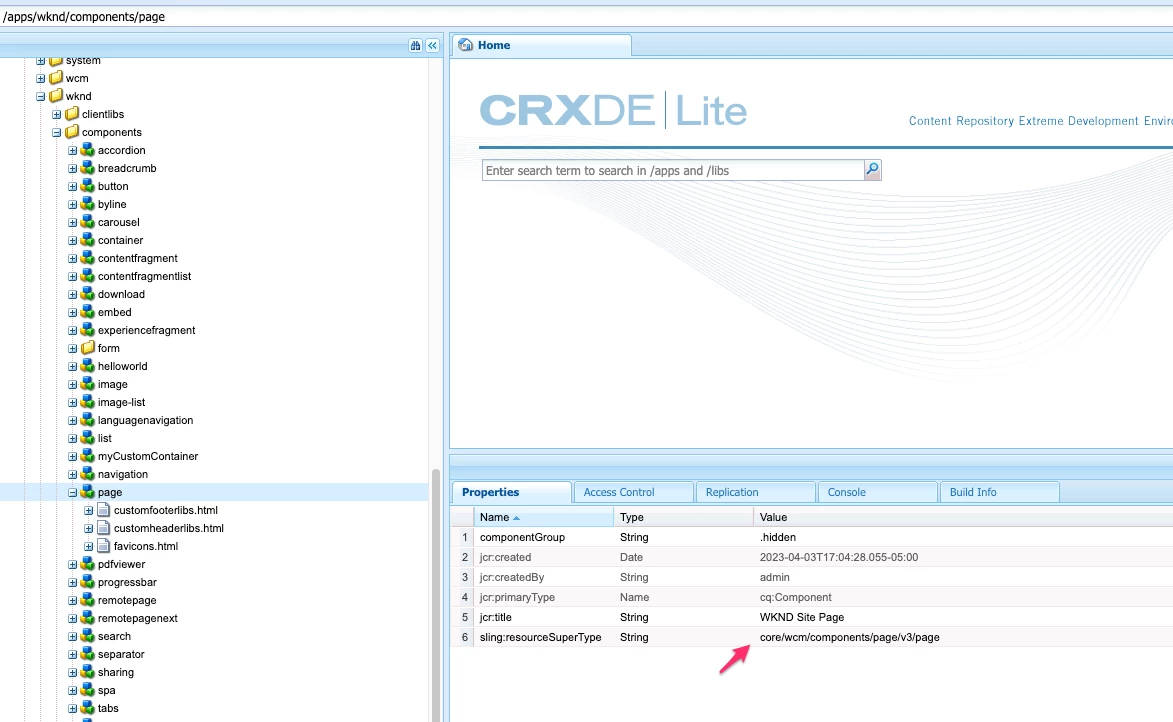
In above image, the resourceSupertype is core/wcm/components/page/v3/page  (which points to /apps/core/wcm/components/page/v3/page). And this has a resourceSuperType to /libs/wcm/foundation/components/basicpage/v1/basicpage, here you will find the cq:dialog to copy to your component

 

1 Resposta

EstebanBustamante
Community Advisor and Adobe Champion
June 21, 2023

Your page (component) is inherited from a parent component which actually has the properties you are looking for. You can take advantage of the Sling ResourceMerges properties to hide the canonical Path, you can learn more about resourcemerge here: https://experienceleague.adobe.com/docs/experience-manager-cloud-service/content/implementing/developing/full-stack/sling-resource-merger.html?lang=en#properties


Simply, track which is the parent of your component by checking the property sling:resourceSuperType[1], then copy the cq:dialog into your component and then add the sling sling:hideProperties accordingly as explained in the documentation.

[1].

In above image, the resourceSupertype is core/wcm/components/page/v3/page  (which points to /apps/core/wcm/components/page/v3/page). And this has a resourceSuperType to /libs/wcm/foundation/components/basicpage/v1/basicpage, here you will find the cq:dialog to copy to your component


Esteban Bustamante