How can i edit exist text or content in a Launch option in AEM 6.4? | Community
Skip to main content
January 27, 2020
Solved

How can i edit exist text or content in a Launch option in AEM 6.4?

  • January 27, 2020
  • 2 replies
  • 5796 views

I discover that you can use Launch in AEM 6.4 to work on a page that you want to publish or promote later in AEM. When i created a Launch option and tried to edit the existing content I noticed that I could not edit or choose the "wrench" icon on any component. Is there a way to edit the exist content on a page once you create a Launch to promote or publish later for a specific date?
This post is no longer active and is closed to new replies. Need help? Start a new post to ask your question.
Best answer by vish.dhaliwal

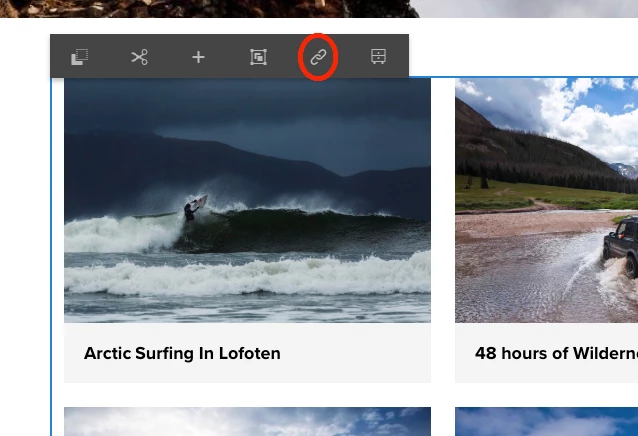
To break inheritance, click on the chain icon in the Edit mode.


2 replies

Adobe Employee
January 29, 2020

Hello,

You should be able to edit the launch page the same way you edit the content pages.

If the launch is already created, you can select the page for which the launch was created earlier, go to the References option in the left rail and select "Go to the page". This will open the launch page for you. The launches are saved under /content/launches.


January 30, 2020
I did that but i notice that i could only add components to the page not edit the exist components on the page. I could only copy exist components or add components.
vish.dhaliwalAdobe EmployeeAccepted solution
Adobe Employee
January 30, 2020

To break inheritance, click on the chain icon in the Edit mode.