How can I add a custom attribute to the dialog element? | Community
Skip to main content
Abhishekty
Level 4
March 24, 2024
Solved

How can I add a custom attribute to the dialog element?

  • March 24, 2024
  • 3 replies
  • 3028 views

How can I add a custom attribute to the dialog element? We typically use attributes like granite:class, Id, and title. Similarly, I believe we can add custom attributes as well. This approach works for RTE.


<textfieldsgroup granite:class="cq-RichText-FixedColumn-column" jcr:primaryType="nt:unstructured" sling:resourceType="granite/ui/components/coral/foundation/container"> <items jcr:primaryType="nt:unstructured"> <title jcr:primaryType="nt:unstructured" sling:resourceType="granite/ui/components/coral/foundation/form/textfield" fieldDescription="Please provide title text." fieldLabel="Title" data-custom-attr1="myData" data-custom-attr="100" name="./title"/> <description jcr:primaryType="nt:unstructured" sling:resourceType="cq/gui/components/authoring/dialog/richtext" fieldDescription="Please enter description." fieldLabel="Description" name="./description" useFixedInlineToolbar="{Boolean}true"> </description> </items> </textfieldsgroup>


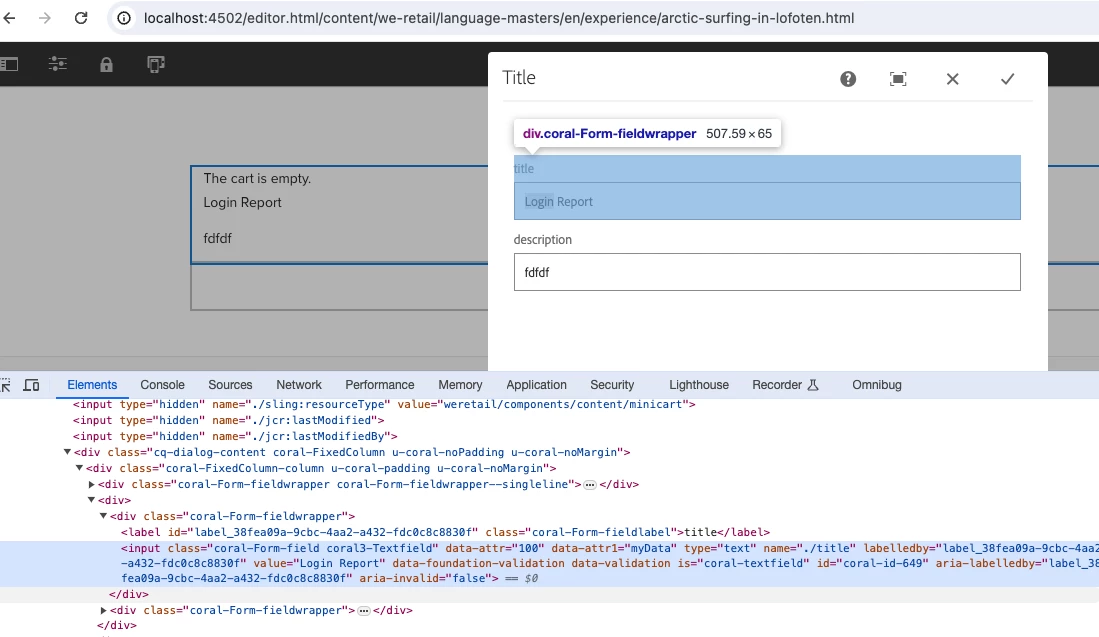
I attempted to implement the same for an input text field within a text fields group, but the attribute (

data-custom-attr and data-custom-attr1) is not available on the HTML for the input.



This post is no longer active and is closed to new replies. Need help? Start a new post to ask your question.
Best answer by Abhishekty

HI @abhishekty 

Working for me


Hi @sateaswa94 , 


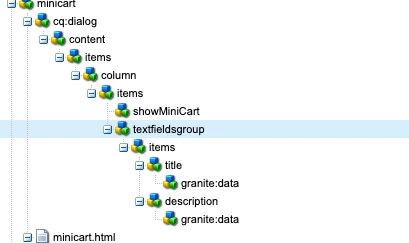
Thanks for help on this, If you observe the second screenshot above which I have added, you'll notice that I'm utilizing the Sling Resource Include feature. This implies that my text field group fields are part of a separate utility content component, and I'm including that group into multiple dialogs.


sling:resourceType="granite/ui/components/coral/foundation/include"
path="/apps/myproject/components/commonfields/content/items/textfieldsgroup"


I noticed that you added the text field group in the same container, and it seems to be working for you. However, if you try it that way, than I think issue will reproduceable to you as well.


Anyway, I found a workaround for it. I added the granite:data:


<granite:data
jcr:primaryType="nt:unstructured"
data-length-Validation="45"/>


where I am including the my util content component and am able to see the attributes as expected.

3 replies

Saravanan_Dharmaraj
Community Advisor
Community Advisor
March 25, 2024
Abhishekty
Level 4
March 25, 2024

Hi @saravanan_dharmaraj ,

No, it is not working for a text field within a text field group. @sateaswa94  it's somewhat similar to the post Saravana mentioned above. I tried that one as well, but unfortunately, it didn't work.


sateaswa94
Level 3
March 25, 2024

Could you share the updated dialog structure

MayurSatav
Community Advisor and Adobe Champion
March 25, 2024

@abhishekty , Did you find the suggestions from users helpful? Please let us know if more information is required. Otherwise, please mark the answer as correct for posterity. If you have found out solution yourself, please share it with the community.