Hide show 2 different feilds on the basis of 2 radio buttons in same tab in page properties | Community
Skip to main content
Level 1
April 20, 2026
Question

Hide show 2 different feilds on the basis of 2 radio buttons in same tab in page properties

  • April 20, 2026
  • 2 replies
  • 14 views

I have a requirement for Hide show 2 different feilds on the basis of 2 radio buttons in same tab in page properties and i also want to persist either data on the basis of authoring. How can i acheive this in aem. Below one is not working.


(function (document, $, Coral) {
    "use strict";

    $(document).on("foundation-contentloaded", function () {

        var radioGroup = $(".cq-dialog-radio-showhide");
        var target = radioGroup.attr("data-cq-dialog-radio-showhide-target");

        if (!target) return;

        function toggle() {

            var value = $("input[type=radio]:checked").val();

            console.log("Selected value:", value);

            $(target).each(function () {

                var $target = $(this);
                var showValue = $target.attr("data-showhidetargetvalue");

                if (value === showValue) {
                    $target.removeClass("hide").show();
                } else {
                    $target.addClass("hide").hide();

                    // 🔥 also hide inner field wrappers
                    $target.find(".coral-Form-fieldwrapper").hide();
                }
            });
        }

        setTimeout(toggle, 200);

        $(document).on("change", "input[type=radio]", function () {
            setTimeout(toggle, 50);
        });

    });

})(document, Granite.$, Coral);
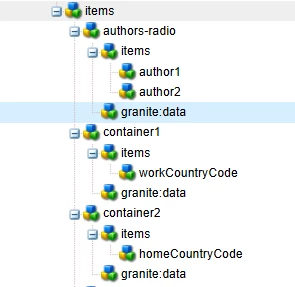
 

2 replies

Adobe Employee
April 20, 2026

Hi ​@ShikhaSo6 
 

Your current script is failing for two separate reasons:

  1. It reads the checked radio from the whole dialog, not from your specific radio group.
  2. Show/hide in Granite/Coral is only UI behavior by default, so hidden field values still remain in JCR unless you explicitly clear/delete them. That UI-only limitation is called out internally as expected behavior.
     

    For page properties in AEM Sites:

  3. extend page properties via /apps + Sling Resource Merger
  4. use a radiogroup
  5. wrap each conditional field in a container
  6. use JS to:
    • show the matching container
    • hide the other one
    • clear + add @Delete marker for the hidden field so the old value is removed from JCR on save
  7. That page-properties extension pattern is the supported way to customize the dialog structure. [1]

    [1] https://experienceleague.adobe.com/en/docs/experience-manager-learn/sites/developing/page-properties-technical-video-develop


    1) This line is too broad

    Copy

    var value = $("input[type=radio]:checked").val();

    That fetches the checked radio from the entire dialog. If page properties has any other radio somewhere else, you get the wrong value.

    It must be scoped to your radiogroup only.

    2) This only hides visually

    Copy

    $target.addClass("hide").hide();

    That hides the field in the UI, but the previously saved property is still in the repository unless you also:

  8. clear the field value, and/or
  9. submit a delete marker like./myField@Delete
     

    1) Dialog structure

    Use a radiogroup and wrap each target field in its own container.
     

    <mytab
    jcr:primaryType="nt:unstructured"
    jcr:title="Custom"
    sling:resourceType="granite/ui/components/coral/foundation/container">
    <items jcr:primaryType="nt:unstructured">

    <selectionType
    jcr:primaryType="nt:unstructured"
    sling:resourceType="granite/ui/components/coral/foundation/form/radiogroup"
    fieldLabel="Choose option"
    name="./selectionType"
    granite:class="cq-dialog-radio-showhide">
    <granite:data
    jcr:primaryType="nt:unstructured"
    cq-dialog-radio-showhide-target=".radio-toggle-target"/>
    <items jcr:primaryType="nt:unstructured">
    <optionA
    jcr:primaryType="nt:unstructured"
    sling:resourceType="granite/ui/components/coral/foundation/form/radio"
    text="Option A"
    value="optionA"/>
    <optionB
    jcr:primaryType="nt:unstructured"
    sling:resourceType="granite/ui/components/coral/foundation/form/radio"
    text="Option B"
    value="optionB"/>
    </items>
    </selectionType>

    <fieldAWrapper
    jcr:primaryType="nt:unstructured"
    sling:resourceType="granite/ui/components/coral/foundation/container"
    granite:class="hide radio-toggle-target">
    <granite:data
    jcr:primaryType="nt:unstructured"
    showhidetargetvalue="optionA"/>
    <items jcr:primaryType="nt:unstructured">
    <fieldA
    jcr:primaryType="nt:unstructured"
    sling:resourceType="granite/ui/components/coral/foundation/form/textfield"
    fieldLabel="Field A"
    name="./fieldA"/>
    </items>
    </fieldAWrapper>

    <fieldBWrapper
    jcr:primaryType="nt:unstructured"
    sling:resourceType="granite/ui/components/coral/foundation/container"
    granite:class="hide radio-toggle-target">
    <granite:data
    jcr:primaryType="nt:unstructured"
    showhidetargetvalue="optionB"/>
    <items jcr:primaryType="nt:unstructured">
    <fieldB
    jcr:primaryType="nt:unstructured"
    sling:resourceType="granite/ui/components/coral/foundation/form/textfield"
    fieldLabel="Field B"
    name="./fieldB"/>
    </items>
    </fieldBWrapper>

    </items>
    </mytab>


    2) Clientlib

    Load a dialog clientlib from your page component dialog.

    <jcr:root
        xmlns:sling="http://sling.apache.org/jcr/sling/1.0"
        xmlns:jcr="http://www.jcp.org/jcr/1.0"
        xmlns:nt="http://www.jcp.org/jcr/nt/1.0"
        jcr:primaryType="nt:unstructured"
        extraClientlibs="[myproject.pageproperties.showhide]"/>

    Make sure page properties are being extended under /apps, not edited under /libs


    3) JS


    You have to right your won logic.


    It scopes to the correct radio group

    So it does not accidentally read another checked radio elsewhere in page properties.

    It hides/shows the wrapper container

    That is the right level for Granite/Coral dialog behavior.

    It removes stale data from JCR

    When a field becomes hidden, it:

  10. clears the value
  11. disables the field
  12. adds ./fieldName@Delete
  13. So on save, AEM removes the old property instead of keeping stale data.

    Important note on persistence

    If your requirement is:

  14. show field A when radio = A
  15. show field B when radio = B
  16. and persist only the visible field's data
  17. then the delete-marker approach above is the correct one.

    If instead you want:

  18. hide the other field
  19. but keep its old value in JCR
  20. then remove the addDeleteHint(...) and disable/clear logic.


PGURUKRISHNA
Level 5
April 21, 2026

Hey ​@ShikhaSo6 

$radioGroup.find("input[type=radio]:checked") instead of the global $("input[type=radio]:checked") :this prevents conflicts with other radio groups on the page.

Re-show inner wrappers: When showing a target, .find(".coral-Form-fieldwrapper").show() is called to undo the hiding you were doing.

Removed setTimeout: Using .each() on foundation-contentloaded and binding change directly on the radio group is reliable : no need for timeouts.

Scoped change listener: $radioGroup.on("change", ...) instead of $(document).on("change", "input[type=radio]", ...).

Data persistence
Both fieldA and fieldB use separate name properties (./fieldA, ./fieldB), so Sling POST servlet persists both independently on jcr:content. When the author switches radio buttons, only the visible field is editable, but both values remain in the JCR. In your Sling Model or HTL, read contentType first, then use the corresponding field value:

String type = properties.get("contentType", "optionA");
String value = "optionA".equals(type)
    ? properties.get("fieldA", "")
    : properties.get("fieldB", "");
This way the persisted data is driven by the radio selection at render time.


Pagidala GuruKrishna