Hi All, I was trying to call js on dialog ready with $document.on("dialog-ready", function(){ alert('Its not coming here on dialog open');} | Community
Skip to main content
March 19, 2021
Solved

Hi All, I was trying to call js on dialog ready with $document.on("dialog-ready", function(){ alert('Its not coming here on dialog open');}

  • March 19, 2021
  • 3 replies
  • 6212 views

Hi All, I was trying to call js on dialog ready with $document.on("dialog-ready", function(){ alert('Its not coming here on dialog open');}

This post is no longer active and is closed to new replies. Need help? Start a new post to ask your question.
Best answer by Asutosh_Jena_

Hi @ajaylabade 


If you want to define styling and behavior for your component, you can create a dedicated client library that defines your custom CSS/LESS and JS.

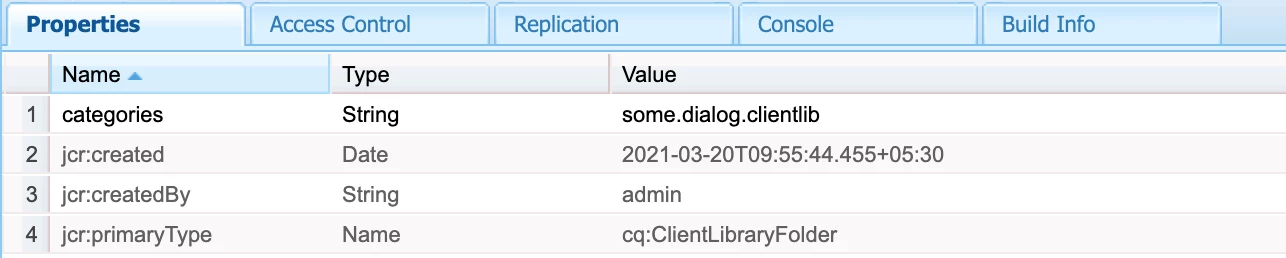
  • To have your client library loaded solely for your component dialog (i.e. it will not be loaded for another component) you need to set the property extraClientlibs of your dialog to the category name of the client library you have just created. This is advisable if your client library is quite big and/or your field is specific to that dialog and will not be needed in other dialogs.
  • To have your client library loaded for all dialogs, set the category property of your client library to cq.authoring.dialog. This is the category name of the client library that is included by default when rendering all dialogs. You want to do that if you client library is small and/or your field is generic and could be reused in other dialogs.

See the below code:

(function ($, $document) {
"use strict";
$document.on("dialog-ready", function() {
alert('Its coming here on dialog open');
});
})($, $(document));


Please see the screenshot below:
 

Hope this helps!

Thanks!

3 replies

Anudeep_Garnepudi
Community Advisor
Community Advisor
March 20, 2021

@ajaylabade 

End parentheses is missing.

$(document).on("dialog-ready", function() { alert("Ready..!!"); });


Reference: https://adapttoaem.blogspot.com/2021/02/aem-hideshow-touch-ui-dialog-fields.html

AG
Asutosh_Jena_
Community Advisor
Asutosh_Jena_Community AdvisorAccepted solution
Community Advisor
March 20, 2021

Hi @ajaylabade 


If you want to define styling and behavior for your component, you can create a dedicated client library that defines your custom CSS/LESS and JS.

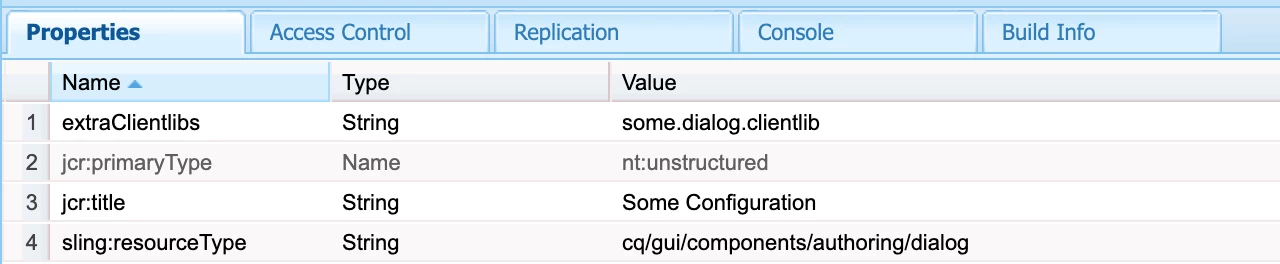
  • To have your client library loaded solely for your component dialog (i.e. it will not be loaded for another component) you need to set the property extraClientlibs of your dialog to the category name of the client library you have just created. This is advisable if your client library is quite big and/or your field is specific to that dialog and will not be needed in other dialogs.
  • To have your client library loaded for all dialogs, set the category property of your client library to cq.authoring.dialog. This is the category name of the client library that is included by default when rendering all dialogs. You want to do that if you client library is small and/or your field is generic and could be reused in other dialogs.

See the below code:

(function ($, $document) {
"use strict";
$document.on("dialog-ready", function() {
alert('Its coming here on dialog open');
});
})($, $(document));


Please see the screenshot below:
 

Hope this helps!

Thanks!

VeenaVikraman
Community Advisor
Community Advisor
March 20, 2021

@ajaylabade I think if you follow @asutosh_jena_ steps you will be able to get this work