Granite datepicker's valueFormat property throws errors/does not work | Community
Skip to main content
Level 3
January 10, 2019

Granite datepicker's valueFormat property throws errors/does not work

  • January 10, 2019
  • 3 replies
  • 4049 views

Hello,

I'm using AEM 6.3 and currently working on a dialog with a datepicker field. I'm trying to use the "valueFormat" property so that I can save the date value in something other than the standard UTC format but it doesn't appear to work correctly. Setting it to "M/D/YY" results in this error message in the log and nothing is saved -
org.apache.sling.servlets.post.impl.operations.ModifyOperation Exception during response processing.

javax.jcr.ValueFormatException: Invalid date 1/1/19

        at org.apache.jackrabbit.oak.plugins.value.ValueFactoryImpl.createValue(ValueFactoryImpl.java:239)

        at org.apache.jackrabbit.oak.jcr.session.NodeImpl.setProperty(NodeImpl.java:449)

        at org.apache.sling.servlets.post.impl.helper.SlingPropertyValueHandler.store(SlingPropertyValueHandler.java:594)

        at org.apache.sling.servlets.post.impl.helper.SlingPropertyValueHandler.setPropertyAsIs(SlingPropertyValueHandler.java:305)

        at org.apache.sling.servlets.post.impl.helper.SlingPropertyValueHandler.setProperty(SlingPropertyValueHandler.java:158)

I assume this is happening because it's trying to save that format in a Date property node which expects standard UTC. To get around this i thought i'd try forcing the datepicker to save as a String using @TypeHint. This does allow it to work as expected, but when I re-open the dialog later the error log throws that same error (despite the field populating correctly in the dialog).

Is there any way to get around this error? Has anyone had success using valueFormat?

Thanks

This post is no longer active and is closed to new replies. Need help? Start a new post to ask your question.

3 replies

Gaurav-Behl
Level 10
January 14, 2019

Not sure about 6.3 but the below code works fine in 6.4 without any errors

<startDate-string

    about="This causes startDate to be saved as a String in JCR instead of Date"

    jcr:primaryType="nt:unstructured"

    sling:resourceType="/libs/granite/ui/components/coral/foundation/form/hidden"

    name="./startDate@TypeHint"

    value="String"/>

<start-date

    jcr:primaryType="nt:unstructured"

    sling:resourceType="granite/ui/components/coral/foundation/form/datepicker"

    fieldLabel="Start Date"

    name="./startDate"

    required="{Boolean}true"

    valueFormat="M/D/YY"/>

smacdonald2008
Level 10
January 14, 2019

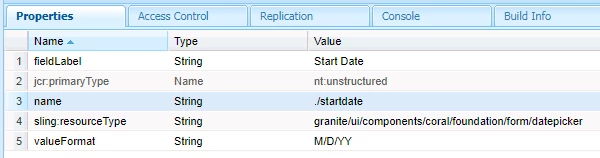
This works for me

Result --

Rohit-Negi
Level 3
January 14, 2019

I tried it using the @TypeHint and it works fine with aem 6.3 as well.

<date-string

                        jcr:primaryType="nt:unstructured"

                        sling:resourceType="/libs/granite/ui/components/coral/foundation/form/hidden"

                        value="String"

                          name="./date@TypeHint"/>

<date

                        jcr:primaryType="nt:unstructured"

                        sling:resourceType="granite/ui/components/coral/foundation/form/datepicker"

                        fieldLabel="Date"

                        name="./date"

                        valueFormat="DD/MM/YYYY"/>

Make sure you are using /libs/granite/ui/components/coral/foundation/form/hidden  for @TypeHint

April 8, 2022

Hi @jocamp Are u able to resolve this issue? I am facing the same issue lately.

jocampAuthor
Level 3
April 8, 2022

I can't recall exactly, but here is what we're using today and it is working. I think the key might have been adding "displayedFormat" as well as adding a typehint.


<startdateHint
  jcr:primaryType="nt:unstructured"
  sling:resourceType="granite/ui/components/coral/foundation/form/hidden"
  name="./startdate@TypeHint"
  value="String"/>
<startdate
  jcr:primaryType="nt:unstructured"
  sling:resourceType="granite/ui/components/coral/foundation/form/datepicker"
  displayedFormat="M/D/YY"
  fieldLabel="Start Date"
  name="./startdate"
  required= "{Boolean}true"
  valueFormat="M/D/YY"/>