Granite component looks differently since AEM 6.3 | Adobe Higher Education
Skip to main content
Magicr
Level 6
May 12, 2022
Respondido

Granite component looks differently since AEM 6.3

  • May 12, 2022
  • 1 resposta
  • 1746 Visualizações

In my projects I used often the component 

granite/ui/components/coral/foundation/form/select

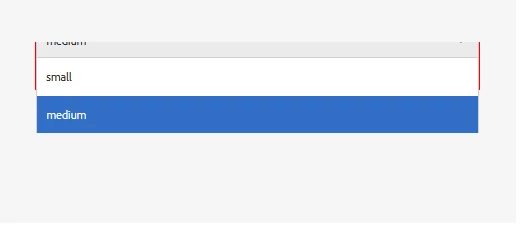
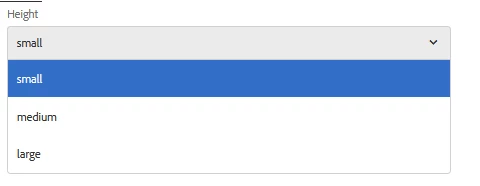
Since AEM 6.3 there is an issue that this granite component looks differently when you include it into a dialog for page properties and in dialog for a component.


Here the look in page properties: (This is not the expected look)
 

And here the look in component dialog. (This is the expected look)
How can I fix it in general? If is it a general bug will it fixed by Adobe?


Thanks in advanced.

Este tópico foi fechado para respostas.
Melhor resposta por Magicr

Hi,

You can have any name for the category e.g. myproj.author.dialog.select.inline

example page dialog

<?xml version="1.0" encoding="UTF-8"?>
<jcr:root xmlns:sling="http://sling.apache.org/jcr/sling/1.0" xmlns:granite="http://www.adobe.com/jcr/granite/1.0" xmlns:cq="http://www.day.com/jcr/cq/1.0" xmlns:jcr="http://www.jcp.org/jcr/1.0" xmlns:nt="http://www.jcp.org/jcr/nt/1.0"
    jcr:primaryType="nt:unstructured"
    jcr:title="Page"
    sling:resourceType="cq/gui/components/authoring/dialog"
    extraClientlibs="[myproj.author.dialog.select.inline]">
    <content
        granite:class="cq-dialog-content-page"
        jcr:primaryType="nt:unstructured"
        sling:resourceType="granite/ui/components/coral/foundation/container">
        <items jcr:primaryType="nt:unstructured">
            <tabs
                granite:class="cq-siteadmin-admin-properties-tabs"
                jcr:primaryType="nt:unstructured"
                sling:resourceType="granite/ui/components/coral/foundation/tabs"
                size="L">
                <items jcr:primaryType="nt:unstructured">
                   ...
                </items>
            </tabs>
        </items>
    </content>
</jcr:root>


I solved it by going a different way:


I created an extra css file with value "overflow:unset". After that I added the recently created css file to clientlib category "coralui3", by creating an extra .content.xml with following content

<?xml version="1.0" encoding="UTF-8"?>
<jcr:root xmlns:cq="http://www.day.com/jcr/cq/1.0" xmlns:jcr="http://www.jcp.org/jcr/1.0"
jcr:primaryType="cq:ClientLibraryFolder"
categories="[coralui3]" />


1 Resposta

arunpatidar
Community Advisor
Community Advisor
May 12, 2022

Hi,

Its looks like a cosmetic issue. Not sure if this is fixed or not in the latest version of AEM.

but you can fix it by introducing additional CSS or look for AEM hotfix/feature fix

Arun Patidar
Magicr
MagicrAutor
Level 6
May 12, 2022

As I wrote "since AEM 6.3" this issue exists in AEM 6.4 und 6.5 either. And it is a little bit annoying.