[Getting Started with React and AEM SPA Editor - Chapter 3] - Router error - Target container is not a DOM element. | Community
Skip to main content
Level 2
April 29, 2021
Solved

[Getting Started with React and AEM SPA Editor - Chapter 3] - Router error - Target container is not a DOM element.

  • April 29, 2021
  • 1 reply
  • 909 views

Hello!

I am executing the AEM SPA react tutorial from the documentation below:

https://helpx.adobe.com/br/experience-manager/kt/sites/using/getting-started-spa-wknd-tutorial-develop/react/chapter-3.html


I did everything as documentation is saying, except because I am using updated version to node and npm:

Node: v14.16.1

npm: 6.14.12


Everything is working fine until I install React Router, create RouteHelper.js and update index.js to to wrap the App with BrowserRouter and ScrollToTop components

When I do this, I start to get the error below on my react app (localhost:3000)
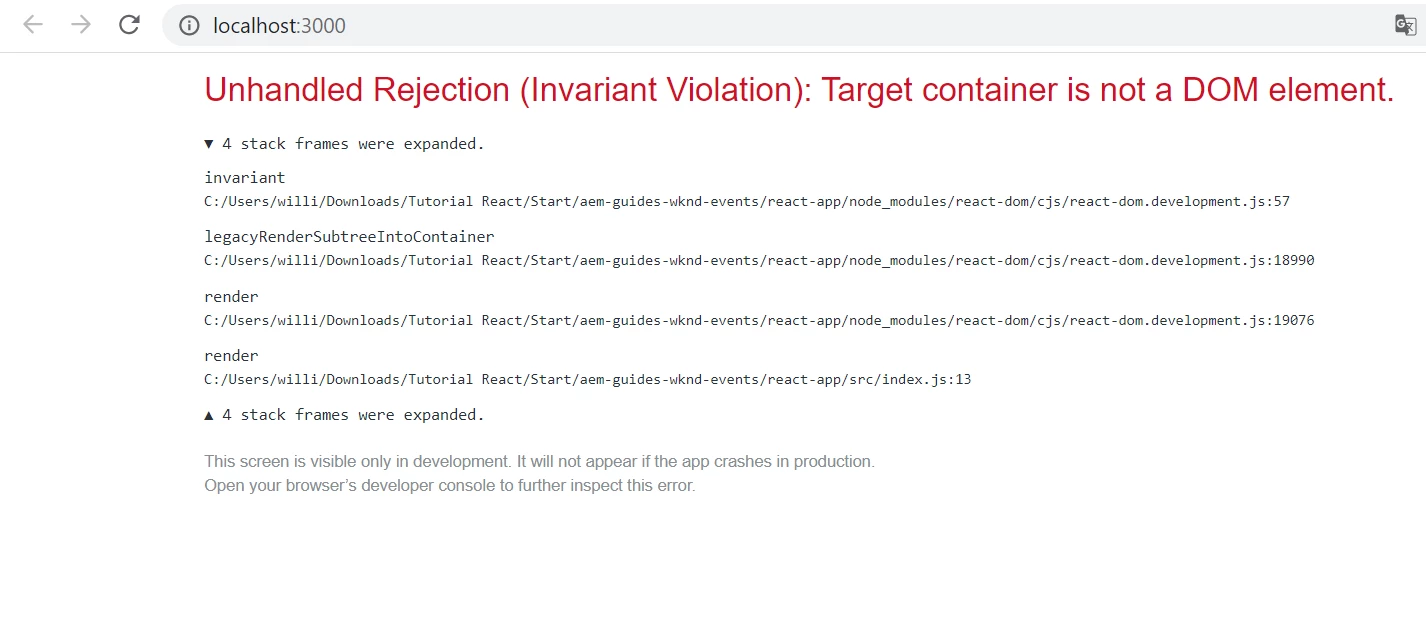
 

When I come back my application to state that was before the instalation of the React Router, everything works again.


Can someone help me? Thanks in advance!  


This post is no longer active and is closed to new replies. Need help? Start a new post to ask your question.
Best answer by Vijayalakshmi_S

Hi @elizabethg83724,

Could you please share details of the code on line 13 in index.js file.(The code where the initial error is reported. Per the screenshot posted in the query, initial error is on the line 13) Is it <ScrollToTop> or <BrowserRouter> ?

If possible, share the related code files to debug further. 

1 reply

Vijayalakshmi_S
Vijayalakshmi_SAccepted solution
Level 10
May 3, 2021

Hi @elizabethg83724,

Could you please share details of the code on line 13 in index.js file.(The code where the initial error is reported. Per the screenshot posted in the query, initial error is on the line 13) Is it <ScrollToTop> or <BrowserRouter> ?

If possible, share the related code files to debug further.