
Getting error while sending email using Oauth configuration | Community
Skip to main content
AshwiniSathe1
Level 3
May 27, 2024
Solved

Getting error while sending email using Oauth configuration

  • May 27, 2024
  • 5 replies
  • 2160 views

Hi Community,


I was trying to send email using Oauth configuration from AEM cloud author instance. I have followed these docs for the setup in Azure and in AEM.

 https://aemconcepts.com/home/smtp-integration-with-aemaacs-over-oauth-2-0/ & https://experienceleague.adobe.com/en/docs/experience-manager-cloud-service/content/security/oauth2-support-for-mail-service
I was able to send email using postman by Graph API but with AEM it is giving error

 *ERROR* [EventAdminThread #17] com.day.cq.mailer.oauth.impl.OAuthMailerServiceImpl error occurred while sending mail using oauth
javax.mail.MessagingException: 451 4.7.0 Temporary server error. Please try again later. PRX5 [BN9PR03CA0921.namprd03.prod.outlook.com 2024-05-20T12:50:45.241Z 08DC784CD9B28ACE]_
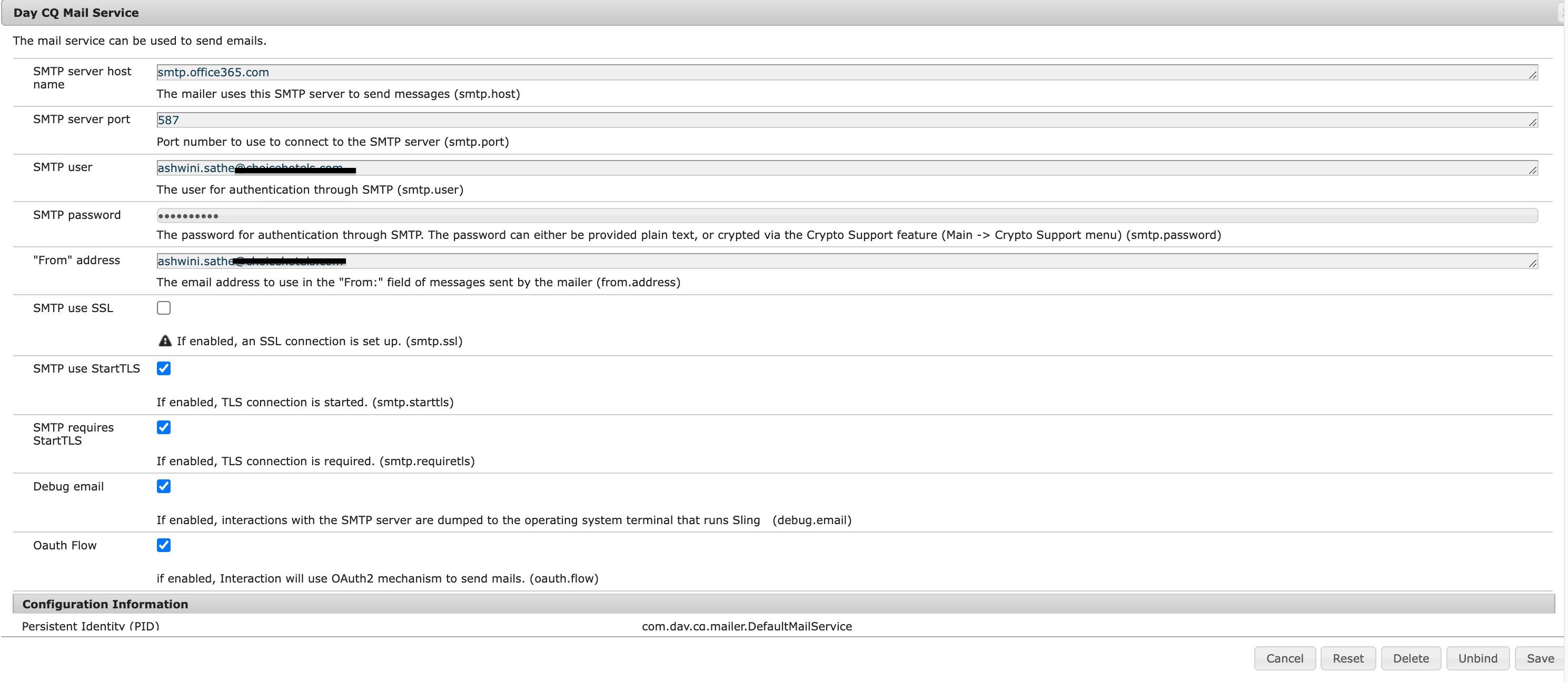
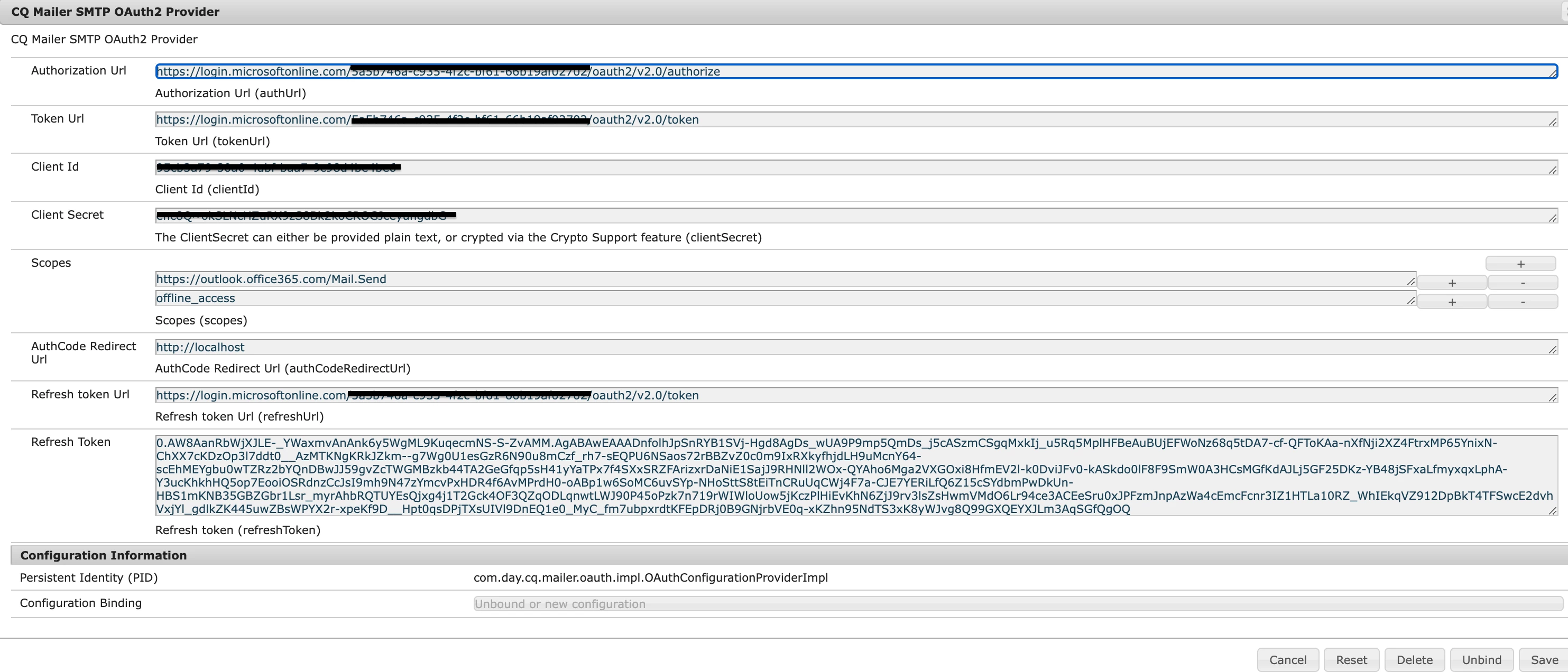
 

I have tried with different scopes as well but every time I am getting error.

https://graph.microsoft.com/SMTP.Send

https://graph.microsoft.com/Mail.Read

https://graph.microsoft.com/Mail.Send

https://graph.microsoft.com/User.Read

openid

offline_access

email

profile

https://outlook.office365.com/SMTP.Send

Has anyone tried this configs for sending email through Oauth?

This post is no longer active and is closed to new replies. Need help? Start a new post to ask your question.
Best answer by AshwiniSathe1

We resolved this issue by ourself instead of using the flexible egress port we used dedicated one and whitelisted the IP at Azure end. 


5 replies

gkalyan
Community Advisor and Adobe Champion
May 28, 2024

@ashwinisathe1 

The error "451 4.7.0 Temporary server error. So, it should be a temporary issue with the Microsoft Outlook SMTP server. This doesn't look like related to the AEM or Azure configurations.

But you can check the if the access token provided by Microsoft may have expired (or)
Ensure the AEM proxy host and port are configured correctly to route through the AEM proxy to the Outlook SMTP server. The logs may indicate if AEM is attempting to connect directly instead of through the proxy.
AshwiniSathe1
Level 3
May 30, 2024

@gkalyanI have added the egress port for proxy forwards in AEM. Also I checked the access token is valid I am able to send an email using this access token from Postman Graph API. 

I even checked the SMTP settings in mailbox 


h_kataria
Community Advisor
Community Advisor
June 18, 2024

Have you enabled the advanced networking as mentioned here 
https://experienceleague.adobe.com/en/docs/experience-manager-cloud-service/content/implementing/developing/development-guidelines#sending-email 
Once that is done, you will have to update your Day CQ mail service as well, right now as per your screenshot, it is not looking correct. Following link should help in configuring that
https://experienceleague.adobe.com/en/docs/experience-manager-learn/cloud-service/networking/examples/email-service?lang=en 
Once both these steps are done, then only you will be able to use Day CQ Mail service to send emails.

kautuk_sahni
Community Manager
Community Manager
June 19, 2024

@ashwinisathe1 Did you find the suggestion helpful? Please let us know if you require more information. Otherwise, please mark the answer as correct for posterity. If you've discovered a solution yourself, we would appreciate it if you could share it with the community. Thank you!


Kautuk Sahni
AshwiniSathe1
Level 3
June 26, 2024

@kautuk_sahni We resolved this issue by ourself instead of using the flexible egress port we used dedicated one and whitelisted the IP at Azure end. 


Adobe Employee
June 19, 2024

I looked at the screenshot of your osgi config for com.day.cq.mailer.DefaultMailService and you are connecting directly to smtp.office365.com. You should set the hostname to $[env:AEM_PROXY_HOST;default=proxy.tunnel] as per the documentation. And the port should be your port forward port, which is whatever is set in your advanced networking configuration for this environment (probably something like 30001, but you will have to check your advanced networking configuration to verify). 

AshwiniSathe1
Level 3
June 26, 2024

@alisonsa screenshots from local environment. On cloud I have tried the $[env:AEM_PROXY_HOST;default=proxy.tunnel]  only and flexible egress port 

AshwiniSathe1
AshwiniSathe1AuthorAccepted solution
Level 3
June 26, 2024

We resolved this issue by ourself instead of using the flexible egress port we used dedicated one and whitelisted the IP at Azure end.