
Getting error while building angular SPA with AEM 6.5 project | Community
Skip to main content
santhosh_kumark
Level 6
October 28, 2020
Solved

Getting error while building angular SPA with AEM 6.5 project

  • October 28, 2020
  • 4 replies
  • 3205 views

Hi,


I am getting error while building angular SPA with AEM 6.5 project both from eclipse and cmd prompt.

Error:

Failed to execute goal com.github.eirslett:frontend-maven-plugin:1.6:install-node-and-npm (install node and npm) on project spa-angular-app: Could not download Node.js from: https://nodejs.org/dist/v11.2.0/win-x64/node.exe: Could not download https://nodejs.org/dist/v11.2.0/win-x64/node.exe: PKIX path building failed: sun.security.provider.certpath.SunCertPathBuilderException: unable to find valid certification path to requested target -> [Help 1]
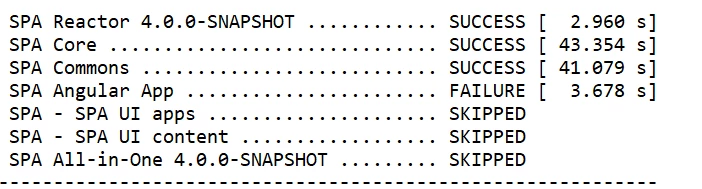
I tried adding vm parameters "-Djavax.net.ssl.trustStore" also, but it doesn't work. Can anyone help with this.


Regards,

Santosh


This post is no longer active and is closed to new replies. Need help? Start a new post to ask your question.
Best answer by prashantonkar

As an alternative, install node and npm manually and run the following commands in the same order.

In ui.frontend

npm install

npm run build

In ui.apps

mvn clean install -PautoInstallPackage.

It will push both your Angular code as well as AEM code.

4 replies

Umesh_Thakur
Community Advisor
Community Advisor
October 29, 2020

Hi @santhosh_kumark ,

It seems your maven repo is trying to connect with https remote repo and there it is failing, it seems like you will have to make some changes at the settings.xml see the below post https://stackoverflow.com/questions/25911623/problems-using-maven-and-ssl-behind-proxy

I think this will help.

Umesh Thakur

santhosh_kumark
Level 6
October 29, 2020
Hi @umesh_thakur, I tried this but its not working.
Anudeep_Garnepudi
Community Advisor
Community Advisor
October 29, 2020

Hi @santhosh_kumark 

Node 11.2.0 installed in your system? If not try installing it manually and set PATH. If it is already installed refer the below link and try.

https://stackoverflow.com/questions/21076179/pkix-path-building-failed-and-unable-to-find-valid-certification-path-to-requ

Hope this will help.

AG

AG
santhosh_kumark
Level 6
October 29, 2020
Hi @anudeep_garnepudi, Yes node is installed but its not working. Tried importing the keytool cert also but no luck. Any alternatives please?
prashantonkar
prashantonkarAccepted solution
Level 4
November 9, 2020

As an alternative, install node and npm manually and run the following commands in the same order.

In ui.frontend

npm install

npm run build

In ui.apps

mvn clean install -PautoInstallPackage.

It will push both your Angular code as well as AEM code.

Anudeep_Garnepudi
Community Advisor
Community Advisor
November 10, 2020

Hi @santhosh_kumark 

Try updating your Java version. If you are currently running Java 8, update to latest Java 8 version that is available. Hope this may resolve your issue.

AG

AG