Get Report for fmUUID and asset Path | Community
Skip to main content
Level 2
April 4, 2024
Solved

Get Report for fmUUID and asset Path

  • April 4, 2024
  • 2 replies
  • 560 views

Dear All,


I want a report with the asset path and fmUUID for my images test folder highlighted in yellows below.
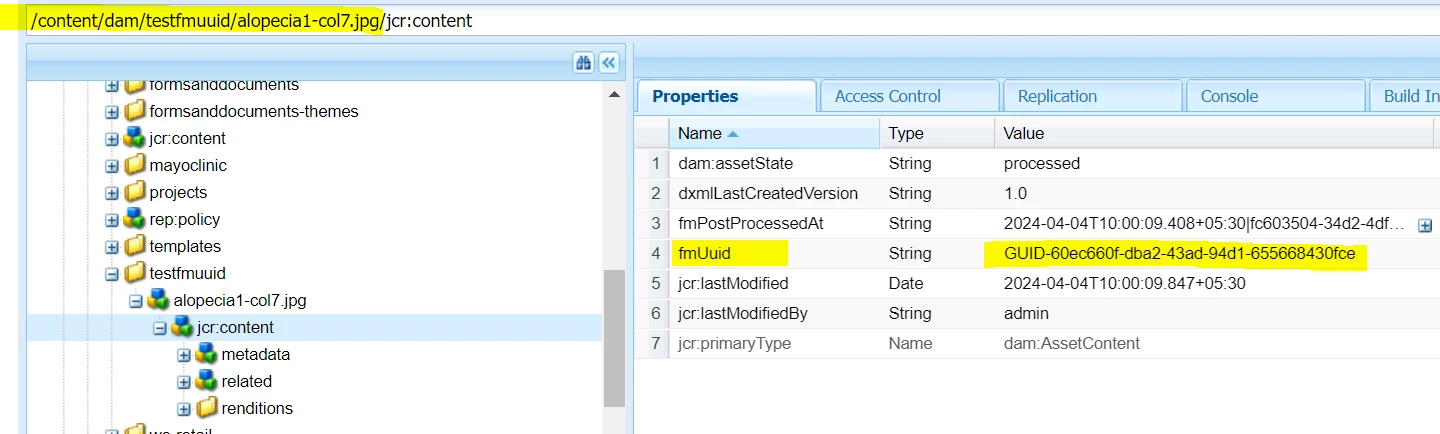


Can anyone please help me here.


Thanks in advance

Sonu

This post is no longer active and is closed to new replies. Need help? Start a new post to ask your question.
Best answer by Kamal_Kishor

@sunitach1 : You can create an assets report.

  1. Go to : AEM Assets | Create Report (Tools -> Assets -> Reports)
  2. Create Report -> Select 'Files'
  3. Fill the required fields , Specify the DAM folder path
  4. From 'Default Columns' select Path and uncheck others such as title, type etc.  if not needed.
  5. In Custom Columns, click Add -> Specify column name (any string value) -> in property to map specify (jcr:content/fmUuid) - Ensure to give correct property-name
  6. Create  the report.

Once, report is generated, you can view the report or have an option to download it as well.
You can refer attached screenshot to get the idea.
Other way is by doing a query, if you have some conditions to filter the DAM assets using query builder.

thanks.


2 replies

Kamal_Kishor
Community Advisor
Kamal_KishorCommunity AdvisorAccepted solution
Community Advisor
April 4, 2024

@sunitach1 : You can create an assets report.

  1. Go to : AEM Assets | Create Report (Tools -> Assets -> Reports)
  2. Create Report -> Select 'Files'
  3. Fill the required fields , Specify the DAM folder path
  4. From 'Default Columns' select Path and uncheck others such as title, type etc.  if not needed.
  5. In Custom Columns, click Add -> Specify column name (any string value) -> in property to map specify (jcr:content/fmUuid) - Ensure to give correct property-name
  6. Create  the report.

Once, report is generated, you can view the report or have an option to download it as well.
You can refer attached screenshot to get the idea.
Other way is by doing a query, if you have some conditions to filter the DAM assets using query builder.

thanks.


TarunKumar
Community Advisor
Community Advisor
April 4, 2024

Hi @sunitach1 ,

Follow below steps:

1. Go to : AEM Assets | Create Report (Tools -> Assets -> Reports)
2. Give the title for your report and Click on Add report.

3. In Configuration add this query and select SQL2SELECT * FROM [dam:Asset] AS s WHERE ISDESCENDANTNODE(s,'{{path}}')

4. In search parameter or report basic parameter select a textfield and provide name as "path".

5. In result column provide your property name like "jcr:content/ fmUUID "

6. save it and now run it by giving the path.

Hope it helps!

Thanks
Tarun
