Get PathBrowser Value | Community
Skip to main content
Adobe Employee
May 13, 2021
Solved

Get PathBrowser Value

  • May 13, 2021
  • 3 replies
  • 1031 views

Hi all,


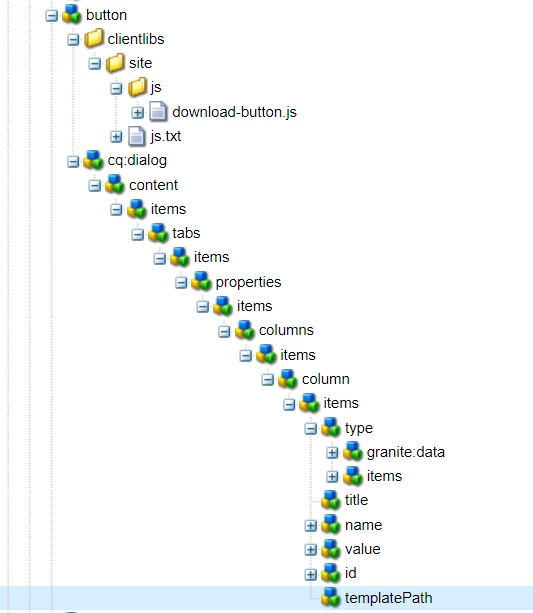
I've created a button component and given resourceType "core/wcm/components/form/button/v2/button". I have added dialog to my component because an extra field was supposed to be added (Path Browser). I need to get the path browser value given in dialog box in js file. How can I do that? 

This post is no longer active and is closed to new replies. Need help? Start a new post to ask your question.
Best answer by arunpatidar

Hi, It seems you are extending core components.

Please follow the below article to check how to extend core components

https://helpx.adobe.com/experience-manager/using/extend_jave_corecomponents.html

https://experienceleaguecommunities.adobe.com/t5/adobe-experience-manager/extending-the-listitems-of-teaser-component/qaq-p/403163


3 replies

Asutosh_Jena_
Community Advisor
Community Advisor
May 13, 2021

Hi @keerthana_h_n 


You want to read the path browser value from dialog field and perform some operation in JS which is located on clientlib.

So you need to read the field value and put it as a hidden value in HTML (put as hidden only if it's not required to be shown on page else you can attach to any attribute)


Now using the id or class attribute you can read the value and perform any action.


Let's say I have the node name as ./templatePath in the path browser and want to keep it as an hidden value in page.

<div class="hide" id="somevalue">${properties.templatePath}</div>

now in js:

var x = $("#somevalue").text();

x holds the value of the pathfield which is authored in dialog.


Thanks!

Adobe Employee
May 13, 2021

@asutosh_jena_ 


<div class="hide" id="file_report_template">${properties.templatePath}</div>

I added this to my htl file and not able to hide the value

Asutosh_Jena_
Community Advisor
Community Advisor
May 13, 2021

@keerthana_h_n Which framework are you using? Is it bootstrap 3 or bootstrap 4?


If you are using bootstrap 3 the class will be "hide".
if it's bootstrap 4 the class will be "d-none".


If no framework is used, you can add any class and apply the css style to it.


Let's say you use class as "hide". Then in css add the below property:


hide {

display: none;

}

arunpatidar
Community Advisor
arunpatidarCommunity AdvisorAccepted solution
Community Advisor
May 14, 2021