Footer with 3 sections in custom dialog | Community
Skip to main content
Level 2
July 13, 2022
Solved

Footer with 3 sections in custom dialog
  • July 13, 2022
  • 2 replies
  • 683 views

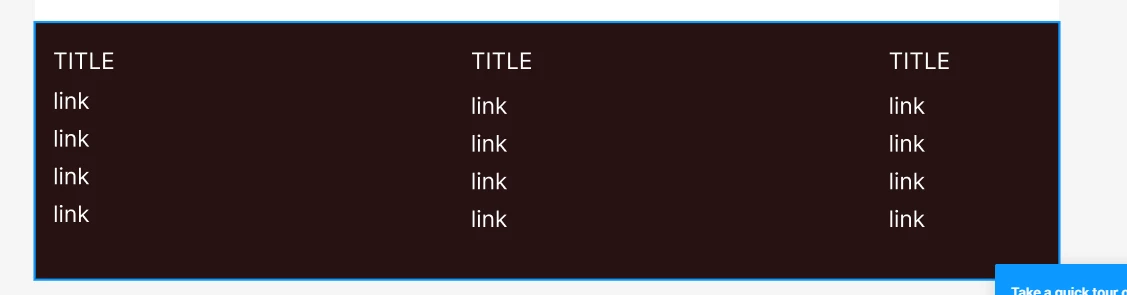
I want to create custom footer component like this, which will have footer dialog and inside that user can add 3 titles and add links, how I can achieve this

This post is no longer active and is closed to new replies. Need help? Start a new post to ask your question.
Best answer by arunpatidar

The simplest implementation is : 
Create an container component with parsys example Footer

Create another component i.e. footer-tile, this can have a dialog to add title and links. which can be drag and drop in Footer component


If you already have title and link atom then you can use those as well.

2 replies

arunpatidar
Community Advisor
arunpatidarCommunity AdvisorAccepted solution
Community Advisor
July 13, 2022

The simplest implementation is : 
Create an container component with parsys example Footer

Create another component i.e. footer-tile, this can have a dialog to add title and links. which can be drag and drop in Footer component


If you already have title and link atom then you can use those as well.

Arun Patidar
ShaileshBassi
Community Advisor
Community Advisor
July 13, 2022

@stefanjank You can create a Tab Component with the dialog configuration as shown in the below screenshot.

You can make a generic tab as well, if required to specific the no of tabs required.


Steps:

1. Read the no of tabs and based on that display the tabs to be configured. This will be optional.

2. Configure the different tabs.

3. In the sling model, either you can fetch the value based on the hard code field Name i.e. 

and write your logic to read and create the custom Map or List from the tabs multifield list.

4. Or you can iterate based on the no of tabs and make it dynamic using the for loop, but in this case the name field should be name something like ./items_1 and iterating in the loop you can fetch the respective values.

5. Return the list from the Sling Model

6. Iterate the sling model from sightly.


Hope this helps!

Thanks