Filter that adds dynamic css class to experience fragment | Community
Skip to main content
Level 2
July 17, 2019
Solved

Filter that adds dynamic css class to experience fragment

  • July 17, 2019
  • 5 replies
  • 3134 views

Hello,

I'm trying to implement a Filter that adds a css class into the div of ExperienceFragment. Everything works fine, until we change the ExperienceFragment (single one) via a cq:dialog. The IncludeOptions do not pass the css class.

(Sling filter activated properly and added the "footer" class on page refresh).

After editing single XF, like,
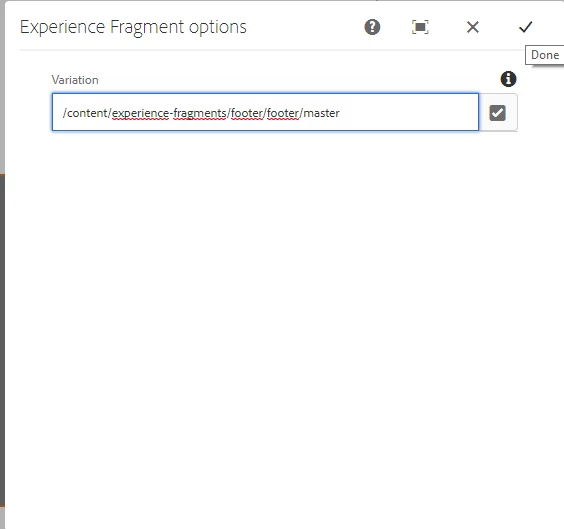
"footer" class is not applied.

I'm using sling sling.filter.scope = "COMPONENT" and sling.filter.resourceTypes pointing to "cq/experience-fragments/editor/components/experiencefragment".

Is there any other way to achieve that via a SlingFilter?

Thanks for any advice,

Kind regards,

Dymitr

This post is no longer active and is closed to new replies. Need help? Start a new post to ask your question.
Best answer by arunpatidar

Hi,

I am trying in 6.3 and working for me.

In your case, you can add javascript code to refresh the page after editing experience fragment.

Refresh Page when edit component

5 replies

arunpatidar
Community Advisor
Community Advisor
July 17, 2019

Hi,

Can you force next edit context as current

options.forceSameContext(true);

Could you please share your sample code, I can try.

Arun Patidar
DymitrSSAuthor
Level 2
July 18, 2019

Hi Arun,

Of course I can. I set it as you proposed, but unfortunately it's not working.

Code used:

@Component(

   service = Filter.class,
   property = {

  EngineConstants.SLING_FILTER_SCOPE + "=" + EngineConstants.FILTER_SCOPE_COMPONENT,
   EngineConstants.SLING_FILTER_RESOURCETYPES + "="
   + "cq/experience-fragments/editor/components/experiencefragment",
   Constants.SERVICE_RANKING + ":Integer=" + 201

   }

@Override
public void doFilter(ServletRequest servletRequest, ServletResponse servletResponse, FilterChain filterChain)

  throws IOException, ServletException {

  SlingHttpServletRequest slingRequest = (SlingHttpServletRequest) servletRequest;
  Resource resource = slingRequest.getResource();
  ValueMap properties = resource.adaptTo(ValueMap.class);

  IncludeOptions options = IncludeOptions.getOptions(servletRequest, true);
  options.forceSameContext(true);
  options.getCssClassNames().add("footer");
  options.setDecorationTagName("div");

  filterChain.doFilter(servletRequest, servletResponse);
}

If the options.forceSameContext(true) is set above .getCssClassNames(), it does nothing. If I set it under that method all experience fragments on the page are not editable and I can't pick a new path for the XF via a cq:dialog. (it's not clickable). Service ranking is set to 201 to force it to be above the WCMComponentFilter.

Also, setting the forceSameContext after the getCssClassNames() do not applies the experiencefragment class into div and overrides it with root as on the screenshot:

Sorry for the raw code that I pasted, but when I highlighted it with Java it does not look very nice.

arunpatidar
Community Advisor
Community Advisor
July 18, 2019

I tried with your code without options.forceSameContext(true);

it works and doesn't remove footer class

aem63app-repo/XFFilter.java at master · arunpatidar02/aem63app-repo · GitHub

but why you need "footer" in every div, It is ok if you get at element div or its parents

Things can be handles using element selector with parent for CSS or JS rules.

Arun Patidar
DymitrSSAuthor
Level 2
July 18, 2019

Hi again Arun,

thanks for your time and the sample code but are you sure that the above java filter worked for an editable experience fragment for example in structure mode on a template? I agree with you that is working but not for a single edition of an experience fragment (it works after page refresh though).

The reproduction steps are: 1. Having a template with an added experience fragment in structure.

                                              2. Opening the dialog by clicking the wrench on the experience fragment

                                              3. picking the same path or trying another one

                                               4. submitting the changes

                                              4. css is not added without page refresh

I'm sorry that i'm explaining this once more to you but I just wanted to be sure that you understood my case in 100%

Maybe it's just something screwed on my side. Atleast it's not working for me so maybe it's smth with my AEM? I'm using 6.5. Maybe i'll try with element selector or JS rules but I wanted really to make working via the filter class.

arunpatidar
Community Advisor
arunpatidarCommunity AdvisorAccepted solution
Community Advisor
July 18, 2019

Hi,

I am trying in 6.3 and working for me.

In your case, you can add javascript code to refresh the page after editing experience fragment.

Refresh Page when edit component

Arun Patidar