Filter rules expression format in package manager | Community
Skip to main content
Level 2
November 9, 2023
Solved

Filter rules expression format in package manager

  • November 9, 2023
  • 3 replies
  • 2529 views

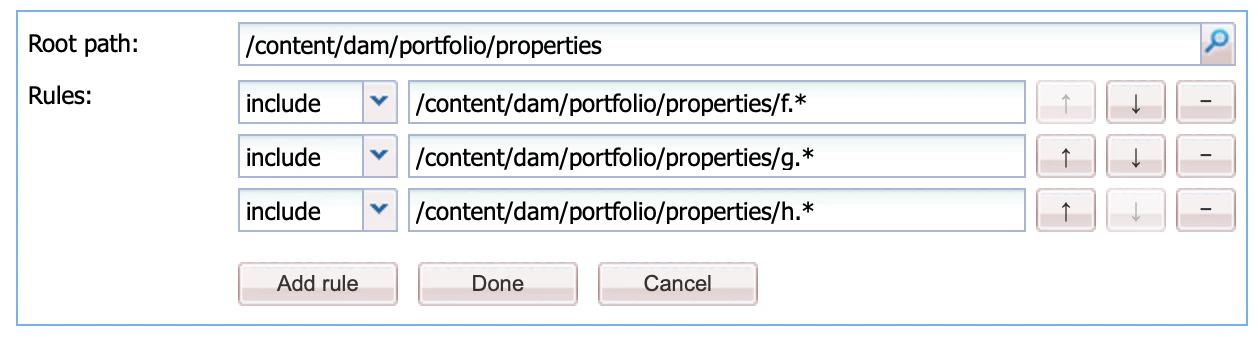
I am creating packages to sync our AEM prod environment with dev using package manager. Since package manager fails to build the packages with large size, I was splitting some folders by creating packages for the sub-folders inside the larger folders. But as there is many number of sub folders, it is a burden to create packages for each one. So, I decided to create packages by taking multiple sub-folders inside the larger folder. For that I gave regular expressions in filter rules like following;

include/content/dam/portfolio/properties/f*
include/content/dam/portfolio/properties/g*
include/content/dam/portfolio/properties/h*


What I meant with this is to take all the sub-folders starting with f, g, and h inside /content/dam/portfolio/properties/ folder.
But this is not working as expected. What is the correct solution to achieve my requirement?

This post is no longer active and is closed to new replies. Need help? Start a new post to ask your question.
Best answer by Mahedi_Sabuj

The subfolders must be direct children of the filter root, or you should allow all parent folders up to the filter root [0]. Additionally, make a slight adjustment to the include regex by using f.*, g.*, etc.

[0]: https://jackrabbit.apache.org/filevault/filter.html#usage-for-export

3 replies

EstebanBustamante
Community Advisor and Adobe Champion
November 9, 2023

Hi, 


Keep in mind that the include and exclude rules accept only regular expressions. Therefore, I believe that might be the issue. You can try something similar to the following, which will include only the folders which start with the letter "f" under the path "/content/dam/portfolio/properties"


/content/dam/portfolio/properties/f[^/]+.*


Here you can find more info: https://jackrabbit.apache.org/filevault/filter.html#Include_and_Exclude_Elements 

Hope this helps

Esteban Bustamante
Mahedi_Sabuj
Community Advisor
Mahedi_SabujCommunity AdvisorAccepted solution
Community Advisor
November 9, 2023

The subfolders must be direct children of the filter root, or you should allow all parent folders up to the filter root [0]. Additionally, make a slight adjustment to the include regex by using f.*, g.*, etc.

[0]: https://jackrabbit.apache.org/filevault/filter.html#usage-for-export

Mahedi Sabuj
aanchal-sikka
Community Advisor
Community Advisor
November 9, 2023

@anas_r 


If content sync is a regular activity, please review https://adobe-consulting-services.github.io/acs-aem-commons/features/contentsync/index.html

Its a new content sync feature in ACS commons to incrementally sync content

Aanchal Sikka