Level 3
December 4, 2020
Solved

FileUpload needs img to upload again and again
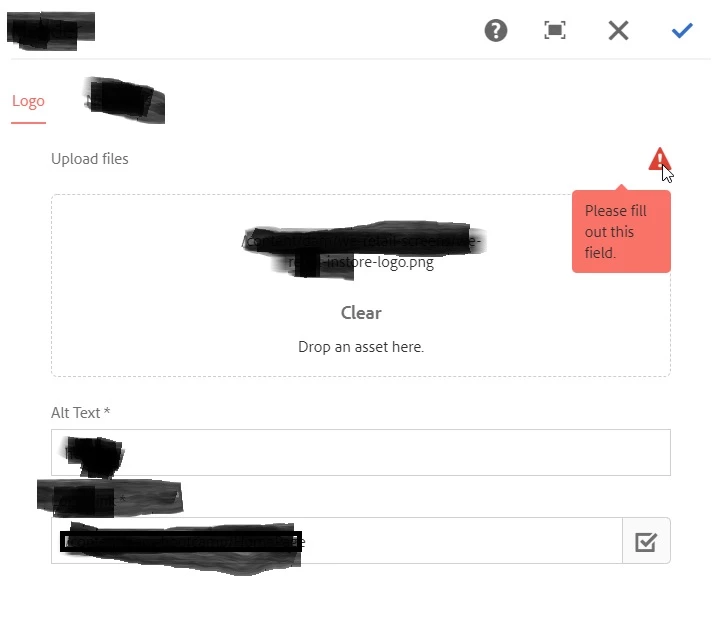
 I have drag n dropped a logo from DAM and clicked save. Now when I open the dialog again, I can see that the previous link of logo is there but the dialog still needs me to add image.


can anybody tell me why is this happening? why the image is not retained

I'm using AEM 6.3 and following is the dialog code


<file
jcr:primaryType="nt:unstructured"
sling:resourceType="granite/ui/components/foundation/form/fileupload"
autoStart="{Boolean}true"
cq-msm-lockable="/file"
fieldLabel="Upload files"
mimeTypes="[image/*]"
multiple="{Boolean}false"
name="./file"
sizeLimit="100000000"
text="Upload file"
uploadUrl="/content/dam"
required="{Boolean}true"
allowUpload="{Boolean}false"
uploadUrlBuilder=""/>

This post is no longer active and is closed to new replies. Need help? Start a new post to ask your question.
Manjunath_K
Manjunath_KAccepted solution
Level 7
December 4, 2020

@vinit_pillai 

Please change mimeTypes property value as highlighted below, then it will work as expected.


<file
jcr:primaryType="nt:unstructured"
sling:resourceType="granite/ui/components/foundation/form/fileupload"
autoStart="{Boolean}true"
cq-msm-lockable="/file"
fieldLabel="Upload files"
mimeTypes="[image]"
multiple="{Boolean}false"
name="./file"
sizeLimit="100000000"
text="Upload file"
uploadUrl="/content/dam"
required="{Boolean}true"
allowUpload="{Boolean}false"
uploadUrlBuilder=""/>


10 replies

Adobe Employee
December 4, 2020

Can you paste here how the File Upload is defined in the dialog?
And what AEM version you use.

Translate
Level 3
December 4, 2020
Sorry for not providing all the info. I have updated my question.
Translate
Manjunath_K
Manjunath_KAccepted solution
Level 7
December 4, 2020

@vinit_pillai 

Please change mimeTypes property value as highlighted below, then it will work as expected.


<file
jcr:primaryType="nt:unstructured"
sling:resourceType="granite/ui/components/foundation/form/fileupload"
autoStart="{Boolean}true"
cq-msm-lockable="/file"
fieldLabel="Upload files"
mimeTypes="[image]"
multiple="{Boolean}false"
name="./file"
sizeLimit="100000000"
text="Upload file"
uploadUrl="/content/dam"
required="{Boolean}true"
allowUpload="{Boolean}false"
uploadUrlBuilder=""/>


Translate
Adobe Employee
December 4, 2020
Level 3
December 4, 2020

using Coral 3 lets me choose while . I want drag n drop so that user cannot upload anything outside DAM. Is there a  way to do this in coral3?

Translate
Level 4
December 4, 2020

Hi @vinit_pillai ,

please update the dialog as below.


<file jcr:primaryType="nt:unstructured" jcr:title="Image" sling:resourceType="granite/ui/components/foundation/form/fileupload" autoStart="{Boolean}false" class="cq-droptarget" fileNameParameter="./fileName" fileReferenceParameter="./fileReference" mimeTypes="[image]" multiple="{Boolean}false" name="./file" uploadUrl="${suffix.path}" useHTML5="{Boolean}true"/>


Translate
Manjunath_K
Level 7
December 4, 2020

@vinit_pillai 

Please change mimeTypes value as mentioned below.


mimeTypes="[image]"


Translate
Anudeep_Garnepudi
Community Advisor
Community Advisor
December 4, 2020

Hi @vinit_pillai 

Change the mimeTypes property value to image( remove /*), that should resolve your issue.

-AG

Translate
AG
Level 3
December 4, 2020
This fixed it . thanks Can you please tell me how to disable browsing files and only allow to drag n drop in coral 3 component. as it came to my attention I'm using coral 2 component.
Translate