
Solved
fields not changing in dialog for dynamic participant step of workflow
I am trying to add a dialog in dynamic participant step. So, it will grab some inputs from the assignee and store for the workflow instance. I have created a component under apps/<my-website>/... like I do for other components. The component have simple dropdown which has simple date picker functionality and a dropdown. If No is selected from dropdown, it will hide date picker and will show up if yes is selected from dropdown.
I have added a path to that in the dialog property of dynamic participant step. It is working as expected when I add that as a component in other pages. But not working inside the complete work item step (as shown in below).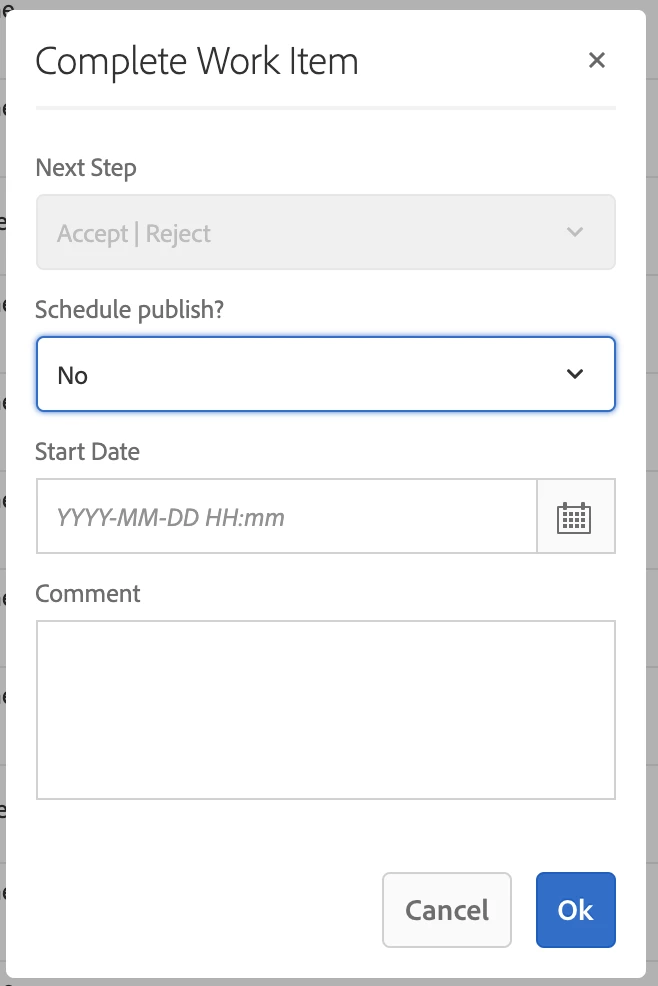
The .context.xml file for _cq_dialog is as below.
<?xml version="1.0" encoding="UTF-8"?>
<jcr:root
    xmlns:sling="http://sling.apache.org/jcr/sling/1.0"
    xmlns:cq="http://www.day.com/jcr/cq/1.0"
    xmlns:granite="http://www.adobe.com/jcr/granite/1.0"
    xmlns:jcr="http://www.jcp.org/jcr/1.0"
    xmlns:nt="http://www.jcp.org/jcr/nt/1.0"
    jcr:primaryType="nt:unstructured"
    jcr:title="Date Time Picker Component Component"
    sling:resourceType="cq/gui/components/authoring/dialog">

        <content jcr:primaryType="nt:unstructured"
            sling:resourceType="granite/ui/components/coral/foundation/container">
            <layout jcr:primaryType="nt:unstructured"
                margin="false"
                sling:resourceType="granite/ui/components/coral/foundation/fixedcolumns"
            />
            <items jcr:primaryType="nt:unstructured">
                <column jcr:primaryType="nt:unstructured"
                    sling:resourceType="granite/ui/components/coral/foundation/container">
                    <items jcr:primaryType="nt:unstructured">
                        <schedulepublish
                            jcr:primaryType="nt:unstructured"
                            sling:resourceType="granite/ui/components/coral/foundation/form/select"
                            fieldLabel="Schedule publish?"
                            granite:class="cq-dialog-dropdown-showhide"
                            name="./schedulepublish">
                            <granite:data
                                jcr:primaryType="nt:unstructured"
                                cq-dialog-dropdown-showhide-target=".schedulepublish-showhide-target" />
                            <items jcr:primaryType="nt:unstructured">
                                <schedulepublishfalse
                                    jcr:primaryType="nt:unstructured"
                                    text="No"
                                    value="schedulepublishfalse"/>
                                <schedulepublishtrue
                                    jcr:primaryType="nt:unstructured"
                                    text="Yes"
                                    value="schedulepublishtrue"/>
                            </items>
                        </schedulepublish>
                        <schedulepublishtrue
                            granite:class="hide schedulepublish-showhide-target"
                            jcr:primaryType="nt:unstructured"
                            sling:resourceType="granite/ui/components/coral/foundation/container">
                            <granite:data
                                jcr:primaryType="nt:unstructured"
                                showhidetargetvalue="schedulepublishtrue" />
                            <items jcr:primaryType="nt:unstructured">
                                <datepicker jcr:primaryType="nt:unstructured"
                                    sling:resourceType="granite/ui/components/coral/foundation/form/datepicker"
                                    displayedFormat="YYYY-MM-DD HH:mm"
                                    emptyText="YYYY-MM-DD HH:mm"
                                    fieldLabel="Start Date"
                                    listOrder="5"
                                    metaType="date"
                                    name="publishdatetime"
                                    renderReadOnly="false"
                                    showEmptyInReadOnly="true"
                                    type="datetime"
                                    valueFormat="YYYY-MM-DD[T]HH:mm:ss.000Z"
                                    valueType="calendar">
                                    <granite:data
                                        jcr:primaryType="nt:unstructured"
                                        typeHint="Date"/>
                                </datepicker>
                            </items>
                        </schedulepublishtrue>
                    </items>
                </column>
            </items>
        </content>

</jcr:root>