Failed to connect to adobe target | Community
Skip to main content
This post is no longer active and is closed to new replies. Need help? Start a new post to ask your question.
Best answer by Nirmal_Jose

What is the AEM and JDK version you are using.


I have seen this error during AEM connection to Adobe Nexus during an application build on 6.4 and JDK 1.8. The steps we followed to fix this issue are


1. Go to the path: <jdk-path>/Contents/Home/jre/lib/security (Usually this'll be installed in /Library/Java/JavaVirtualMachines/jdk1.8.0_102-b14.jdk/Contents/Home/jre/lib/security)

2. Go to https://www.oracle.com/java/technologies/javase-jce8-downloads.html, agree to the Terms & Conditions, and download & extract the zip file.

3. Copy the files in this zip file, and paste them into your security folder, replacing these two files.

  • local_policy.jar
  • US_export_policy.jar

4 replies

VeenaVikraman
Community Advisor
Community Advisor
July 5, 2020

Are you behind any firewall ? For example are you accessing form your office laptop which is firewall protected ?

Level 4
July 5, 2020
Yes
Nirmal_Jose
Adobe Employee
Nirmal_JoseAdobe EmployeeAccepted solution
Adobe Employee
July 5, 2020

What is the AEM and JDK version you are using.


I have seen this error during AEM connection to Adobe Nexus during an application build on 6.4 and JDK 1.8. The steps we followed to fix this issue are


1. Go to the path: <jdk-path>/Contents/Home/jre/lib/security (Usually this'll be installed in /Library/Java/JavaVirtualMachines/jdk1.8.0_102-b14.jdk/Contents/Home/jre/lib/security)

2. Go to https://www.oracle.com/java/technologies/javase-jce8-downloads.html, agree to the Terms & Conditions, and download & extract the zip file.

3. Copy the files in this zip file, and paste them into your security folder, replacing these two files.

  • local_policy.jar
  • US_export_policy.jar
Vaibhavi_J
Level 7
July 5, 2020

Hi @chinmayish , 

I have faced this issue recently when I tried connecting to other host. 

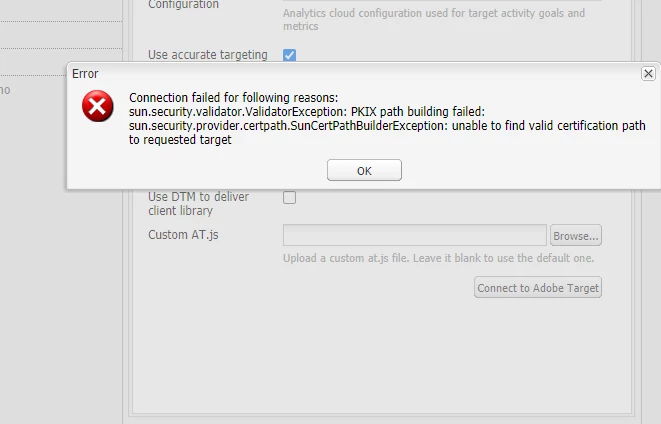
Issue is due to the server is trying to find the valid SSL certificate. 

This happens when your java version is older or when your server does not recognize the root certificate authority(CA) 

If you can access the HTTPS URL in your browser then it is possible to update Java to recognize the root CA.

In order to fix the issue please for the below steps. 

1. Launch the host which you are trying to connect in the browser. 

2. Download the certificate. 

3.Using the keytool command update the downloaded cert to java cert. Default path of java cert will be jre/lib/security/cacerts.

Below command will help you to update the cert file. 

keytool -import -alias example -keystore /path/to/cacerts -file example.crt

This will fix your issue. 

Below article explains the steps in detail on how to add certs. 

https://magicmonster.com/kb/prg/java/ssl/pkix_path_building_failed/


Asutosh_Jena_
Community Advisor
Community Advisor
July 6, 2020
@chinmayi This type of issue occurs if you are trying to access anything from office network i.e. either LAN or VPN or if your office laptop/system has any software installed which prevents it. We have seen similar issue while building a new project where it tries to download the dependencies to local m2 folder as well. I will suggest to try it on personal system else try from disconnecting from VPN i.e. from public internet and you will not see this issue anymore. If still the issue persists you need to reach out to network support team to whitelist the address and it will start working. Hope this helps!