Extending Embed component! | Community
Skip to main content
jezwn
Level 5
June 3, 2020
Solved

Extending Embed component!

  • June 3, 2020
  • 1 reply
  • 3760 views

I was following this git repo for extending the Embed core component. Extension of the Embed component is possible by providing any of the following: 

  • Custom URL Processor
  • Custom oEmbed Configuration
  • Custom embeddable fragment

The custom oEmbed configuration, I tried adding a new config in Core Components oEmbed client with the following values.
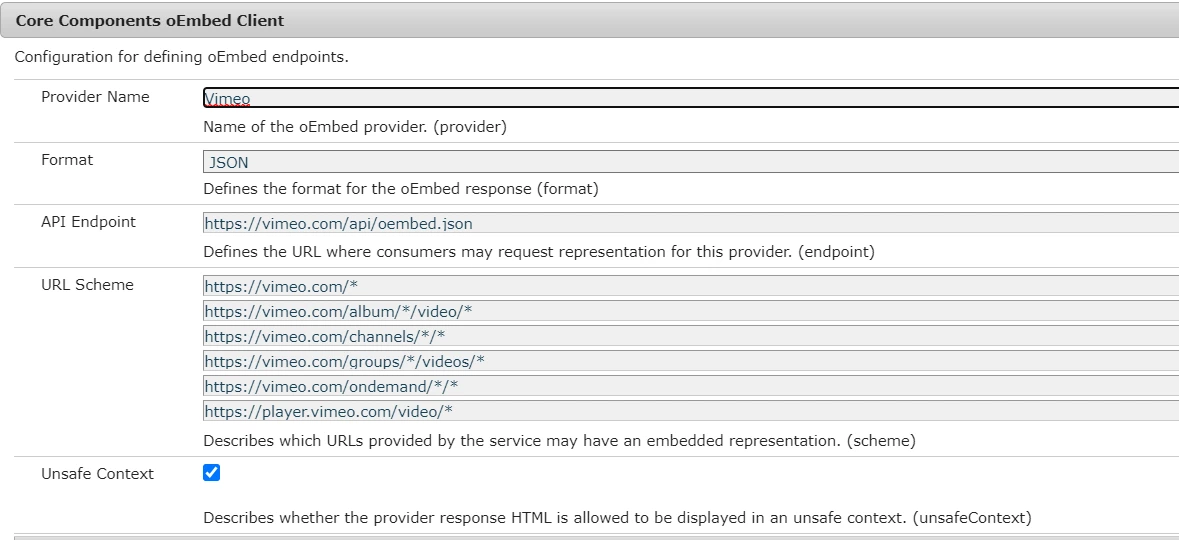


When I try to enter a URL like https://vimeo.com/76979871 I get a message that this URL is not supported and a 404 response in the network tab for that request.

The request URL: http://localhost:4502/content/project_name/_jcr_content/root/container/container/embed.urlProcessor.json?url=https://vimeo.com/7697987

Did I miss something here, could someone help!


Also how can use the custom URL processor for vimeo? 


This post is no longer active and is closed to new replies. Need help? Start a new post to ask your question.
Best answer by arunpatidar

The Url seems invalid to me as well.

I got 404 because of comma at the end of URL.


Is the embedded URL is correct  in the configuration

<iframe src="https://player.vimeo.com/video/3873878" width="320" height="240" webkitallowfullscreen mozallowfullscreen allowfullscreen></iframe>


Youtube e.g.


<iframe width="420" height="315" src="https://www.youtube.com/embed/tgbNymZ7vqY"> </iframe>


Youtube config


provider="YouTube" endpoint="https://www.youtube.com/oembed" format="json" scheme=["https://.*\.youtube.com/watch.*","https://.*\.youtube.com/v/.*","https://youtu\.be/.*"] unsafeContext="true"


1 reply

arunpatidar
Community Advisor
arunpatidarCommunity AdvisorAccepted solution
Community Advisor
June 3, 2020

The Url seems invalid to me as well.

I got 404 because of comma at the end of URL.


Is the embedded URL is correct  in the configuration

<iframe src="https://player.vimeo.com/video/3873878" width="320" height="240" webkitallowfullscreen mozallowfullscreen allowfullscreen></iframe>


Youtube e.g.


<iframe width="420" height="315" src="https://www.youtube.com/embed/tgbNymZ7vqY"> </iframe>


Youtube config


provider="YouTube" endpoint="https://www.youtube.com/oembed" format="json" scheme=["https://.*\.youtube.com/watch.*","https://.*\.youtube.com/v/.*","https://youtu\.be/.*"] unsafeContext="true"


Arun Patidar
jezwn
jezwnAuthor
Level 5
June 4, 2020

Hi @arunpatidar 

The vimeo config is,

{ "provider_name": "Vimeo", "provider_url": "https://vimeo.com/", "endpoints": [ { "schemes": [ "https://vimeo.com/*", "https://vimeo.com/album/*/video/*", "https://vimeo.com/channels/*/*", "https://vimeo.com/groups/*/videos/*", "https://vimeo.com/ondemand/*/*", "https://player.vimeo.com/video/*" ], "url": "https://vimeo.com/api/oembed.{format}", "discovery": true } ] }


And it's the same I've added in the Core Components oEmbed client if you've noticed the screenshot. And as per the config, the URL which I entered should be valid.